简体中文
简体中文 繁體中文
繁體中文 English
 Français
 Русский
 日本語
日本語 Tiếng Việt
 한국어
한국어 Deutsch
 Español
 Italiano
 Português
 العربية
 ไทย
ไทย Bahasa Indonesia
 Bahasa Melayu
 Türkçe
 Polski
 Nederlands
 Dansk
Dansk Norsk
Norsk Қазақша
Claude Opus 4.6 Pricing Explained — Caching, Tiers, and How to Save 45% with Crazyrouter
Complete breakdown of Claude Opus 4.6 API pricing — base tokens at $5/$25 per MTok, 5-minute and 1-hour prompt caching, Batch API discounts, data residency surcharges, and how Crazyrouter cuts your bill by 45%.

Claude Opus 4.6 Pricing Explained — Caching, Tiers, and How to Save 45% with Crazyrouter#
Claude Opus 4.6 is Anthropic's premium-tier model, sitting alongside Opus 4.5 and Opus 4.7 in the same generation of frontier AI. It's built for the tasks where you need the absolute best: complex multi-step reasoning, large-scale code generation, deep research synthesis, and nuanced document analysis. If you're reaching for Opus, you already know you need top-shelf intelligence — the question is how much it costs and how to keep that cost under control.
This guide breaks down every dimension of Claude Opus 4.6 pricing: base tokens, prompt caching (both 5-minute and 1-hour tiers), Batch API discounts, data residency surcharges, and how routing through Crazyrouter can cut your total bill by 45%. Every number here is verified against Anthropic's official pricing as of April 2026.
Let's get into it.
Base Token Pricing#
Claude Opus 4.6 uses a straightforward per-token pricing model. You pay separately for input tokens (what you send) and output tokens (what the model generates).
| Component | Price per Million Tokens (MTok) |
|---|---|
| Input tokens | $5.00 |
| Output tokens | $25.00 |
Output tokens cost 5× more than input tokens. This ratio matters — if your workload is output-heavy (code generation, long-form writing), your costs will skew toward the output side.
Quick Cost Reference#
To give you a feel for real-world costs at base pricing:
| Use Case | Input Tokens | Output Tokens | Estimated Cost |
|---|---|---|---|
| Short chat (single turn) | ~1,000 | ~500 | $0.0175 |
| Code review (medium file) | ~8,000 | ~2,000 | $0.09 |
| Document summary (10 pages) | ~15,000 | ~3,000 | $0.15 |
| Heavy coding session (1 hour) | ~200,000 | ~100,000 | $3.50 |
| Production pipeline (per day) | ~5,000,000 | ~2,000,000 | $75.00 |
These are base prices without any caching or batch discounts. As you'll see below, the actual cost can drop dramatically with the right optimization strategy.
Prompt Caching Deep Dive#
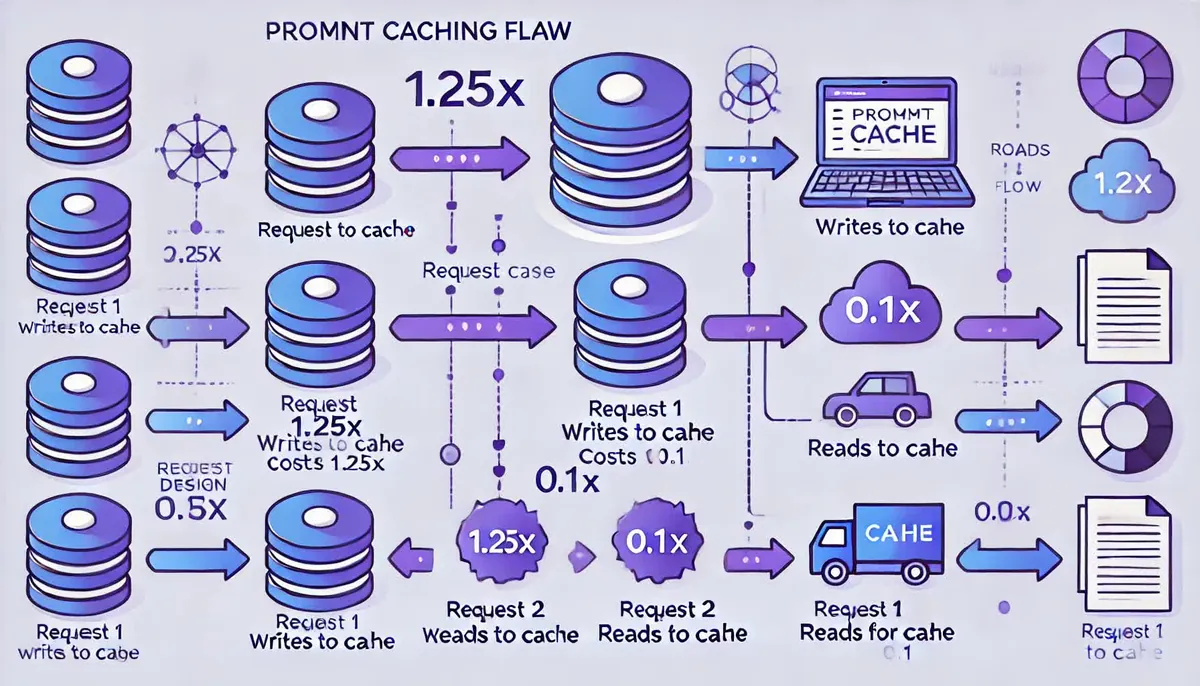
Prompt caching is where Opus 4.6 pricing gets interesting — and where the biggest savings live. Anthropic offers two caching tiers: a 5-minute cache and a 1-hour cache. Both let you avoid re-processing repeated content (system prompts, large documents, few-shot examples) across multiple requests.
How It Works#
When you mark content as cacheable, Anthropic stores the processed representation of those tokens. Subsequent requests that include the same cached content pay the much cheaper "cache hit" rate instead of the full input rate.
| Cache Operation | Price per MTok | Multiplier vs Base Input |
|---|---|---|
| Base input (no cache) | $5.00 | 1.0× |
| 5-minute cache write | $6.25 | 1.25× |
| 1-hour cache write | $10.00 | 2.0× |
| Cache hit (read) | $0.50 | 0.1× |
The key insight: cache hits cost just 10% of base input price. That's a 90% discount on every token that hits the cache.
5-Minute vs 1-Hour Cache: When to Use Which#
5-minute cache ($6.25/MTok write) is ideal for:
- Interactive chat sessions where the user sends multiple messages in quick succession
- Rapid iteration loops (code → test → fix → test)
- Short-lived workflows that complete within a few minutes
1-hour cache ($10.00/MTok write) is ideal for:
- Production pipelines processing many requests against the same system prompt
- Document Q&A where multiple users query the same uploaded document
- Batch-like workloads spread over tens of minutes
Break-Even Math#
The cache write costs more than a regular input read, so you need enough cache hits to recoup that upfront cost.
5-minute cache break-even:
- Cache write cost: 1.25 vs base $5.00)
- Savings per cache hit: 5.00 − $0.50)
- Break-even: 4.50 = 0.28 hits → you break even after just 1 cache hit
1-hour cache break-even:
- Cache write cost: 5.00 vs base $5.00)
- Savings per cache hit: 5.00 − $0.50)
- Break-even: 4.50 = 1.11 hits → you break even after 2 cache hits
In practice, if you're making 2+ requests with the same prefix within the cache window, caching saves money. For most production workloads, this is a no-brainer.
Code Examples#
Automatic caching — Anthropic automatically caches system prompts and long prefixes when the content exceeds a minimum length:
import anthropic

client = anthropic.Anthropic()

# System prompt is automatically cached when it's long enough
response = client.messages.create(
    model="claude-opus-4-6",
    max_tokens=4096,
    system="You are an expert code reviewer. [... long system prompt ...]",
    messages=[
        {"role": "user", "content": "Review this Python function for bugs..."}
    ]
)
Explicit caching — Use cache_control to mark specific content blocks for caching:
import anthropic

client = anthropic.Anthropic()

response = client.messages.create(
    model="claude-opus-4-6",
    max_tokens=4096,
    system=[
        {
            "type": "text",
            "text": "You are an expert code reviewer specializing in Python...",
            "cache_control": {"type": "ephemeral"}  # 5-minute cache
        }
    ],
    messages=[
        {
            "role": "user",
            "content": [
                {
                    "type": "text",
                    "text": "<large_document>... 50,000 tokens of code ...</large_document>",
                    "cache_control": {"type": "ephemeral"}
                },
                {
                    "type": "text",
                    "text": "Find all security vulnerabilities in this codebase."
                }
            ]
        }
    ]
)
Reading Cache Usage in the Response#
The API response includes cache diagnostics in the usage object:
{
  "usage": {
    "input_tokens": 2500,
    "output_tokens": 1200,
    "cache_creation_input_tokens": 50000,
    "cache_read_input_tokens": 0
  }
}
On subsequent requests with the same cached prefix:
{
  "usage": {
    "input_tokens": 500,
    "output_tokens": 1100,
    "cache_creation_input_tokens": 0,
    "cache_read_input_tokens": 50000
  }
}
When cache_read_input_tokens is high and cache_creation_input_tokens is zero, your cache is working. Those 50,000 tokens are being read at 5.00/MTok — saving you $0.225 per request.
Batch API — 50% Off Everything#
Anthropic's Batch API offers a flat 50% discount on all token prices. The trade-off: requests are processed asynchronously with up to 24 hours of latency (though most complete much faster).
| Component | Standard Price | Batch API Price |
|---|---|---|
| Input tokens | $5.00/MTok | $2.50/MTok |
| Output tokens | $25.00/MTok | $12.50/MTok |
| 5-min cache write | $6.25/MTok | $3.125/MTok |
| 1-hour cache write | $10.00/MTok | $5.00/MTok |
| Cache hit | $0.50/MTok | $0.25/MTok |
Batch API discounts stack with caching. A cached batch request with cache hits pays just $0.25/MTok for those cached input tokens — that's 95% off the base input price.
When to Use Batch API#
- Bulk document processing (summarization, classification, extraction)
- Evaluation pipelines and benchmarks
- Nightly data processing jobs
- Any workload where you don't need real-time responses
import anthropic

client = anthropic.Anthropic()

# Create a batch of requests
batch = client.batches.create(
    requests=[
        {
            "custom_id": "doc-001",
            "params": {
                "model": "claude-opus-4-6",
                "max_tokens": 2048,
                "messages": [
                    {"role": "user", "content": "Summarize this document: ..."}
                ]
            }
        },
        {
            "custom_id": "doc-002",
            "params": {
                "model": "claude-opus-4-6",
                "max_tokens": 2048,
                "messages": [
                    {"role": "user", "content": "Summarize this document: ..."}
                ]
            }
        }
    ]
)
Data Residency Surcharge#
If you require data residency guarantees — specifically US-only processing — Anthropic applies a 1.1× surcharge on all token prices.
| Component | Standard | US Data Residency (1.1×) |
|---|---|---|
| Input tokens | $5.00/MTok | $5.50/MTok |
| Output tokens | $25.00/MTok | $27.50/MTok |
| 5-min cache write | $6.25/MTok | $6.875/MTok |
| 1-hour cache write | $10.00/MTok | $11.00/MTok |
| Cache hit | $0.50/MTok | $0.55/MTok |
This surcharge applies to organizations that need compliance with data sovereignty requirements (HIPAA, FedRAMP, certain enterprise policies). If you don't have a regulatory requirement for US-only processing, you can skip this and save 10%.
Crazyrouter Pricing — Save 45%#
Crazyrouter offers Claude Opus 4.6 at 55% of Anthropic's official price — a straight 45% discount with no usage caps, no rate limit downgrades, and full API compatibility.

| Component | Anthropic Direct | Crazyrouter (45% off) |
|---|---|---|
| Input tokens | $5.00/MTok | $2.75/MTok |
| Output tokens | $25.00/MTok | $13.75/MTok |
| 5-min cache write | $6.25/MTok | $3.4375/MTok |
| 1-hour cache write | $10.00/MTok | $5.50/MTok |
| Cache hit | $0.50/MTok | $0.275/MTok |
Code Examples#
OpenAI-compatible SDK — drop-in replacement, just change the base URL:
from openai import OpenAI

client = OpenAI(
    api_key="your-crazyrouter-api-key",
    base_url="https://crazyrouter.com/v1"
)

response = client.chat.completions.create(
    model="claude-opus-4-6",
    messages=[
        {"role": "system", "content": "You are a helpful assistant."},
        {"role": "user", "content": "Explain quantum computing in simple terms."}
    ],
    max_tokens=2048
)

print(response.choices[0].message.content)
Anthropic-native SDK — use the Anthropic Python library with Crazyrouter's endpoint:
import anthropic

client = anthropic.Anthropic(
    api_key="your-crazyrouter-api-key",
    base_url="https://crazyrouter.com"
)

response = client.messages.create(
    model="claude-opus-4-6",
    max_tokens=2048,
    messages=[
        {"role": "user", "content": "Write a Python function to merge two sorted arrays."}
    ]
)

print(response.content[0].text)
cURL — direct HTTP call:
curl -X POST https://crazyrouter.com/v1/chat/completions \
  -H "Content-Type: application/json" \
  -H "Authorization: Bearer your-crazyrouter-api-key" \
  -d '{
    "model": "claude-opus-4-6",
    "messages": [
      {"role": "user", "content": "What is the capital of France?"}
    ],
    "max_tokens": 256
  }'
Switching takes about 30 seconds — change your base_url and API key, and you're done.
Real-World Cost Comparison#
Let's look at three realistic scenarios and compare costs across pricing tiers.
Scenario 1: Customer Support Bot#
A support bot handling 500 conversations/day, each averaging 3,000 input tokens and 1,500 output tokens. System prompt (2,000 tokens) is cached across all requests.
| Pricing Tier | Daily Input Cost | Daily Output Cost | Daily Total | Monthly (30d) |
|---|---|---|---|---|
| Anthropic base (no cache) | $7.50 | $18.75 | $26.25 | $787.50 |
| Anthropic + 5-min cache | $2.99 | $18.75 | $21.74 | $652.20 |
| Crazyrouter (no cache) | $4.13 | $10.31 | $14.44 | $433.13 |
| Crazyrouter + 5-min cache | $1.64 | $10.31 | $11.96 | $358.71 |
Savings with Crazyrouter + caching vs Anthropic base: $428.79/month (54%)
Scenario 2: Code Review Pipeline#
A CI/CD pipeline running 200 code reviews/day. Each review sends 20,000 input tokens (code + context) and receives 5,000 output tokens. A shared 8,000-token system prompt is cached with 1-hour TTL.
| Pricing Tier | Daily Input Cost | Daily Output Cost | Daily Total | Monthly (30d) |
|---|---|---|---|---|
| Anthropic base (no cache) | $20.00 | $25.00 | $45.00 | $1,350.00 |
| Anthropic + 1-hr cache | $13.20 | $25.00 | $38.20 | $1,146.00 |
| Crazyrouter (no cache) | $11.00 | $13.75 | $24.75 | $742.50 |
| Crazyrouter + 1-hr cache | $7.26 | $13.75 | $21.01 | $630.30 |
Savings with Crazyrouter + caching vs Anthropic base: $719.70/month (53%)
Scenario 3: Batch Document Processing#
A weekly batch job processing 10,000 documents. Each document averages 8,000 input tokens and 2,000 output tokens. Uses Batch API.
| Pricing Tier | Per-Batch Input Cost | Per-Batch Output Cost | Per-Batch Total | Monthly (4 batches) |
|---|---|---|---|---|
| Anthropic base (no batch) | $400.00 | $500.00 | $900.00 | $3,600.00 |
| Anthropic Batch API (50% off) | $200.00 | $250.00 | $450.00 | $1,800.00 |
| Crazyrouter base (no batch) | $220.00 | $275.00 | $495.00 | $1,980.00 |
| Crazyrouter + Batch API | $110.00 | $137.50 | $247.50 | $990.00 |
Savings with Crazyrouter + Batch vs Anthropic base: $2,610.00/month (73%)
Pricing Summary Table#
All Claude Opus 4.6 pricing tiers in one place:
| Component | Anthropic Direct | Batch API (50% off) | Crazyrouter (45% off) | Crazyrouter + Batch |
|---|---|---|---|---|
| Input | $5.00/MTok | $2.50/MTok | $2.75/MTok | $1.375/MTok |
| Output | $25.00/MTok | $12.50/MTok | $13.75/MTok | $6.875/MTok |
| 5-min cache write | $6.25/MTok | $3.125/MTok | $3.4375/MTok | $1.71875/MTok |
| 1-hr cache write | $10.00/MTok | $5.00/MTok | $5.50/MTok | $2.75/MTok |
| Cache hit | $0.50/MTok | $0.25/MTok | $0.275/MTok | $0.1375/MTok |
| Data residency | 1.1× surcharge | 1.1× surcharge | N/A | N/A |
Key Takeaways#
-
Base pricing is 25 per MTok (input/output). Output tokens are 5× more expensive — optimize for concise outputs when possible.
-
Prompt caching pays for itself after 1-2 cache hits. If you're making repeated requests with shared context, enable caching immediately. The 5-minute cache is nearly free to use; the 1-hour cache needs just 2 hits to break even.
-
Batch API cuts everything in half. If your workload can tolerate async processing, the 50% discount is the single biggest lever available directly from Anthropic.
-
Caching + Batch stack together. Cached batch requests can bring input costs down to $0.25/MTok — a 95% reduction from base price.
-
Data residency adds 10%. Only opt in if you have a genuine compliance requirement.
-
Crazyrouter saves 45% on every token. No usage caps, full API compatibility, and it takes 30 seconds to switch. For a production workload spending 450/month back in your pocket.
-
Stack all three for maximum savings. Crazyrouter + caching + Batch API can reduce costs by 70-95% compared to base Anthropic pricing.
Start Saving Today#
Claude Opus 4.6 is a powerful model — but power doesn't have to mean expensive. With the right combination of prompt caching, Batch API, and Crazyrouter's 45% discount, you can run Opus-class intelligence at a fraction of the sticker price.
Get started at crazyrouter.com — create an API key, swap your base URL, and start saving on your next API call.
Last updated: April 27, 2026. Prices reflect Anthropic's published rates at the time of writing. Anthropic may adjust pricing at any time — check anthropic.com/pricing for the latest official rates. Crazyrouter discount is subject to current promotional terms.