Crazyrouter
Multi-Model Agent: Architecture, Use Cases, and a Practical Build Guide
Teams can access 300+ AI models through one gateway, yet agent projects still fail on basic handoffs between routing, tools, and memory. A **multi-model agent** is not just a model switcher; it is...

Multi-Model Agent: Architecture, Use Cases, and a Practical Build Guide#
Teams can access 300+ AI models through one gateway, yet agent projects still fail on basic handoffs between routing, tools, and memory. A multi-model agent is not just a model switcher; it is an orchestration loop that reads modality, picks the right model, calls tools, stores useful state, and applies governance before each next action. If you only swap models for cost, you miss the part that breaks production: retry logic, fallback order, permission checks, and spend limits tied to real token usage.
This guide gives a build path you can run in code: map tasks to text, vision, audio, or video models; wire OpenAI-compatible calls; add failure handling; and track cost per step. You will see where a gateway like Crazyrouter fits, especially if you want one API key across providers, 30-50% lower API pricing, and a 99.9% SLA target while testing cross-provider routing. You will also get a practical way to judge agent quality through decision accuracy, recovery after upstream failure, and predictable billing. Start with the architecture choices that keep the loop reliable.
What Is a Multi-Model Agent? (And How It Differs from Multi-Modal and Multi-Agent)#
A precise definition for multi-model orchestration#
A multi-model agent is one control loop that assigns different models to different steps, then keeps memory, tool results, and policy checks aligned before each next action. The key test is control flow, not model count. If one model plans, one handles retrieval, and one drafts the reply, you still have one agent when a single controller owns the goal, decides retries, and applies fallback rules after failures.
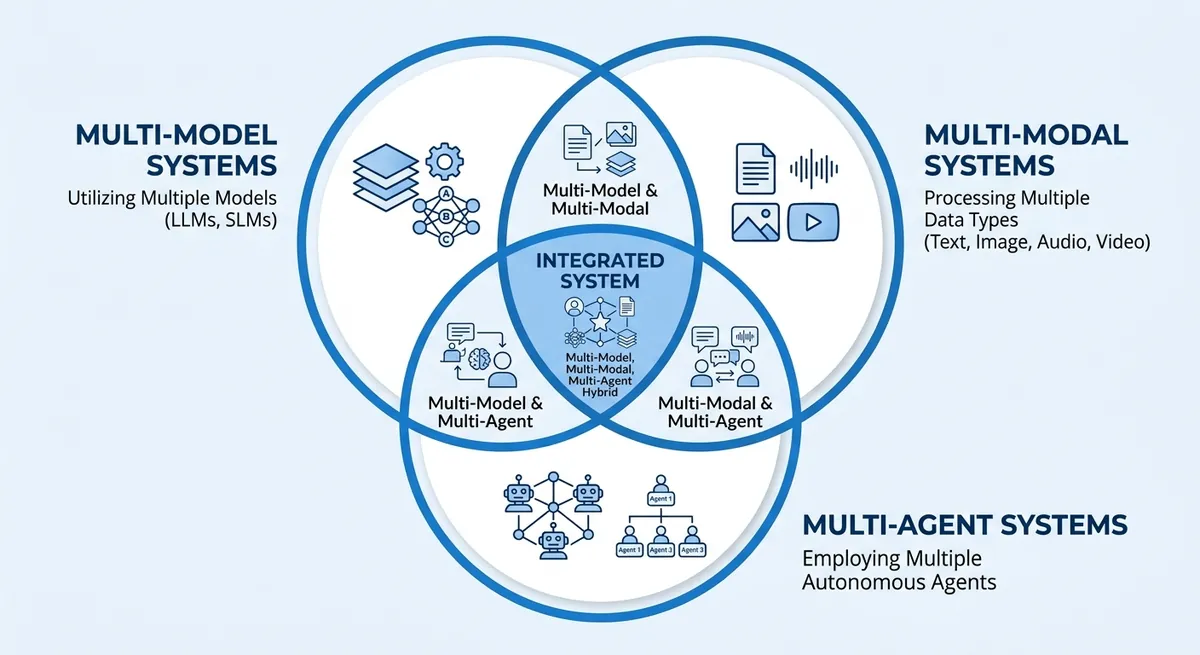
Multi-model vs multi-modal vs multi-agent systems#
People mix these terms and then wire the wrong architecture. This table keeps the boundaries clear.
| Term | What changes | Common wrong assumption | What breaks in production |
|---|---|---|---|
| Multi-model | One agent uses different models for planning, retrieval, perception, or generation | “Switching models for cost is enough.” | No fallback order, weak retry logic, unstable outputs |
| Multi-modal | One model or pipeline handles text, image, audio, or video input/output | “Multi-modal equals multi-model.” | Missing model selection per step, higher cost on simple tasks |
| Multi-agent | Multiple agents split goals and coordinate | “More agents means smarter results.” | Deadlocks, duplicate tool calls, hard-to-trace failures |
These can overlap in one system. Example: a support workflow uses vision input (multi-modal), routes planning and drafting to different models (multi-model), and hands billing disputes to a separate agent (multi-agent).
How a Multi-Model Agent Works: End-to-End Architecture#
A multi-model agent is a loop, not a single model call. It turns user intent into steps, picks models and tools, checks each result, then writes a final answer you can trust.
Multi-model agent control loop: perceive, plan, act, verify#
The loop starts by normalizing input. The system converts chat text, files, images, or audio into one internal task format. That keeps downstream logic stable even when users send mixed media.
Next, the planner breaks intent into actions: reasoning, retrieval, tool calls, and response drafting. Each action gets a goal, timeout, and token budget. The safe default is to verify every tool result before final output.
Verification checkpoints are simple and strict:
- schema check (did the tool return the right fields?)
- source check (is the evidence attached?)
- policy check (is output allowed for this user role?)
- confidence check (does the result conflict with earlier state?)
If a check fails, the loop retries or reroutes before user-facing output.
Multi-model agent routing and policy engine#
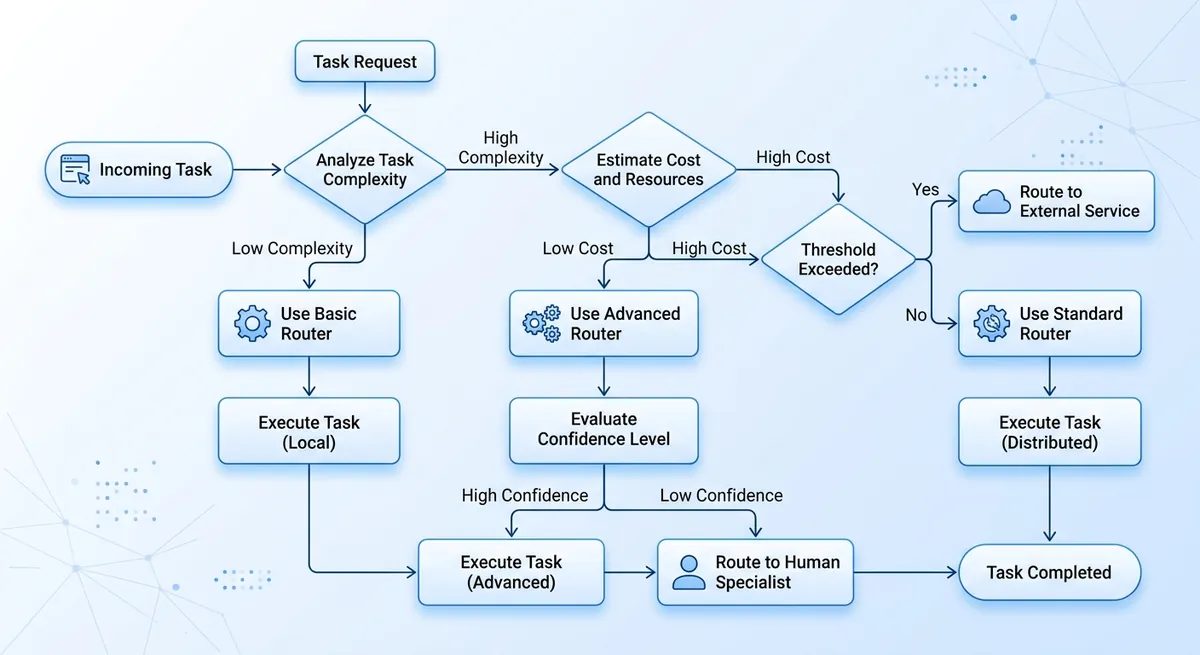
Routing should use task type, spend cap, latency target, and risk level. This avoids sending every step to one expensive model.
| Task signal | Route choice | Policy guard | Fallback |
|---|---|---|---|
| Long reasoning, high risk | Higher-quality reasoning model | strict output filter | retry on alternate provider |
| Fast chat, low risk | Lower-cost chat model | basic safety filter | switch to backup chat model |
| Vision or audio input | Multimodal model | media validation | convert to text + retry |
Table: Router policy example for model selection and recovery. Source: Crazyrouter Core/Product, Domain/Features, Domain/Models.
You can use Crazyrouter here if you want one API key across OpenAI, Anthropic, Google, and other providers, with OpenAI-compatible calls. The gateway supports 300+ models, targets 99.9% SLA, and lists API pricing at 30-50% lower than official pricing.
Multi-model agent tool execution and grounded response synthesis#
Tool calls should be explicit function calls for databases, internal APIs, and web fetchers. Store tool input, output, and token use per step. Then synthesize the final response from verified tool results only. Attach citations or evidence snippets so reviewers can audit what the agent used and why.
Core Components You Need in Production#
A demo can answer prompts. A multi-model agent must survive bad inputs, tool failures, and cost pressure without silent errors. The minimum production stack is memory, tooling controls, and output guardrails working together.
<.-- IMAGE: architecture diagram showing memory store, tool runner, policy engine, validator, and human checkpoint in one loop -->
| Component | Minimum production rule | Failure you avoid |
|---|---|---|
| Memory layer | Keep short-term state per run, summarize old context, expire sensitive data on schedule | Context drift, privacy leaks, token waste |
| Tooling layer | Use idempotency keys, retry with capped backoff, enforce least-privilege scopes | Double charges, repeated side effects, over-scoped access |
| Output controls | Enforce JSON schema, run validators, route risky actions to human review | Broken automations, unsafe writes, silent policy violations |
Source: implementation guidance in this section; platform capabilities from Crazyrouter Core/Product.md and Domain/Features.md.
Memory design for multi-model workflows#
Store three memory types. Short-term memory keeps current task facts and tool results for the active run. Long-term memory keeps stable user preferences or business rules. Episodic logs keep what happened, with timestamps, model used, and tool outcomes.
Summarize when a thread gets long or token cost climbs. Drop raw details after you extract durable facts. For sensitive data, set short retention and strict deletion rules. Keep audit logs longer than conversation text when policy requires traceability.
Tooling layer for agent actions across models#
Every external action needs an idempotency key, so retry does not create duplicate writes or charges. Keep retries bounded, with clear stop conditions and fallback model order.
Use narrow API scopes per tool. A read-only reporting tool should never have write permission. You can use Crazyrouter as the gateway layer: one API key, OpenAI-compatible calls, access to 300+ models, and a 99.9% SLA target with 30-50% lower API pricing than official APIs.
Output controls for dependable agent decisions#
Force structured output with JSON schema before any tool call. Then run validators for field types, required keys, and policy rules. If an action can move money, change records, or message customers, pause for human approval. Trigger that checkpoint by risk tags, spend thresholds, or low confidence signals. This is where demos turn into reliable operations.
High-Impact Use Cases for a Multi-Model Agent#
A multi-model agent pays off when one workflow needs text, vision, and rule checks in one loop. ROI is clearest where an error costs real money, compliance risk, or customer trust. If the task is fixed and low risk, simple automation is usually enough.
You can use Crazyrouter to test these flows with one API key, OpenAI-compatible calls, and access to 300+ models. The platform lists 30-50% lower API pricing than official channels and a 99.9% SLA target, so you can track cost and uptime while you route across providers.
Multi-model workflow for knowledge work: research, analysis, reporting#
Teams save time when OCR reads files, retrieval pulls source facts, and a reasoning model writes synthesis in one chain. The same flow can output an executive summary with evidence links, so reviewers can verify claims fast. Simple automation is fine for fixed weekly reports where source format never changes.
Multi-provider agent pattern for customer operations: support, onboarding, account workflows#
Support stacks gain speed when one flow classifies tickets, drafts replies, and suggests next actions from account history. Keep hard boundaries for account-changing actions like email, payout, or permission updates: require human approval before execution. Simple automation is enough for FAQ routing, status checks, and template replies.
Compliance-focused agent setup for regulated industries: finance, healthcare, legal#
These teams need traceable outputs. Add audit logs, citation requirements, and policy checks before response release. Run risk scoring before action execution so high-risk cases pause for review. Simple automation still works for reminders, form intake, and basic triage where no legal or medical claim is generated.
| Use case | Where multi-model routing pays off | Required controls | KPI | Risk level | When simple automation is enough |
|---|---|---|---|---|---|
| Knowledge work | Mixed input types and changing sources | Evidence links, retry/fallback logs | Review pass rate, cycle time | Medium | Fixed templates |
| Customer operations | Ticket + account context in one flow | Permission checks, human approval gates | Time to resolution, reopen rate | Medium-High | FAQ and status flows |
| Regulated industries | Decisions with legal/clinical impact | Audit trail, citations, policy checks, risk score | Policy violation rate, escalation rate | High | Reminders and intake |
Source: Crazyrouter Core/Product and Domain/Features knowledge base.
<.-- IMAGE: Table mapping use cases to required controls, KPIs, and risk levels. -->
How to Build a Multi-Model Agent: A Practical 7-Step Blueprint#
A production-ready multi-model agent starts small, with clear gates between each stage. You can ship a pilot fast, then add control for cost, quality, and failure recovery only when data shows you need it.
Steps 1-3: multi-model agent scope, data prep, and model selection#
Step 1: Define one business task and one output format. Set pass/fail metrics before you write code, such as answer accuracy, tool-call success rate, and max cost per run.
Step 2: Prepare test data that matches real inputs. Include clean cases, edge cases, and known failure cases, so your agent learns to recover instead of only passing happy paths.
Step 3: Assign model roles by job, not by brand. Keep a planner model for reasoning, an extractor for structured fields, and a generator for user-facing text.
| Role in agent flow | What you measure | Practical model-routing choice |
|---|---|---|
| Planner | Decision accuracy and stop rate | Route to stronger reasoning models |
| Extractor | JSON/schema validity | Route to stable low-latency text models |
| Generator | User score and style fit | Route to cost-aware chat models |
Source: Crazyrouter supports 300+ models, OpenAI-compatible API, one API key across providers.
Steps 4-5: multi-model orchestration and prompt-program design#
Step 4: Build a planner-executor loop with hard stop rules. Stop on max turns, budget cap, or repeated tool failure. If you only tune prompts and skip stop conditions, your pilot will pass demos but fail under real load.
Step 5: Define tool schemas and confidence thresholds in code. If confidence drops below your threshold, trigger retry with fallback order, then return a safe response instead of guessing.
<.-- IMAGE: Reference architecture showing orchestrator, model router, tools, memory, and evaluator. -->
You can use Crazyrouter here to keep one OpenAI-style endpoint while testing cross-provider fallback. That setup can cut API cost by 30-50% versus official APIs, based on published pricing claims.
Steps 6-7: multi-model agent evaluation, rollout, and operations#
Step 6: Run offline eval, then shadow mode, then canary release. Compare new and old traces before full traffic cutover.
Step 7: Monitor drift, cost spikes, and failure patterns per step. Track token use by planner, tools, and generator so billing stays predictable and routing rules stay grounded in real data.
Security, Governance, and Team Operations#
A multi-model agent fails in production when permissions, logs, and guardrails are loose. Treat each tool call like a privileged action, not a normal chat turn.
Access control for the multi-model agent#
Map tools to roles before you ship. A simple model works well: user (role=1) can run allowed APIs, admin (role=10) can manage channels and users, and super admin (role=100) can change global settings.
Use short-lived API tokens for each service account, set token expiry, and revoke tokens on incident. Keep session-level isolation: one task session, one credential scope, one audit trail.
You can use Crazyrouter’s role control, JWT auth, token revoke, and usage logs to enforce this without changing OpenAI SDK call patterns.
Observability for cross-model agent incidents#
Log every step in one trace: prompt input, selected model, tool call args, output, retries, fallback path, and manual override. Add hard alerts for two events: unusual token burn per step and repeated upstream errors. When alerts fire, route to a runbook: pause the agent, freeze risky tools, review the last successful state, then replay from a safe checkpoint. <.-- IMAGE: timeline view showing prompt, model route, tool call, retry, and human override -->
Secure environment controls for team-run AI agents#
Agents that sign in to web portals need isolated browser profiles. Shared profiles cause cross-account cookie bleed and hidden session reuse.
| Setup | Session risk | Team debugging | Recommended use |
|---|---|---|---|
| Shared browser profile | High | Hard to trace ownership | Never for production |
| Isolated profile per agent/task | Low | Clear ownership and replay | Default for team ops |
Source: Crazyrouter Features docs (RBAC, JWT, token logs, request/error logging) and standard secure operations practice.
Common Pitfalls and How to Avoid Them#
Real multi-model agent failure modes in production#
Tool calls fail in quiet ways: wrong tool choice, action schema mismatch, or no retry path after a timeout. Prompt drift also slips in. A bad web snippet can poison later steps, so the agent keeps acting on stale or false context.
| Failure pattern | Safeguard to add now |
|---|---|
| Hallucinated action or wrong tool | Strict tool schema checks and a task allowlist |
| Silent API failure | Retry logic, fallback order, and error logs |
| Context poisoning | Short context windows and trusted-source tags |
<.-- IMAGE: flowchart of action request, validation gate, fallback route, and human approval -->
Guardrails for a safer multi-model agent workflow#
Block irreversible actions until human approval. Set tiered autonomy: read-only tasks can run auto; payment, account changes, or deletions need confirmation. Track token spend per step, so cost spikes show up early.
Multi-model agent web-task isolation with DICloak#
When agents log into web tools, you can use DICloak-style isolated browser profiles to separate sessions and reduce cross-account leakage. That keeps team accounts safer during parallel runs.
Tools like DICloak let you apply role-based access, so only approved users can run high-risk flows. For distributed teams, controlled access plus environment isolation supports compliance and safer operations.
Choosing Your Stack and What Comes Next#
Multi-model agent stack: build vs buy vs hybrid checklist#
| Option | Best fit | Watch out | Cost view |
|---|---|---|---|
| Build | Strong backend team, strict data rules | Longer delivery, on-call load | Infra + engineer time + API spend |
| Buy | Need fast launch | Less control over routing logic | Vendor fee + API spend |
| Hybrid | You need control on policy, fast model access | Integration work across tools | Total cost is API + ops + incident recovery |
A multi-model agent breaks when routing and fallback are weak, not when one model is slow. You can use Crazyrouter if you want one API key across providers, OpenAI-compatible calls, 300+ models, 30-50% lower API pricing, and a 99.9% SLA target. Start with $0.2 free credit for test traffic.
Multi-model agent roadmap: 90-day adoption plan#
Week 1-3: pilot one workflow, set spend cap, log token cost per step. Week 4-8: validate fallback order, retry rules, and permission checks. Week 9-12: production gate with alerting, runbook, and rollback path.
KPIs: task success rate, median latency, upstream failure recovery time, and cost per successful task. <.-- IMAGE: 90-day timeline with pilot, validation, and production readiness gates -->
Frequently Asked Questions#
What is a multi-model agent in simple terms?#
A multi-model agent is an AI worker that coordinates several models and tools to finish one job. One model can plan steps, another can search documents, another can write code, and a final model can check results. It works like a small team, not a single brain. This setup is useful for multi-step tasks such as “pull data, analyze it, draft a summary, and send an email,” where checks and tool use improve reliability.
How is a multi-model agent different from a multi-modal agent?#
A multi-model agent uses different models for different roles (planner, router, verifier, coder). A multi-modal agent handles different data types, like text, images, audio, or video. The key difference is model diversity vs input/output data diversity. They can exist together: one agent may route work across several models and also process text plus images. Example: a support agent reads screenshots (multi-modal) and uses separate models for OCR, reasoning, and policy checks (multi-model).
When should I use a multi-model agent instead of a single LLM?#
Use a multi-model agent when tasks have many steps, external tools, or strict quality needs. Good cases include onboarding workflows, finance ops, incident response, and report generation with citations. A single LLM may draft text well, but it is weaker at reliable tool calling and verification loops. Multi-model routing also helps cost and speed: use a small model for simple steps, a stronger model for hard reasoning, and a checker model before final output.
What are the main risks of deploying a multi-model agent?#
Main risks are permission abuse, bad tool output, hallucinated actions, privacy leaks, and weak governance. If the agent can run tools with broad access, it may trigger unsafe actions. If a database or API returns wrong data, the agent can spread errors fast. Hallucinated actions can create fake tickets or wrong updates. Logs may expose private data if not masked. Governance gaps appear when no owner tracks prompts, model versions, and approval rules across the full workflow.
How do I measure multi-model agent performance?#
Track performance at both task and step level. Start with task success rate: did the agent finish the job correctly? Add groundedness: are claims tied to source docs or tool results? Measure tool-call accuracy: correct tool, correct parameters, correct order. Track latency per task and per step, plus cost per task across all models and APIs. Finally, watch human override rate. Frequent overrides show trust gaps, weak routing, or poor guardrails that need fixes.
A multi-model agent creates durable performance gains when each model is used for the task it does best, then orchestrated with explicit routing, shared state, and continuous evaluation so quality, cost, and latency stay predictable as complexity grows. Ready to prototype your first production-grade multi-model agent? Start with a small workflow, instrument everything, and benchmark weekly.