Crazyrouter
Cheaper AI API in 2026: How to Lower LLM Costs Without Losing Quality
At 1M GPT-4 tokens per month, official API pricing is $30, while Crazyrouter lists $21 for the same volume (pricing data updated 2026-03-06). That 30% gap looks clear on paper, yet real production...

Cheaper AI API in 2026: How to Lower LLM Costs Without Losing Quality#
At 1M GPT-4 tokens per month, official API pricing is 21 for the same volume (pricing data updated 2026-03-06). That 30% gap looks clear on paper, yet real production spend can drift fast when failed calls, retries, and slow responses force extra requests. A low token price alone does not guarantee lower total cost.
The real target is a cheaper AI API that cuts cost per usable output, not just cost per 1K tokens. If one provider is cheap but gives weaker answers, your team sends follow-up prompts, burns extra tokens, and waits longer. If rate limits block bursts, you add queue logic and spend more engineering time. Even migration effort has a price, though OpenAI-compatible gateways can reduce that by keeping the same SDK flow and only changing base_url and api_key.
You will see a practical way to measure total LLM cost across quality, latency, and operational overhead, then compare providers with numbers you can trust. Start with the metric that catches hidden waste: cost per accepted response.
What 'Cheaper AI API' Really Means for Buyers#
Sticker Price vs Real Cost in a low-cost AI API check#
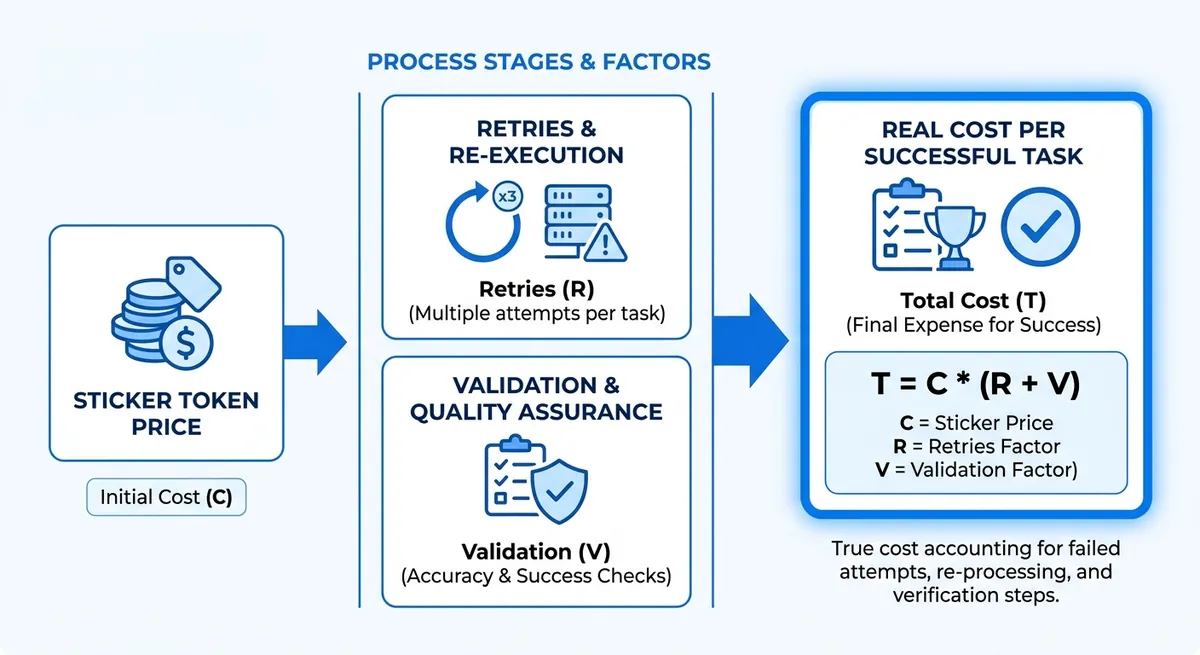
Token price is a starting point, not the finish line. A cheaper AI API can still end up costing more per accepted response. Set one clear rule before any comparison: a successful output is an answer that passes quality review, arrives within your response-time target, and does not need a retry.
| Model | Official price | Crazyrouter price | Sticker saving |
|---|---|---|---|
| GPT-4 | $0.03/1K tokens | $0.021/1K tokens | 30% |
| GPT-3.5 | $0.002/1K tokens | $0.0014/1K tokens | 30% |
| Claude 3 | $0.015/1K tokens | $0.0105/1K tokens | 30% |
| Gemini Pro | $0.00025/1K tokens | $0.000175/1K tokens | 30% |
Source: Crazyrouter Pricing, updated 2026-03-06.
4 production metrics behind a cheaper API choice#
Use one scorecard for each provider, then compare with real runs:
- Cost per task:
(input + output token spend + retry spend) / completed tasks. - Quality pass rate: accepted responses divided by total responses.
- Latency and throughput: median response time plus request-limit headroom. Crazyrouter documents 60 requests/min on free tier and 600 requests/min on paid tier.
- Ops overhead: integration and maintenance time. You can use an OpenAI-compatible gateway like Crazyrouter and keep your SDK flow by changing only
base_urlandapi_key.
If you compare only price per 1M tokens, hidden retry cost and engineering time stay invisible.
How AI API Pricing Actually Works#
A pricing page can look cheap and still burn your budget. Track cost per accepted response, not cost per 1K tokens. That metric catches weak answers, retries, and extra prompts.
Cheaper AI API comparison: core pricing components#
Input and output tokens often have different prices, so check both rates before you compare vendors. If a page shows only one number, verify how it bills long outputs. Context window also changes cost. A larger window can cut prompt trimming work, but repeated long context raises token spend fast. Streaming, batch, and priority lanes can also change your bill. Some teams pay more to reduce queue time during traffic spikes.
| Model | Official price | Crazyrouter price | Listed savings |
|---|---|---|---|
| GPT-4 | $0.03 / 1K tokens | $0.021 / 1K tokens | 30% |
| GPT-3.5 | $0.002 / 1K tokens | $0.0014 / 1K tokens | 30% |
| Claude 3 | $0.015 / 1K tokens | $0.0105 / 1K tokens | 30% |
| Gemini Pro | $0.00025 / 1K tokens | $0.000175 / 1K tokens | 30% |
Source: Crazyrouter pricing page (updated 2026-03-06) and listed official API prices.
You can use this table as a baseline, then add your own acceptance rate and retry rate to find a truly cheaper AI API for your workload.
Cheaper AI API trap checklist in 2026#
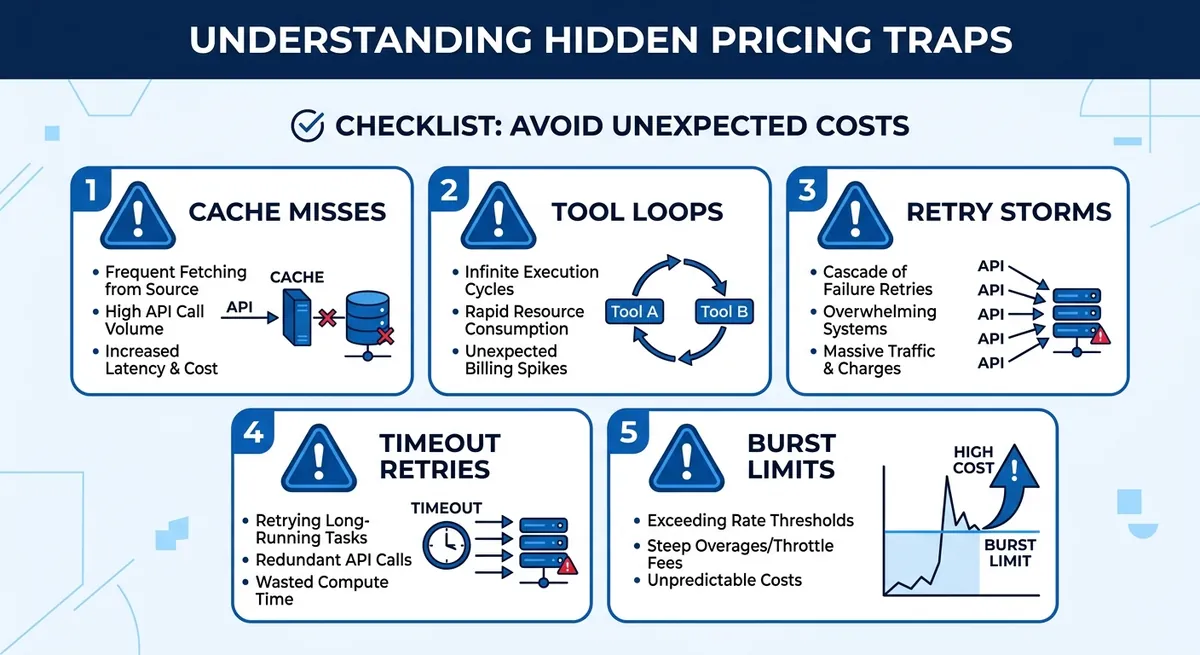
Cache hit rate gets ignored all the time. If cache misses rise, you repay full token cost for repeated prompts. Tool calling and agent loops also surprise teams. One user request can trigger several model turns, each billed. Retries matter more than people expect. Free tier limits can hit 60 requests per minute, paid tier 600 requests per minute on Crazyrouter. If your burst goes past that, 429 errors force retry logic and raise total spend.
Cheaper AI API Providers: Practical Comparison by Category#
You are not picking a vendor name yet. You are picking a cost pattern that matches your workload. A cheaper AI API only helps when answer quality stays high enough to avoid extra retries and follow-up prompts.
Frontier providers and cheaper AI API trade-offs (premium quality, mixed efficiency)#
Use frontier models when wrong answers are expensive, like legal drafting, complex coding, or multi-step planning. The per-token rate can be higher, yet total spend can still be lower if acceptance rate is high on the first pass.
Prompt compression helps here. Shorter system prompts and tighter output format lower token burn. Model routing also helps: send hard prompts to top models, route easy prompts to cheaper models.
Open-source inference clouds as a cheaper AI API path (budget-focused)#
This path fits bulk tasks: classification, extraction, short summaries, and internal tools where perfect style is not required. You can cut unit cost, but you should test consistency on your real prompts before rollout.
The common trade-offs are output stability, safety guardrails, and extra maintenance. If your team must tune prompts for every model update, your engineering cost can erase token savings.
Aggregator APIs for cheaper AI API access (one integration, multi-model routing)#
Aggregator APIs reduce integration work. You can keep OpenAI SDK calls and only change base_url and api_key when the gateway is OpenAI-compatible. You can use Crazyrouter with https://crazyrouter.com/v1, then call OpenAI, Anthropic, and Google models through one key.
You also get operational wins: failover across upstream channels and one billing surface. Still, verify markup transparency, model mapping, and rate limits before committing.
| Category | Cost pattern | Quality fit | Integration effort | What to verify |
|---|---|---|---|---|
| Frontier providers | Higher list rates | Top reasoning tasks | Low to medium | Acceptance rate, latency under load |
| Open-source clouds | Lower unit rates in budget setups | Repetitive, structured tasks | Medium to high | Consistency, safety behavior, maintenance time |
| Aggregator APIs | Markup + routing savings; can be 30% lower on listed models | Mixed workloads with routing | Low | Price transparency, fallback behavior, lock-in risk |
| Example listed prices (per 1K tokens) | Official | Crazyrouter |
|---|---|---|
| GPT-4 | $0.03 | $0.021 |
| GPT-3.5 | $0.002 | $0.0014 |
| Claude 3 | $0.015 | $0.0105 |
| Gemini Pro | $0.00025 | $0.000175 |
Source: Crazyrouter Pricing and API docs (updated 2026-03-06), https://crazyrouter.com/pricing, https://crazyrouter.com/v1/docs <.-- IMAGE: Matrix comparing frontier, open-source cloud, and aggregator models across cost, quality, and integration effort. -->
A Cost-Per-Output Framework to Pick the Right API#
If you want a cheaper AI API, compare providers on accepted outputs, not raw token price. Track cost per accepted response, not cost per 1K tokens. This catches re-prompts, retries, and failed calls that hide in billing totals.
Build a Fair Benchmark in 7 Steps for a Cheaper AI API Decision#
- Pick 100 real prompts from your logs (support, coding, extraction, and long context).
- Write expected outcomes for each prompt (facts, format, safety rules, max latency).
- Set pass/fail rules before testing (for example: valid JSON, no missing fields, answer relevance).
- Run the same prompt set on each provider with fixed settings (temperature, max tokens, system prompt).
- Record prompt tokens, completion tokens, latency, HTTP errors, and retries.
- Mark each answer accepted or rejected by your rule set.
- Compute:
- Cost per accepted response
- P95 latency on accepted responses
- Failure rate (401/429/500 and timeout share)
| Metric | OpenAI Direct | Crazyrouter |
|---|---|---|
| GPT-4 price | $0.03 / 1K tokens | $0.021 / 1K tokens |
| GPT-3.5 price | $0.002 / 1K tokens | $0.0014 / 1K tokens |
| Free entry credit | Not listed here | $1 |
| Free-tier rate limit | Not listed here | 60 req/min |
Source: Crazyrouter pricing and API docs (updated 2026-03-06).
Compute a Decision Score for Cheaper AI API Selection#
Use a weighted score: Quality 50%, Cost per accepted response 30%, P95 latency 15%, failure rate 5%.
If one model passes quality with stable latency, keep one model. If quality varies by task, use routed tiers. You can use OpenAI-compatible routing by changing base_url and api_key, then send hard prompts to stronger models and easy prompts to lower-cost ones.
Best Cheaper AI API Choices by Use Case#
The lowest token price is not always the cheapest path in production. A cheaper AI API depends on workload shape, quality bar, and how often you need fallback calls. You can use Crazyrouter to keep one OpenAI-style SDK flow and route by task, then switch only base_url and api_key.
| Use case | Default low-cost model path | Premium fallback path | Cost signal to track |
|---|---|---|---|
| High-volume chat/support | GPT-3.5 class for routine tickets | GPT-4 class for failed intent or complex cases | Cost per solved ticket |
| Content/SEO workflows | Gemini Pro class for draft generation | Claude 3 or GPT-4 class for final polish | Cost per approved draft |
| RAG/agents | Smaller model for retrieval summary and tool planning | Stronger model only for final answer synthesis | Cost per accepted response |
Source: Crazyrouter pricing data (updated 2026-03-06) and API docs.
Cheaper AI API for High-Volume Chat and Support#
For support queues, start with low-cost replies, then escalate only when needed. Pricing data gives a clear anchor: GPT-3.5 is 0.021/1K. That gap is huge for repetitive tickets. Set a budget cap per conversation and route overflow to a shorter answer format. Keep latency targets tied to team SLAs. Crazyrouter lists 99.9% SLA, plus rate limits of 60 req/min on free and 600 req/min on paid tiers, so you can plan burst traffic without guessing.
Cheaper AI API Pattern for Content, SEO, and Marketing Workflows#
Draft and refine in two passes. Use a low-cost model for structure, outline, and meta description ideas. Then run one refinement pass on a stronger model for tone, fact checks, and CTA clarity. Style guides cut rewrite spend. Lock tone, banned claims, and output template in the prompt, so editors fix fewer format issues and spend time on message quality.
Cheaper AI API Control for RAG, Analytics, and Agent Automation#
RAG costs climb in retrieval, not only generation. Cap chunk count, trim long passages, and set strict max_tokens before synthesis.
For agents, set tool-call budgets and loop limits. If an agent calls tools too long, force a stop and return a partial answer with next-step options.
<.-- IMAGE: Use-case decision tree mapping workload type to model tier and routing strategy. -->
Hidden Costs Most Teams Miss (and How to Control Them)#
A cheaper AI API can still blow your budget if your team tracks only token price. The leaks usually come from rework, retries, and access mistakes. Track cost per accepted response, not just cost per 1K tokens.
Operational Leak Points Beyond Token Billing for a cheaper AI API#
Low-quality outputs create follow-up prompts. Each retry adds tokens, time, and review work. Rate limits also create waste. On Crazyrouter, free tier is 60 requests/minute, paid tier is 600 requests/minute. If your burst traffic hits limits, queues grow, users resend, and token use climbs.
Moderation and human QA costs also hide in plain sight. If your team must manually fix unsafe or off-topic outputs, your real cost moves from API billing to labor.
Fragmented integrations add engineering drag. If teams call OpenAI, Anthropic, and Google with different auth and payloads, maintenance cost rises. You can use an OpenAI-compatible gateway and keep the same SDK flow by changing only base_url and api_key.
| Leak point | What to monitor | Control that cuts waste |
|---|---|---|
| Retry loops | Retry count per request | Set retry caps + backoff; alert on spikes |
| Rate-limit resends | 429 error rate, queue depth | Move heavy traffic to paid tier (600 req/min) |
| Human QA rework | % outputs edited by humans | Tighten prompts, add acceptance checks |
| Multi-vendor code drift | Time spent on adapter fixes | Use one OpenAI-compatible API endpoint |
Source: Crazyrouter API and pricing docs (rate limits, compatibility model).
<.-- IMAGE: Flow chart showing hidden cost leaks from retries, QA, and integration overhead, then controls that reduce each leak -->
Governance for Multi-API Teams with lower-cost AI API operations#
Budget control fails without account control. Use separate API tokens per team, set token expiry, and keep usage logs. Crazyrouter supports role levels (user/admin/super admin), request logs, and error logs, so you can trace who used what model and when.
You can use controlled browser environments, for example DICloak, to isolate team sessions across AI platforms. That lowers account-risk events, keeps access clean, and makes shared operations easier to audit.
Migration Plan: Switch to a Cheaper AI API Without Downtime#
A cheaper AI API should cut spend per accepted answer, not just token price. Use a 30-day pilot with strict pass/fail gates before full traffic shift.
30-Day Pilot Roadmap for a lower-cost AI API#
| Week | Owner | Tasks | KPI |
|---|---|---|---|
| 1 | Engineering | Point OpenAI SDK to https://crazyrouter.com/v1; keep prompts fixed; log latency, retries, and accepted responses | Baseline report ready |
| 2 | QA + PM | Run A/B prompts on current provider vs Crazyrouter models; review output quality blind | Accepted-response rate holds |
| 3 | Finance + SRE | Compare spend and burst behavior; test rate limits (60 req/min free, 600 req/min paid) | Cost and burst risk scored |
| 4 | Engineering + SRE | Shadow 10% production traffic; verify rollback path | No error spike; rollback under 5 min |
<.-- IMAGE: Timeline graphic for a 30-day API migration pilot with milestones. -->
Growth teams often test OpenAI, Anthropic, and Gemini in parallel. Session mix-ups can trigger account security issues and messy debugging. You can use DICloak isolated environments and identity separation so each provider test stays in its own clean workspace.
Remote teams also struggle with account handoffs. Tools like DICloak let you enforce role-based access and environment control, so QA, finance, and ops can audit usage without sharing raw credentials in chat.
Promote only when accepted-response cost drops and reliability stays flat.
Production Rollout and cost-saving AI API risk controls#
Canary traffic at 5% -> 25% -> 50% -> 100%, with budget alarms on daily spend and 429/500 error rates. Track SLA against 99.9% target.
| Model | Official API | Crazyrouter | Savings |
|---|---|---|---|
| GPT-4 | $0.03/1K | $0.021/1K | 30% |
| GPT-3.5 | $0.002/1K | $0.0014/1K | 30% |
Source: Crazyrouter pricing page (updated 2026-03-06).
Final Checklist to Choose Your Cheaper AI API Today#
10-Point cheaper AI API buyer checklist#
Track cost per accepted response and check these 10 items: token price, answer pass rate, p95 latency, burst rate limits, SLA target (99.9%), retry and failover behavior, security controls, request logs, migration effort, and support speed.
| Metric | Official API | Crazyrouter |
|---|---|---|
| GPT-4 price | $0.03 / 1K tokens | $0.021 / 1K tokens |
| GPT-3.5 price | $0.002 / 1K tokens | $0.0014 / 1K tokens |
| Free credits | Usually none | $1 signup credit |
| Free-tier rate limit | Varies | 60 req/min (paid: 600 req/min) |
Source: Crazyrouter pricing and API docs (updated 2026-03-06).
<.-- IMAGE: side-by-side scorecard showing baseline vs candidate across price, pass rate, latency, and retries -->
Next action: benchmark your lower-cost AI API this week#
Pick one high-volume workflow. Record 3 days of baseline: total tokens, accepted responses, latency, retries, and error rate. Then test one candidate for 3 days. You can use Crazyrouter with the OpenAI SDK by changing only base_url and api_key. Keep the provider that gives lower cost per accepted response, not just lower token price.
Frequently Asked Questions#
How do I find a cheaper AI API for my specific workflow?#
Start with your real tasks, not demo prompts. Pull a test set from recent production requests (for example, 100–300 prompts across your main use cases). For each provider, track pass rate, average latency, output length, and total cost. Then calculate cost per accepted output: total spend divided by outputs that meet your quality bar. Build a weighted score (for example: 50% quality, 30% cost, 20% speed). This method finds a truly cheaper AI API for your workflow, not just on paper.
Is the cheapest listed model always the cheaper AI API in production?#
No. A low per-token price can still cost more in real use. If a model fails quality checks, you pay again for retries or human review. Long outputs can inflate token spend fast. Slow models can increase queue time and user drop-off, which adds operational cost. Teams also spend time fixing prompt edge cases. In production, the real cheaper AI API is the one with the best accepted-output cost, stable quality, and fewer rework loops.
Can I use multiple providers to get a cheaper AI API stack?#
Yes, and this is often the best setup. Route simple tasks (classification, short summaries) to low-cost models. Send high-risk tasks (legal, finance, customer-facing final drafts) to stronger models with better reliability. Add fallback rules: if provider A times out or fails quality checks, send the same request to provider B. Keep one policy layer for logging, redaction, and audit trails across vendors. This multi-provider approach can create a cheaper AI API stack without hurting quality.
What hidden fees should I check before choosing a cheaper AI API?#
Check costs beyond input tokens. Output tokens often run longer than expected and can double spend on chat-heavy flows. Some vendors charge more for premium throughput tiers, burst capacity, or dedicated endpoints. Review pricing for moderation, embeddings, file storage, and data retention. Support plans, SLAs, and enterprise security features can add monthly fees. Also count engineering maintenance: routing logic, monitoring, and prompt tuning time. A true cheaper AI API includes these full lifecycle costs, not just list price.
How often should I re-evaluate my cheaper AI API choice?#
Run a formal review every quarter. Re-test sooner after major model launches, pricing updates, or workflow changes such as longer prompts, new languages, or stricter quality targets. Use the same benchmark set each cycle so results stay comparable over time. Track three trend lines: pass rate, cost per accepted output, and latency. If any metric moves in the wrong direction for two review periods, start a migration test. Regular checks keep your cheaper AI API decision current and defensible.
A cheaper AI API strategy is less about chasing the lowest list price and more about matching model performance, latency, and governance to real business needs. Teams that benchmark providers, improve prompts, and track token usage continuously can lower spend while maintaining quality and reliability. Run a 30-day cheaper AI API benchmark and migration pilot to cut costs with confidence.