中文
中文 English
 Français
 Русский
 日本語
日本語 Tiếng Việt
 한국어
한국어 Deutsch
 Español
 Italiano
 Português
 العربية
 ไทย
ไทย Bahasa Indonesia
 Bahasa Melayu
 Türkçe
 Polski
 Nederlands
 Dansk
Dansk Norsk
Norsk Қазақша
Sora API: The Complete Guide to Building with OpenAI Video Generation
OpenAI's current Sora API is asynchronous and tier-based, not a fire-and-forget video button. The official guide recommends polling every 10 to 20 seconds, and Sora access is not available on the F...
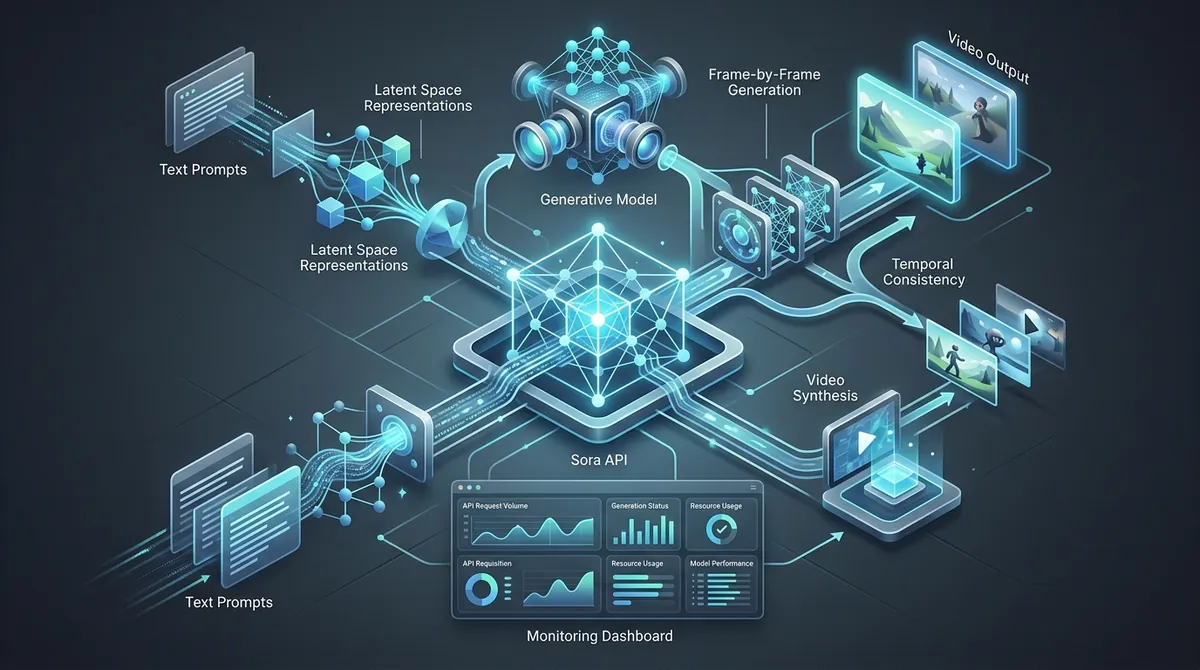
Sora API: The Complete Guide to Building with OpenAI Video Generation#
OpenAI's current Sora API is asynchronous and tier-based, not a fire-and-forget video button. The official guide recommends polling every 10 to 20 seconds, and Sora access is not available on the Free tier. That is where teams get stuck with the sora api: outputs look great in demos, then queueing, retries, and cost control get messy once real traffic hits. (Source: OpenAI API docs, 2026)
This guide is built for that exact gap between demo and production. You will learn how to write prompt specs that keep style and motion consistent across batches, how to add queueing and exponential backoff so failed jobs recover cleanly, and how to set usage guardrails before spend runs away. You will also see where a multi-model gateway fits when you need fallback paths or lower pricing; Crazyrouter, for example, says it routes 469 models across 30+ providers, with OpenAI-compatible calls at https://crazyrouter.com/v1 and prices 30-50% below official APIs. The point is not feature hype. The point is repeatable output, stable delivery, and fewer late-night fire drills. Start with the workflow design that keeps creative quality and engineering reliability in the same loop. (Source: Crazyrouter metrics, 2026)
What Is the Sora API and Why It Matters#
Sora API in plain terms#
The sora api lets your app send text prompts and get generated video back through code. It solves a real production problem: repeatable video generation inside your own workflow, with logs, retries, and review steps, instead of manual click-by-click exporting in a web tool.
API-based generation and consumer video tools serve different jobs:
| Use case | Sora API route | Consumer tool route |
|---|---|---|
| Batch creation | Queue prompts and run at scale | Manual run per clip |
| App integration | Connect to backend, CMS, or product logic | Mostly standalone UI |
| Reliability controls | Add retries, status checks, and guardrails | Limited automation controls |
Who should use the Sora API#
Product teams should look at this when video is part of a feature, like personalized onboarding clips or in-app explainers. Creative and marketing teams should look at it when they need campaign variants fast, with one prompt spec and controlled edits across regions or channels. Treat it as production infrastructure, not a toy editor.
Sora API workflow at a glance#
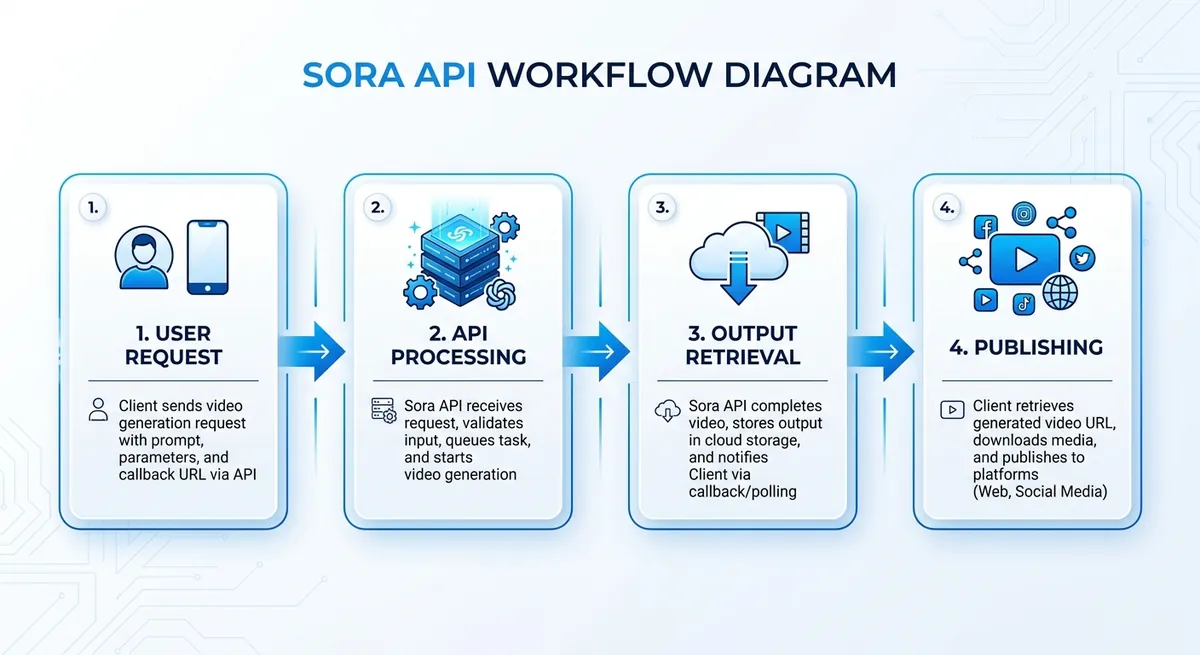
You submit a generation request, then poll job status until output is ready. After retrieval, you store the file, run review checks, and publish through your normal release path.
If you need fallback models or lower API spend, you can use Crazyrouter as a gateway: it says it supports 469 models across 30+ providers, keeps an OpenAI-compatible base URL at https://crazyrouter.com/v1, and targets prices 30-50% below official APIs. Use the gateway as an ops layer, not as a replacement for learning the official Sora workflow. (Source: Crazyrouter metrics, 2026)
Core Capabilities of the Sora API#
Sora API text-to-video and image-to-video modes#
You get two practical paths: start from plain text, or start from a reference image. Pick based on control level, not hype. For fast concept tests, text-only is quicker. For branded work, image conditioning gives tighter visual consistency. OpenAI's current Sora 2 model also supports synced audio, which matters if your workflow includes narration, ambient sound, or music timing. (Source: OpenAI API docs, 2026)
| Mode | Best starting point | Control level | Common use case |
|---|---|---|---|
| Text-to-video | You have a scene idea but no fixed look | Medium | Ad concept drafts, story exploration |
| Image-to-video | You already have a frame, character, or product shot | High | Brand scenes, product hero shots, style lock |
(Source: OpenAI API docs, 2026)
If you only care about speed, text prompts can work. If you care about matching colors, wardrobe, camera angle, or character identity, image input usually saves revision rounds.
Sora video API strengths: motion, composition, cinematic feel#
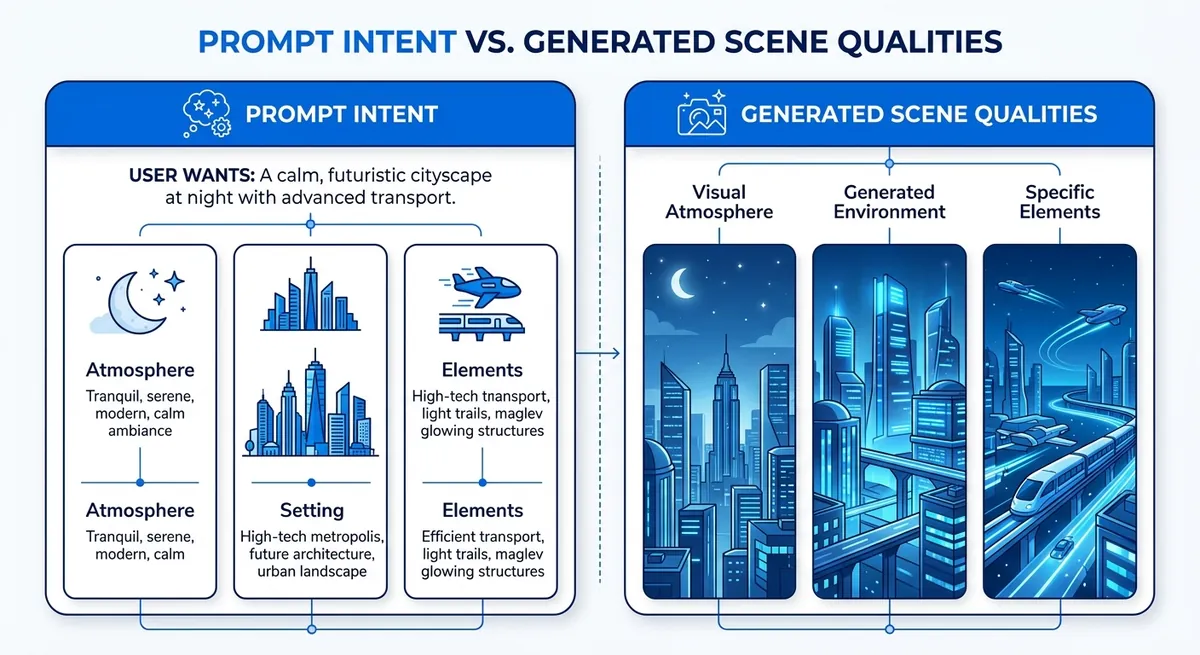
The strong side is shot language. Prompts with camera direction often work better than broad style words. Example: “slow dolly in, dusk streetlight, shallow depth of field, subject centered, 24fps film look.” This gives the model clearer motion intent and framing intent.
For continuity, expect good short-scene coherence when the prompt is specific about subject, setting, and movement. Keep each shot goal narrow. One prompt for one scene beat tends to stay cleaner than trying to cover a full sequence at once.
Sora API limits and realistic production expectations#
Artifacts can still show up: object shape drift, hand details, text on signs, or sudden style jumps across cuts. Fast motion and crowded scenes raise failure risk. Treat iterative prompting as normal production work, not as a fallback plan.
In practice, teams run prompt versions, compare outputs, and keep a "known-good" template library per use case. If you need fallback routes during peak load or model outages, a gateway path can help. Crazyrouter, for example, keeps an OpenAI-compatible interface at https://crazyrouter.com/v1, which makes it easier to swap providers without rewriting the rest of your queue and storage flow. (Source: Crazyrouter metrics, 2026)
How to Get Started with the Sora API: Access, Auth, and First Call#
Sora API account setup, verification, and billing readiness#
Before you write code, confirm account status, billing status, and model access in your provider dashboard. For Sora work, the real blocker is usually permission, not code. OpenAI explicitly treats Sora as a usage-tier feature, so access verification belongs at the top of your launch checklist. (Source: OpenAI API docs, 2026)
Use this quick split so you do not mix test and real traffic:
| Mode | What to check before calls | Why it changes your code |
|---|---|---|
| Sandbox | Test key, low-risk prompts, mock output handling | You focus on request format and error paths |
| Production | Live billing, quota alerts, storage policy, timeout rules | You protect cost, latency, and output delivery |
If you front Sora through Crazyrouter, keep the same release discipline: separate prototype traffic from production traffic, and keep provider-specific quotas in a different dashboard from your creative QA metrics. (Source: Crazyrouter metrics, 2026)
Sora API authentication and secure key management#
Store keys on the server only. Do not put API keys in web or mobile code. Load them from environment variables, then inject them at runtime.
If your team shares access, create separate keys per service. Revoke keys when a person leaves or a service is retired. Rotate keys on a schedule and after any leak.
If you route through Crazyrouter, use:
- Base URL:
https://crazyrouter.com/v1 - Header:
Authorization: Bearer YOUR_API_KEY
Treat key scope like production data: least privilege, short lifetime, full audit trail.
Sora API first generation request: anatomy of a payload#
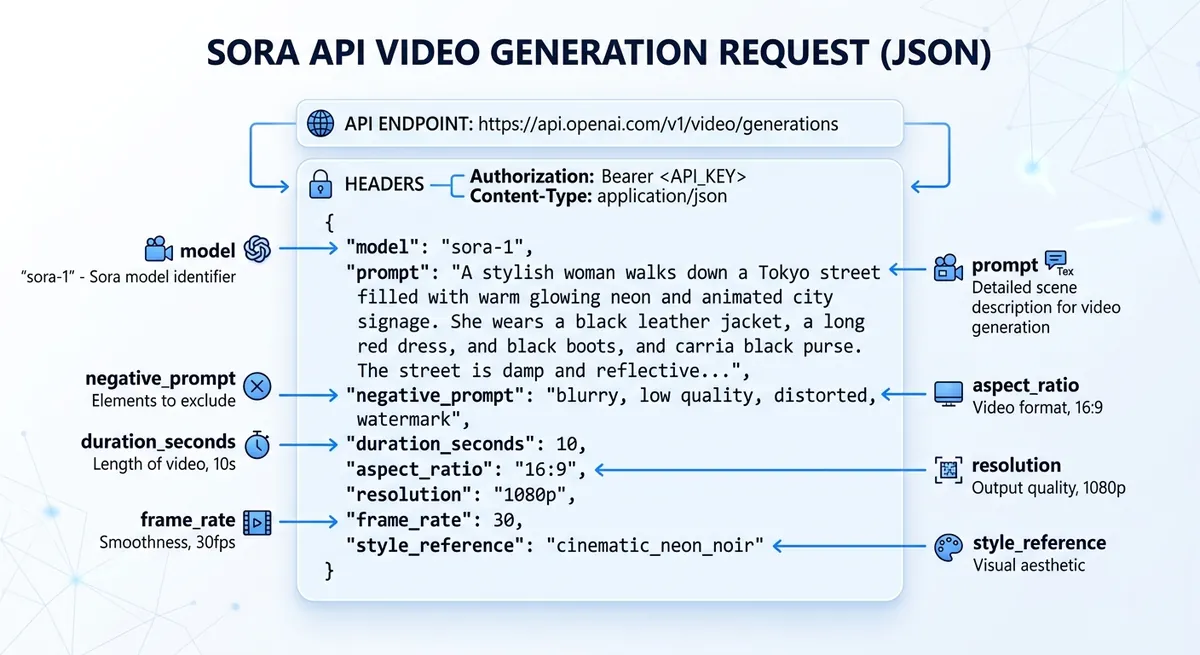
For a sora api call, keep payload rules strict: clear prompt, a supported model name, a supported output size, and a duration from your own allowlist. The official Sora flow starts with POST /videos, then returns a job you can monitor until the asset is ready. (Source: OpenAI API docs, 2026)
{
"model": "sora-2",
"prompt": "A calm drone shot over a rainy neon street at night",
"size": "1280x720",
"seconds": "5"
}
Validate fields before send:
- prompt is not empty
- model is enabled for your account
- size is on your allowlist
- seconds is inside your allowed range
If you are doing image-to-video, upload the source asset first and reference it in the create call instead of inventing your own payload shape. (Source: OpenAI API docs, 2026)
Sora API job status, retries, and output retrieval#
Video generation is async. Submit the job, store the video ID, then poll status. OpenAI's guide recommends checking every 10 to 20 seconds unless you wire up webhooks. Stop at a fixed timeout so workers do not hang forever. (Source: OpenAI API docs, 2026)
Handle transient failures with exponential backoff and jitter. Retry only safe states like 429 or 5xx. Do not retry malformed payloads.
If you route through a gateway like Crazyrouter, treat gateway quotas as a separate queue policy. Your direct OpenAI Sora limits and your gateway-level limits are not the same thing, so do not hardcode one provider's numbers into every worker.
Prompt Engineering for Better Sora API Results#
A practical Sora API prompt template for production teams#
Teams get unstable output when prompts mix ideas without a fixed order. Use one format every time:
Subject + Action + Context + Camera + Mood + Duration + Constraints
Example: “Electric scooter, turns into a side street at sunset, wet asphalt in a dense city, low tracking shot from rear wheel, calm cinematic mood, 8 seconds, no logos, no text overlays, no crowd faces.”
The key is clear slots, not poetic wording. Lock the prompt structure before you scale batch jobs. Add negative constraints at the end so the model does not miss them: “no watermark, no subtitles, no extra limbs, no scene cuts, no fisheye lens.”
From one-off Sora API prompts to reusable prompt libraries#
A prompt library saves time and keeps campaign style steady. Store prompts like this:
campaign/product/use_case/versionspring_launch/scooter/ad_v3edu/solar_intro/explainer_v2
Keep a short change note on each version: what changed, what improved, what broke.
Run A/B tests with one variable changed per test. Example: keep subject and action fixed, test only camera angle. If quality drops, roll back fast. This avoids random edits that blur your creative direction.
Common Sora API prompt mistakes and fast fixes#
Most failed outputs come from conflicts inside the prompt, not from the model.
| Prompt issue | Fast fix |
|---|---|
| Too many actions in one sentence | Split into one main action and one secondary action |
| Vague style words (“cool,” “nice”) | Replace with concrete visual terms (“soft daylight,” “handheld camera shake”) |
| Time conflict (“slow motion” + “fast jump cuts”) | Pick one tempo and remove the opposite cue |
| Scene conflict (“quiet office” + “street parade”) | Keep one setting per clip |
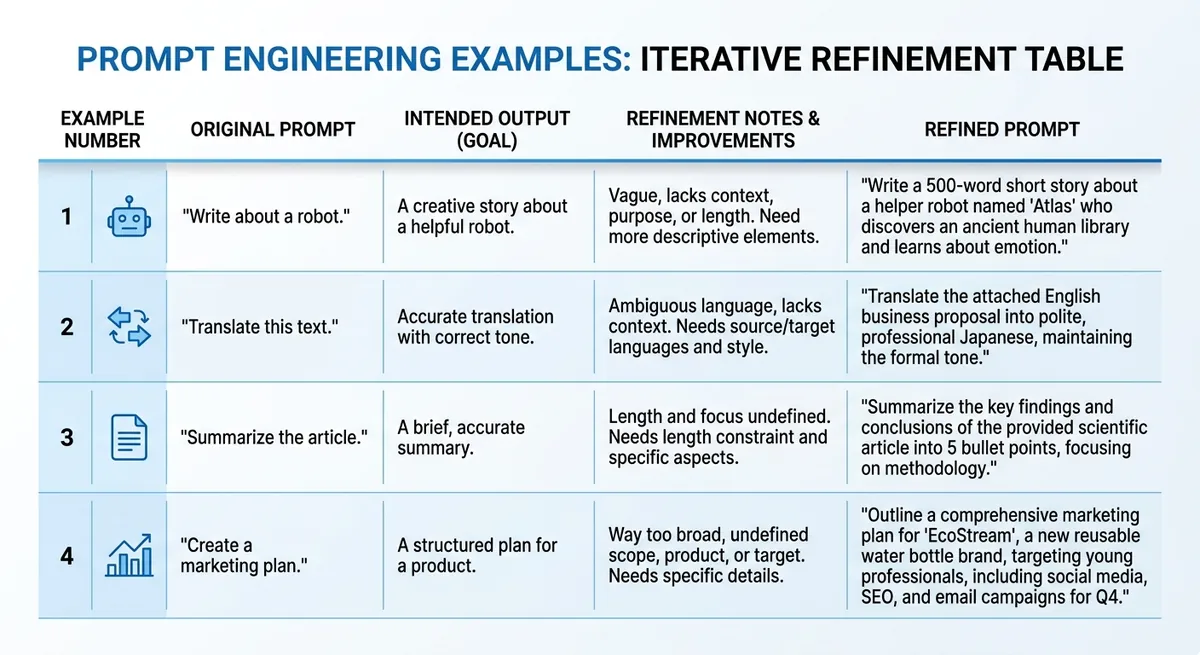
Example prompt sets by use case#
Use this quick set to start, then tune by output review.
| Use case | Starter prompt | Intended output | Refinement note |
|---|---|---|---|
| Product demo clip | “Smart bottle rotates on white table, macro close-up, studio light, clean tech mood, 6 seconds, no text.” | Clean hero shot | Add “slow clockwise turn” if motion feels random |
| Social ad variation | “Runner ties shoes, city dawn, handheld medium shot, energetic mood, 5 seconds, no logos.” | Fast lifestyle visual | Add brand color in clothing, not as overlay |
| Educational explainer scene | “Teacher points at simple solar panel model in classroom, static wide shot, neutral mood, 7 seconds, no subtitles.” | Clear teaching context | Add one object focus if frame feels busy |
Output Quality Control and Troubleshooting#
Sora video output rubric before generation#
Set quality rules before you send jobs to the sora api. If you skip this step, you cannot tell if a clip failed or your taste just changed.
Use a simple pass/fail sheet:
- Motion realism: no jitter, no broken limbs, no object teleport
- Framing accuracy: subject stays in frame, camera path matches prompt
- Brand alignment: color, tone, logo-safe zones, and forbidden elements
Score each item 0, 1, or 2. Mark pass only when total score is at your team threshold. If a prompt cannot be graded, do not run production batches.
Sora API troubleshooting playbook for weak outputs#
When output quality drops, check symptoms in a fixed order instead of guessing.
| Signal | Likely cause | Quick fix | Retry rule |
|---|---|---|---|
| Style drift across clips | Prompt too loose | Lock camera, lens, color palette, motion verbs | Retry once with tighter prompt |
| Visual artifacts | Overloaded scene instructions | Cut prompt into core scene + one motion goal | Retry with shorter prompt |
| Timeout / failed job | Queue spikes or provider issue | Add queue + exponential backoff | Retry up to 3 times |
| 429 rate limit | Too high request burst | Throttle workers | Respect provider limits |
| 401 / malformed request | Bad key or payload shape | Validate auth and JSON schema | Fail fast, alert team |
Keep transport failures and creative failures in different logs. A 401, 429, or 5xx is an ops problem; artifact drift and weak framing are prompt-quality problems. Track them separately so you do not solve the wrong issue.
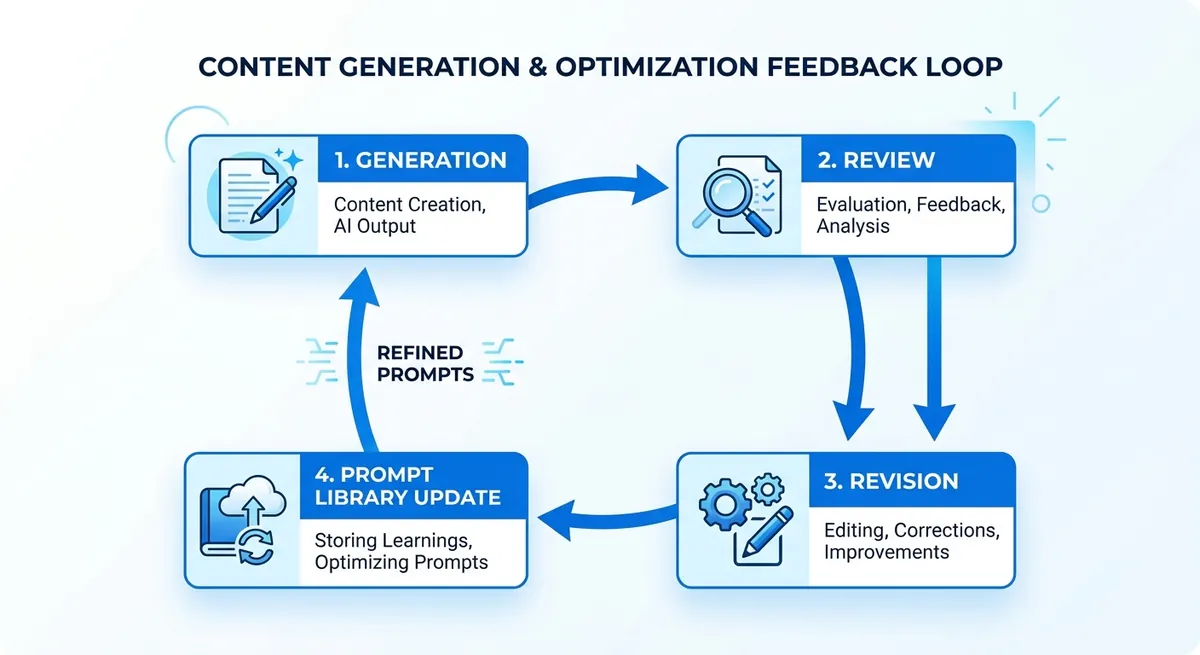
Build a closed-loop QA cycle for sora api delivery#
Log every prompt, seed, model, output URL, reviewer score, and failure code. Tag winners by use case, then convert them into reusable templates for ads, product demos, and social shorts.
You can use Crazyrouter at https://crazyrouter.com/v1 as a fallback path in the same OpenAI-style client, so failed runs can reroute without rewriting your app.
Pricing, Rate Limits, and Scaling the Sora API in Production#
Moving from demo to production with the sora api fails at three points: cost drift, queue jams, and weak retry logic. Control spend at request intake, not after renders finish.
Sora API pricing guardrails and budget controls#
Cost usually scales with three multipliers: output resolution, video duration, and generation count per prompt. If a team doubles duration and also asks for three variants, spend can jump fast even with the same prompt quality. OpenAI's official pricing is already split by model and output format, so your budget guardrails should mirror the exact job specs you let developers submit. (Source: OpenAI API pricing, 2026)
| Official OpenAI Sora price point | Current price |
|---|---|
sora-2 at 720p | $0.10 / second |
sora-2-pro at 720p | $0.30 / second |
sora-2-pro at 1080p portrait or landscape | $0.50 / second |
(Source: OpenAI API pricing, 2026)
Set budget rules by project, not only by account:
- hard daily cap
- soft alert thresholds (for example 50%, 80%, 100%)
- per-user generation limits for test environments
Use tags like project, campaign, and owner on each job so finance and engineering can trace spend back to one workflow.
Sora API throughput: rate limits, concurrency, and queue design#
Queue all generation jobs, then let workers pull at a controlled rate. Keep retries outside the request thread. For 429 errors, use exponential backoff (1s, 2s, 4s, 8s) with jitter, and stop after a fixed retry budget.
Use priority queues so paid or launch-critical requests skip low-value batch jobs.
| OpenAI usage tier | Requests per minute | Practical use |
|---|---|---|
| Free | Not supported | No direct Sora access |
| Tier 1 | 25 | Early production and small workloads |
| Tier 2 | 50 | Small teams with controlled queues |
| Tier 3 | 125 | Medium production workloads |
| Tier 4 | 200 | Higher-throughput production |
| Tier 5 | 375 | Large workloads with stricter queue planning |
(Source: OpenAI API docs, 2026)
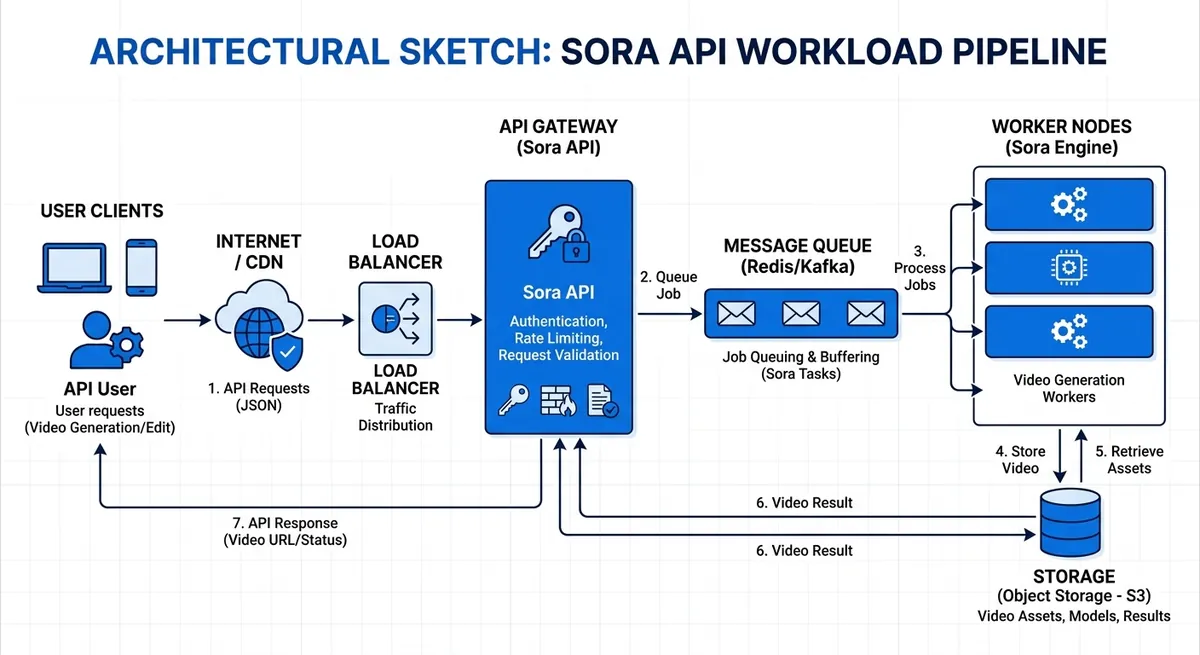
You can use Crazyrouter as an OpenAI-compatible gateway at https://crazyrouter.com/v1; it says it routes 469 models across 30+ providers and targets prices 30-50% below official APIs. That is useful when you want fallback routing or different unit economics, but your Sora-specific queue rules should still be based on the provider actually serving the job. (Source: Crazyrouter metrics, 2026)
KPIs for sora api production scaling#
Track three numbers every week: approval rate, generation latency, and cost per approved asset. If approval rate drops, fix prompt specs. If latency climbs, tune queue depth and worker count. If cost per approved asset rises, cut variant count before cutting quality.
Responsible Use, Legal Risk, and Team Security#
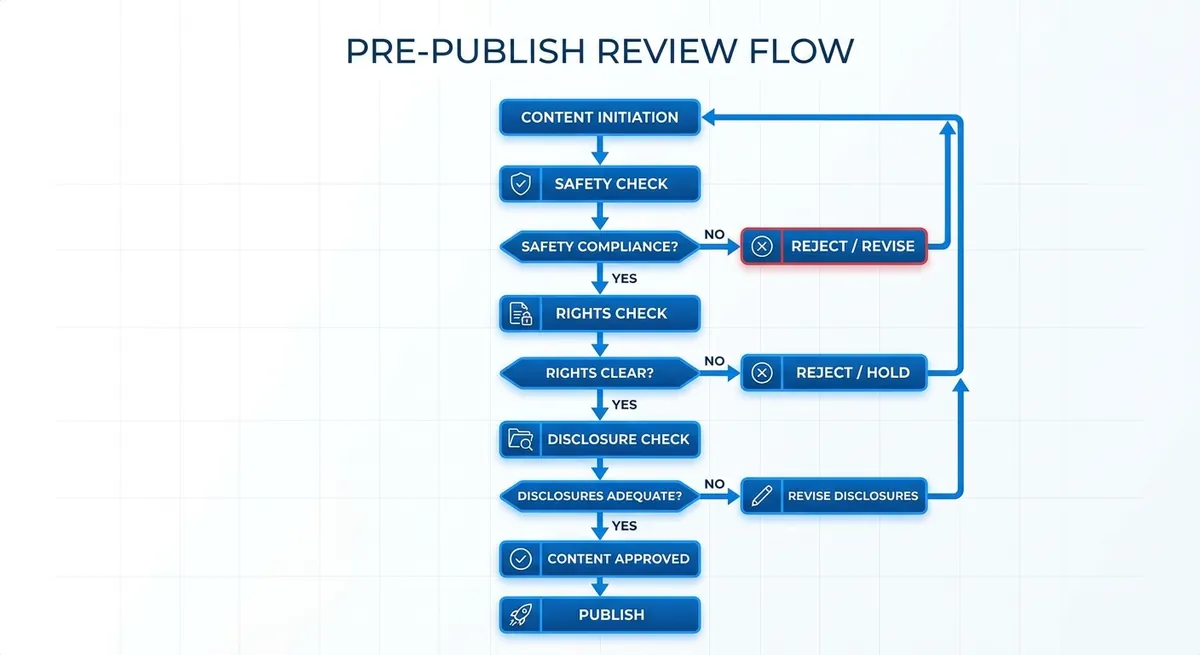
Policy checklist for sora api publishing#
Before any sora api output goes live, run one gate: safety, rights, and disclosure.
- Block prohibited content categories in your review queue.
- Check rights for logos, people, music, and source media.
- Add AI-use disclosure when brand rules or local law require it.
- Keep a release log with prompt, model, editor, and publish time.
Secure collaboration for sora workflow teams#
Remote teams usually break on access control, not model quality. Give each person the minimum access needed, then rotate keys on a fixed schedule.
- Use role-based access and audit trails (a record of who changed what).
- You can use Crazyrouter role levels (1, 10, 100) to separate basic use, admin tasks, and system control.
- Create separate API tokens per project, with expiry dates.
- Keep client work in isolated workspaces to cut credential leakage.
- Watch request logs for unusual spikes or unknown IP activity.
Decision rules for sora content: approve, edit, or discard#
Use a simple risk score before release.
| Output status | Typical trigger | Team action |
|---|---|---|
| Approve | Low-risk internal or marketing clip, no rights issue | Publish with required disclosure |
| Edit | Brand mismatch, unclear claim, or weak context | Revise prompt/script, rerender, recheck |
| Discard + escalate | Safety flag, legal uncertainty, identity misuse | Stop release and send to legal/compliance lead |
Sora API vs Other Video Generation APIs: How to Choose#
Your demo can look great and still break after launch. With sora api, the real test is stable output, stable delivery, and spend control when team traffic grows.
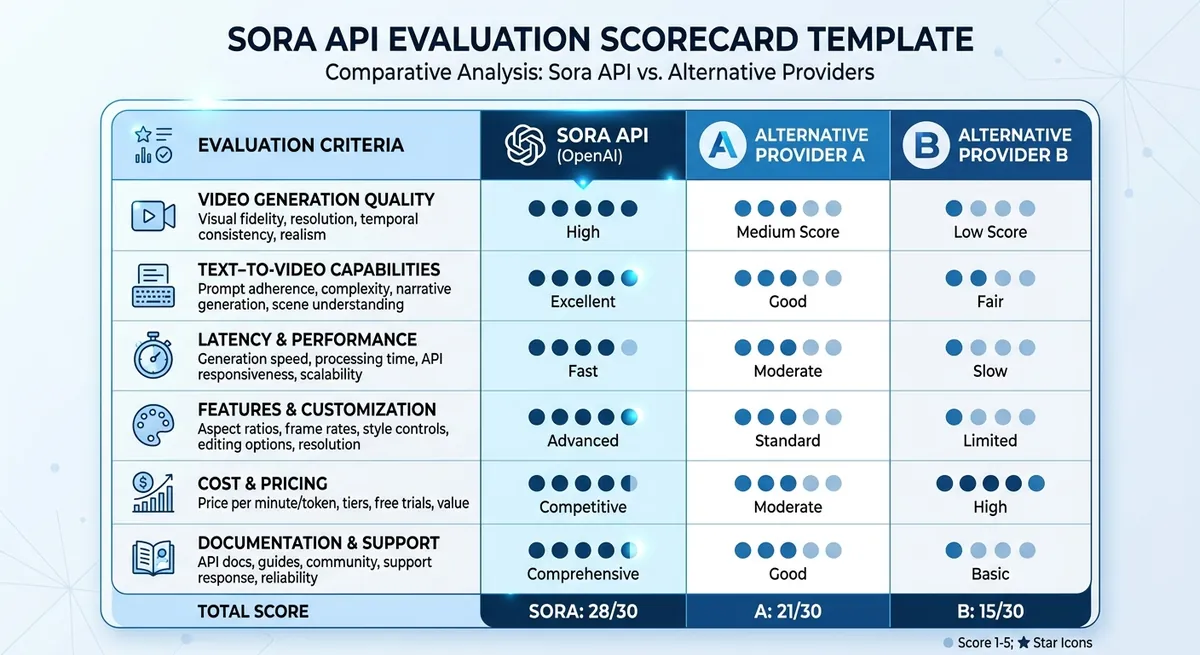
Sora API comparison criteria that actually matter#
Score quality and delivery together, not in separate sheets. Track prompt adherence, artifact rate, p95 latency, and retry success after errors. If retry success is low, your real cost per usable clip climbs fast.
| Area | What to score | Decision use |
|---|---|---|
| Quality | Prompt match, artifact rate | Creative reliability |
| Delivery | p95 latency, timeout rate | Publish timing risk |
| Cost | Cost per usable clip | Budget control |
| Reliability | Error rate, fallback pass rate | Outage tolerance |
When you compare providers, separate official Sora model behavior from gateway-level routing benefits. OpenAI defines the base model, pricing, and default limits; a gateway changes access, fallback, observability, and sometimes cost around that core model. (Source: OpenAI API docs, 2026) (Source: OpenAI API pricing, 2026)
Build a pilot test plan before committing to sora api#
Run 20 shared prompts across three scenes: product demo, talking head, motion graphics. Score each output 1-5 with one rubric. Use weights: quality 50%, latency 30%, cost 20%.
Migration and multi-provider strategy for Sora video API workflows#
Teams often fail on access control, not model quality. People share keys in chat, then client environments mix.
Build a thin adapter layer that normalizes prompt templates, job states, storage paths, and retries. That way you can switch between direct OpenAI access and a gateway like Crazyrouter without rewriting your whole app. Keep secrets per environment, rotate them on a schedule, and never let browser-only workflows become the system of record.
Frequently Asked Questions#
What is the sora api used for?#
The sora api is used to generate videos from text prompts and from source images. Teams use it to make product demos, ad variations, social clips, and storyboard drafts faster. For example, marketing can test different hooks and visual styles without filming each version. Product teams can turn feature descriptions into short explainers. Creative teams can prototype scenes, camera motion, and mood before full production, then pick the best concepts to produce at higher fidelity.
How do I start using the sora api as a developer?#
Start with a provider account that includes access to the sora api. OpenAI's current setup requires a supported usage tier, so verify access before you build the rest of the pipeline. Enable billing, create an API key, store it in a secret manager, and never hard-code it in your app. Send a first generation request with a clear prompt, target size, and supported duration. Most workflows are async: save the video ID, then poll the status endpoint every 10 to 20 seconds or receive a webhook. Download assets only after the job is marked complete. (Source: OpenAI API docs, 2026)
Is the sora api real-time or asynchronous?#
The sora api is generally job-based, not frame-by-frame real-time streaming. You submit a request, receive a job ID, and wait while the system renders video. Your app should handle states like queued, running, completed, and failed. Use polling for simple setups, or webhooks for production systems that need cleaner event handling. Plan for variable latency by showing progress UI, setting request timeouts, and adding retry logic for transient network or service errors.
How much does the sora api cost?#
OpenAI's current official Sora pricing is model- and resolution-based: sora-2 at 720p is 0.30 per second, and sora-2-pro at 1080p portrait or landscape is $0.50 per second. Start with a monthly cap and per-project budget to avoid surprises. Track spend beside business KPIs like cost per approved clip, edit time saved, and conversion lift from creative tests. Add alerts when usage crosses thresholds, and tag jobs by team or campaign so finance reporting stays clear. (Source: OpenAI API pricing, 2026)
How can I improve sora api video quality?#
Write structured prompts: subject, scene, camera move, lighting, style, and negative constraints. In the sora api, short vague prompts often create random results, while specific prompts improve consistency. Use iterative passes: generate a draft, note issues, then revise one variable at a time. Apply a quality rubric with checks for motion stability, object consistency, brand fit, and text legibility. Save winning prompts in a shared prompt library so teams can reuse proven patterns.
What are the main limitations of the sora api?#
The sora api can produce artifacts, such as odd motion, object drift, or inconsistent details across frames. Results are also prompt-sensitive, so small wording changes can shift style or composition. Policy and safety rules may block certain requests, and some outputs may need edits before public use. In production, add human review for legal, brand, and factual checks. Treat generated clips as draft assets first, then approve only after QA and stakeholder sign-off.
The core takeaway is that Sora API delivers the most value when you move beyond demos and build a repeatable workflow around prompt design, quality checks, and performance monitoring. The quickest way to find production-ready settings is to validate with your own tasks and constraints: Review the official Sora API documentation, then run a small benchmark project with your top 10 real use-case prompts.
Summary#
OpenAI's current Sora API is asynchronous and tier-based, not a fire-and-forget video button. The official guide recommends polling every 10 to 20 seconds, and Sora access is not available on the F...