简体中文
简体中文 繁體中文
繁體中文 English
 Français
 Русский
 日本語
日本語 Tiếng Việt
 한국어
한국어 Deutsch
 Español
 Italiano
 Português
 العربية
 ไทย
ไทย Bahasa Indonesia
 Bahasa Melayu
 Türkçe
 Polski
 Nederlands
 Dansk
Dansk Norsk
Norsk Қазақша
AI API Gateway for Thai Developers: Use GPT, Claude and Gemini with One Key
A practical guide for developers in Thailand who want one OpenAI-compatible endpoint for GPT, Claude and Gemini model calls.

AI API Gateway for Thai Developers: Use GPT, Claude and Gemini with One Key#
If you are building AI products in Thailand, you may need to test several model providers before choosing the right one. GPT may work well for one workflow, Claude may be better for long-form reasoning, and Gemini may be useful for fast or multimodal tasks.
The hard part is not only model quality. It is also operational complexity: different API keys, SDKs, response formats, billing dashboards and fallback logic.
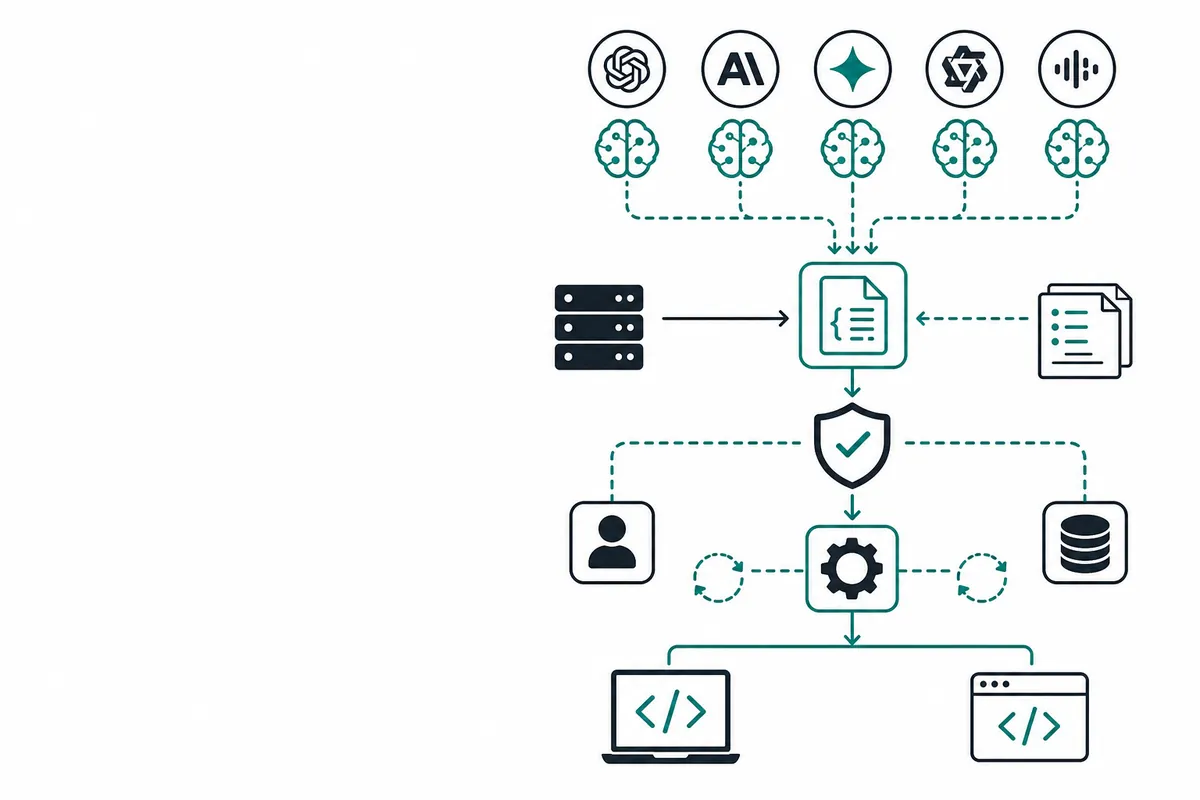
An AI API gateway helps reduce that complexity. With Crazyrouter, you can use one API key and one OpenAI-compatible endpoint, then switch models by changing the model value.
This tutorial shows a simple setup you can use in a backend service, internal tool or prototype.
Why use one gateway?#
For many teams, the goal is not to lock into one model immediately. The goal is to compare models safely while keeping the application code stable.
A single gateway is useful when you want to:
- Test GPT, Claude and Gemini in the same product flow.
- Keep using OpenAI-compatible SDKs.
- Reduce secrets management across environments.
- Add fallback models later without rewriting the app.
- Track model usage from one integration layer.
1. Get an API key#
Start with the documentation intro and quickstart:
- Docs intro: Crazyrouter documentation
- Quickstart: Crazyrouter quickstart
Store your key as an environment variable:
export CRAZYROUTER_API_KEY="cr_..."
For production, put the key in your hosting provider's secret manager. Do not expose it in browser-side code.
2. Configure the OpenAI-compatible client#
In a Node.js project, install the OpenAI SDK:
npm install openai
Then set the baseURL to Crazyrouter:
import OpenAI from "openai";

const client = new OpenAI({
  apiKey: process.env.CRAZYROUTER_API_KEY,
  baseURL: "https://crazyrouter.com/v1",
});

const completion = await client.chat.completions.create({
  model: "openai/gpt-4o-mini",
  messages: [
    { role: "system", content: "You are a concise technical assistant." },
    { role: "user", content: "Explain why an AI API gateway is useful." },
  ],
});

console.log(completion.choices[0].message.content);
This is the main integration pattern: one key, one endpoint, familiar request structure.
3. Try GPT, Claude and Gemini#
To compare models, keep the same prompt and change only model:
const prompt = "Write a short support reply for a delayed delivery order.";

const modelIds = [
  "openai/gpt-4o-mini",
  "anthropic/claude-3-5-haiku",
  "google/gemini-1.5-flash",
];

for (const model of modelIds) {
  const result = await client.chat.completions.create({
    model,
    messages: [{ role: "user", content: prompt }],
  });

  console.log(`\n--- ${model} ---`);
  console.log(result.choices[0].message.content);
}
This makes it easier to evaluate tone, speed and output quality with real application prompts.
4. Python example#
The same approach works in Python:
import os
from openai import OpenAI

client = OpenAI(
    api_key=os.environ["CRAZYROUTER_API_KEY"],
    base_url="https://crazyrouter.com/v1",
)

response = client.chat.completions.create(
    model="google/gemini-1.5-flash",
    messages=[
        {"role": "system", "content": "You help developers debug backend services."},
        {"role": "user", "content": "List three ways to reduce LLM API latency."},
    ],
)

print(response.choices[0].message.content)
5. Production checklist#
Before you connect this to a customer-facing workflow, add basic reliability controls:
- Timeouts for every request.
- Retry with exponential backoff for temporary failures.
- Model-level logging for latency, token usage and errors.
- Fallback rules for non-critical tasks if a provider is temporarily unavailable.
A simple fallback pattern can look like this:
async function completeWithFallback(messages) {
  const models = ["openai/gpt-4o-mini", "anthropic/claude-3-5-haiku"];

  for (const model of models) {
    try {
      return await client.chat.completions.create({ model, messages });
    } catch (error) {
      console.warn(`Model failed: ${model}`, error.message);
    }
  }

  throw new Error("All model attempts failed");
}
Next step#
Pick one low-risk workflow first: summarising support tickets, drafting product copy, classifying leads or generating internal reports. Run the same prompts through two or three models and compare results.
When you are ready to wire the full setup, follow the Crazyrouter quickstart.