Crazyrouter
Trình Tạo Meme & Sách Tô Màu Bằng AI Với GPT-image-2 — Những Dự Án Vui Mà Vẫn Kiếm Ra Tiền
Xây dựng trình tạo meme AI và công cụ tạo trang sách tô màu bằng GPT-image-2 qua Crazyrouter API. Hai dự án thú vị có thể kiếm tiền, kèm mã nguồn đầy đủ.
Trình Tạo Meme & Sách Tô Màu Bằng AI Với GPT-image-2#
Ở phần cuối của series GPT-image-2, chúng ta sẽ đi qua hai use case vừa vui vừa có thể kiếm tiền khá tốt: Tạo meme bằng AI và Tạo trang sách tô màu bằng AI.
Cả hai đều tận dụng điểm mạnh nổi bật nhất của GPT-image-2 — khả năng hiển thị văn bản. Meme cần chữ rõ ràng, còn sách tô màu cần nét line art sạch. GPT-image-2 xử lý cả hai rất ổn.
Phần 1: Trình Tạo Meme Bằng AI#
Vì Sao GPT-image-2 Hợp Để Làm Meme?#
Cách làm meme truyền thống là phải đi tìm template, chỉnh sửa bằng Photoshop rồi thêm chữ thủ công. GPT-image-2 làm tất cả trong một lần gọi API — cảnh, nhân vật và chữ đều được render trực tiếp trong ảnh.
Xem Trước Kết Quả#
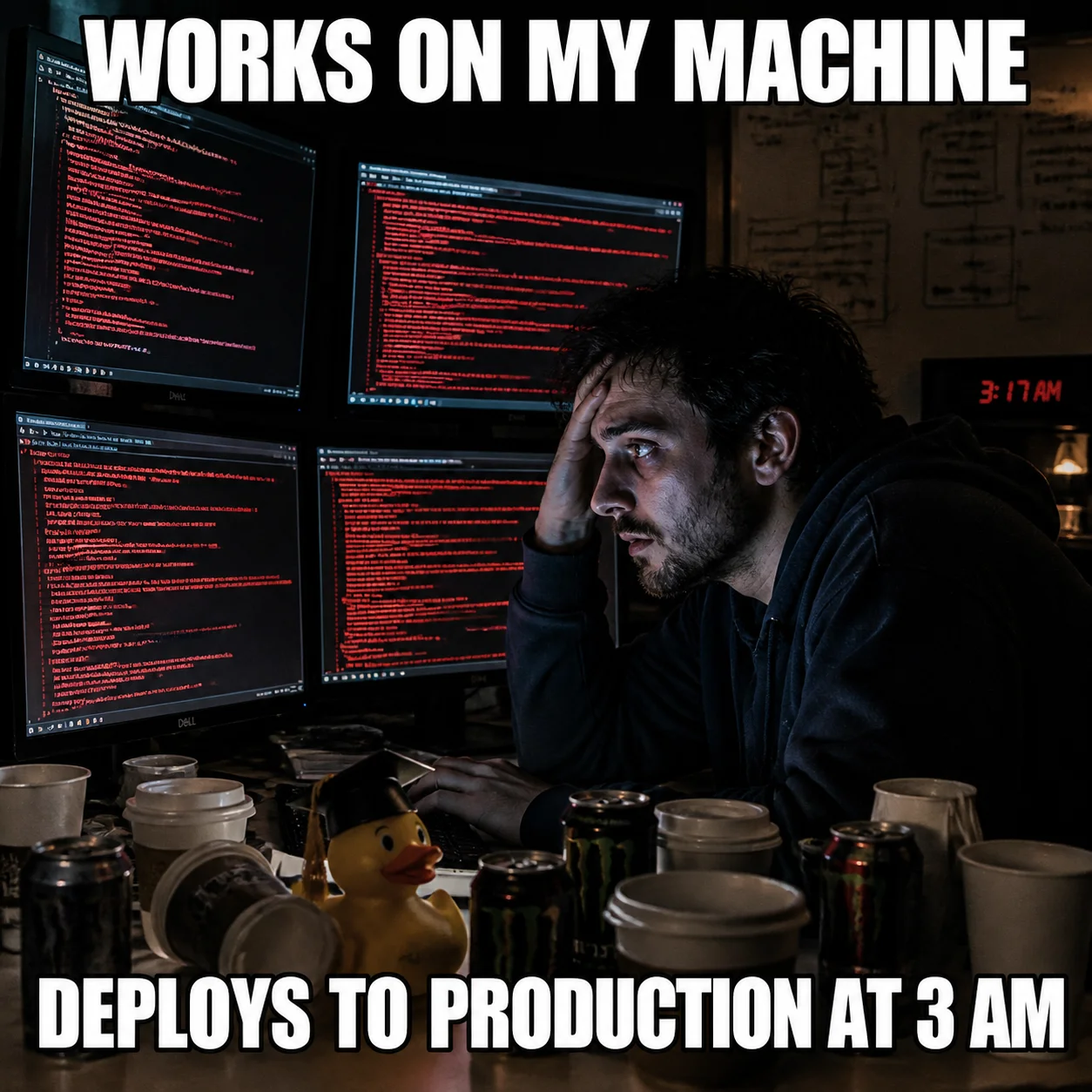
Meme kinh điển về dev lúc "deploy lúc 3 giờ sáng" — chữ kiểu Impact hiển thị rõ ràng, bố cục cảnh rất đúng chất.
Mã Nguồn Đầy Đủ#
Python#
from openai import OpenAI

client = OpenAI(
    api_key="your-crazyrouter-api-key",
    base_url="https://crazyrouter.com/v1"
)

meme_prompt = """
A funny meme image in classic meme format.

Scene: A developer sitting at his desk at 3 AM, surrounded by empty
coffee cups and energy drink cans. His face is illuminated by 4 monitors
all showing error logs. A rubber duck sits on his desk wearing a tiny
graduation cap.

Top text (large white Impact font with black outline):
"WORKS ON MY MACHINE"

Bottom text (large white Impact font with black outline):
"DEPLOYS TO PRODUCTION AT 3 AM"

Style: realistic photo meme format, dramatic lighting, humorous.
"""

response = client.images.generate(
    model="gpt-image-2",
    prompt=meme_prompt,
    size="1024x1024",
    n=1
)

print(f"Meme: {response.data[0].url}")
curl#
curl -X POST https://crazyrouter.com/v1/images/generations \
  -H "Content-Type: application/json" \
  -H "Authorization: Bearer your-crazyrouter-api-key" \
  -d '{
    "model": "gpt-image-2",
    "prompt": "Funny meme: developer at desk at 3AM, surrounded by coffee cups, 4 monitors showing errors, rubber duck with graduation cap. Top text in white Impact font: WORKS ON MY MACHINE. Bottom text: DEPLOYS TO PRODUCTION AT 3 AM. Realistic photo meme style, dramatic lighting.",
    "size": "1024x1024",
    "n": 1
  }'
Node.js#
import OpenAI from "openai";

const client = new OpenAI({
  apiKey: "your-crazyrouter-api-key",
  baseURL: "https://crazyrouter.com/v1",
});

const response = await client.images.generate({
  model: "gpt-image-2",
  prompt: `Funny meme: developer at desk at 3AM, coffee cups everywhere,
monitors showing errors, rubber duck with graduation cap.
Top text (white Impact font, black outline): "WORKS ON MY MACHINE"
Bottom text: "DEPLOYS TO PRODUCTION AT 3 AM"
Realistic photo meme, dramatic lighting, humorous.`,
  size: "1024x1024",
  n: 1,
});

console.log(response.data[0].url);
Hàm Tạo Meme#
Hàm có thể tái sử dụng để tạo bất kỳ meme nào:
def generate_meme(scene, top_text, bottom_text, style="realistic photo meme"):
    prompt = f"""
    A funny meme image. Scene: {scene}.
    Top text (large white Impact font with black outline): "{top_text}"
    Bottom text (large white Impact font with black outline): "{bottom_text}"
    Style: {style}, dramatic lighting, humorous.
    """
    response = client.images.generate(
        model="gpt-image-2",
        prompt=prompt,
        size="1024x1024",
        n=1
    )
    return response.data[0].url

# Examples
url = generate_meme(
    scene="A cat sitting at a computer looking confused at code",
    top_text="SENIOR DEVELOPER REVIEWING MY CODE",
    bottom_text="WHAT IS THIS"
)
10 Ý Tưởng Meme Cho Developer#
| # | Chữ trên | Chữ dưới | Cảnh |
|---|---|---|---|
| 1 | IT WORKS | DON'T TOUCH IT | Developer lùi người khỏi laptop |
| 2 | 99 BUGS IN THE CODE | FIX ONE, 127 BUGS NOW | Developer nhìn màn hình đầy kinh hoàng |
| 3 | FULL STACK DEVELOPER | FULL STACK OF PROBLEMS | Developer tung hứng laptop đang cháy |
| 4 | WORKS IN DEVELOPMENT | 500 ERROR IN PRODUCTION | Hai khung: bình yên vs hỗn loạn |
| 5 | JUST ONE MORE FEATURE | SAID EVERY PM EVER | Xe đẩy hàng đầy tính năng |
| 6 | GIT PUSH --FORCE | TO MAIN ON FRIDAY | Vụ nổ hạt nhân |
| 7 | WHERE'S THE DOCUMENTATION? | THE CODE IS THE DOCUMENTATION | Thư viện trống rỗng |
| 8 | ME IN THE INTERVIEW | ME ON DAY 1 | Siêu anh hùng vs người mới hoang mang |
| 9 | GIT MERGE | 127 CONFLICTS | Hai đoàn tàu sắp đâm nhau |
| 10 | AI WILL REPLACE DEVELOPERS | DEVELOPERS NOW SERVE AI | Robot code, con người bưng cà phê |
Phần 2: Công Cụ Tạo Sách Tô Màu Bằng AI#
Vì Sao Đây Là Một Mô Hình Kinh Doanh Thật Sự#
Sách tô màu tạo bằng AI đang là một danh mục khá hot trên Amazon KDP (Kindle Direct Publishing). Bạn có thể tạo từng trang bằng GPT-image-2, ghép thành sách, xuất bản và kiếm thu nhập thụ động.
Một vài dữ kiện thị trường:
- Sách tô màu AI bán được hàng nghìn bản mỗi tháng trên Amazon
- Chi phí sản xuất gần như bằng 0 (AI tạo ảnh + dàn trang)
- Dùng được cho nhiều chủ đề: động vật, hoa lá, mandala, cảnh thành phố, fantasy
Xem Trước Kết Quả#
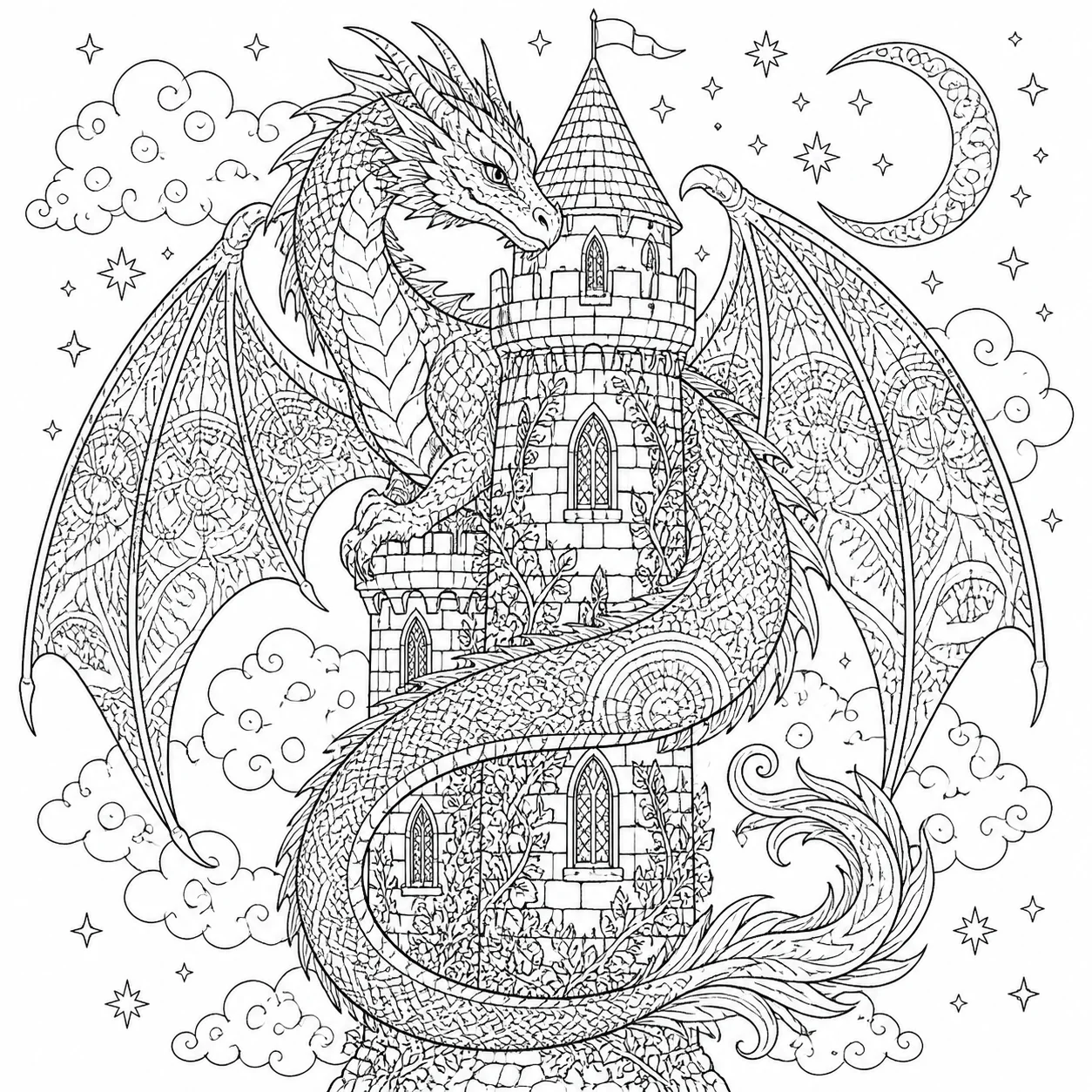
Line art đen trắng thuần túy — chủ đề rồng và lâu đài fantasy với các chi tiết lấp đầy theo kiểu mandala. Có thể in ra và tô màu ngay.
Mã Nguồn Đầy Đủ#
Python#
coloring_prompt = """
A coloring book page for adults. Black and white line art only,
no shading, no gray tones. Clean, crisp outlines suitable for
coloring with colored pencils or markers.

Subject: A majestic dragon coiled around a medieval castle tower.
The dragon has detailed scales and spread wings. The castle has
ornate windows and climbing vines. Background filled with clouds
and small birds.

Style: intricate mandala-inspired patterns filling the dragon's
body and castle walls. Medium complexity — detailed enough to be
engaging but not overwhelming.

Pure black lines on white background. No color. No text.
"""

response = client.images.generate(
    model="gpt-image-2",
    prompt=coloring_prompt,
    size="1024x1024",
    n=1
)

print(f"Coloring page: {response.data[0].url}")
curl#
curl -X POST https://crazyrouter.com/v1/images/generations \
  -H "Content-Type: application/json" \
  -H "Authorization: Bearer your-crazyrouter-api-key" \
  -d '{
    "model": "gpt-image-2",
    "prompt": "Adult coloring book page. Black and white line art only, no shading. A majestic dragon coiled around a medieval castle tower with detailed scales, spread wings, ornate windows, climbing vines. Mandala-inspired pattern fills. Medium complexity. Pure black lines on white. No color, no text.",
    "size": "1024x1024",
    "n": 1
  }'
Tạo Hàng Loạt Cả Cuốn Sách#
Tạo 20 trang theo chủ đề để ghép thành một cuốn sách tô màu hoàn chỉnh:
themes = [
    "A majestic dragon coiled around a castle tower",
    "An enchanted forest with mushroom houses and fairies",
    "An underwater scene with coral reef and tropical fish",
    "A Japanese garden with koi pond and pagoda",
    "A steampunk airship flying over a Victorian city",
    "A phoenix rising from flames with spread wings",
    "A mermaid sitting on rocks by the ocean",
    "A treehouse village connected by rope bridges",
    "A mandala pattern with lotus flowers and butterflies",
    "A wolf howling at a detailed moon with forest background",
]

base_prompt = """Adult coloring book page. Black and white line art only,
no shading, no gray tones. Clean crisp outlines. Intricate mandala-inspired
pattern fills. Medium complexity. Pure black lines on white. No color, no text.
Subject: """

for i, theme in enumerate(themes, 1):
    response = client.images.generate(
        model="gpt-image-2",
        prompt=base_prompt + theme,
        size="1024x1024",
        n=1
    )
    print(f"Page {i}: {response.data[0].url}")
Mẹo Viết Prompt Cho Sách Tô Màu#
| Mẹo | Lý do |
|---|---|
| "Black and white line art only" | Tránh tạo vùng xám đổ bóng |
| "No color, no text" | Giữ đầu ra sạch sẽ |
| "Mandala-inspired pattern fills" | Thêm chi tiết phù hợp để tô màu |
| "Medium complexity" | Cân bằng giữa thú vị và không quá rối |
| "Clean crisp outlines" | Đảm bảo chất lượng in ấn |
Xuất Bản Lên Amazon KDP#
- Tạo 20-30 trang bằng GPT-image-2
- Nâng độ phân giải lên 300 DPI bằng công cụ upscaler
- Tạo trang bìa (cũng có thể dùng GPT-image-2)
- Ghép thành PDF với lề chuẩn
- Tải lên Amazon KDP — đặt giá từ 9.99
- Biên lợi nhuận: khoảng ~$3-6 mỗi bản sau khi trừ chi phí in
Tổng Kết Chi Phí#
| Dự án | Số ảnh | Chi phí (qua Crazyrouter) |
|---|---|---|
| 10 meme | 10 | ~$0.50 |
| Sách tô màu 30 trang | 30 | ~$1.50 |
| Toàn bộ dự án meme + tô màu | 40 | ~$2.00 |
Tức là bạn có thể tạo cả một cuốn sách tô màu với chi phí sinh ảnh dưới $2.
Vậy là chúng ta đã đi hết series 6 phần về GPT-image-2. Từ xem chỉ tay cho tới tạo meme, GPT-image-2 qua Crazyrouter API mở ra rất nhiều khả năng vừa sáng tạo vừa có thể kiếm tiền.
🚀 Crazyrouter — Một API key, hơn 600 mô hình. GPT-image-2, GPT-5.5, Claude Opus 4.7, DeepSeek V4 và nhiều hơn nữa.