简体中文
简体中文 繁體中文
繁體中文 English
 Français
 Русский
 日本語
日本語 Tiếng Việt
 한국어
한국어 Deutsch
 Español
 Italiano
 Português
 العربية
 ไทย
ไทย Bahasa Indonesia
 Bahasa Melayu
 Türkçe
 Polski
 Nederlands
 Dansk
Dansk Norsk
Norsk Қазақша
Gemini 2.5 Flash-Lite for RAG, Agent Routing, and Cost per Successful Task
A developer guide to using Gemini 2.5 Flash-Lite as a routing and evaluation layer in RAG and agent systems, with practical metrics beyond cost per token.
Gemini 2.5 Flash-Lite for RAG, Agent Routing, and Cost per Successful Task#
RAG and agent systems often fail for a boring reason: every request is treated as equally hard.
A simple FAQ question, a vague troubleshooting request, a code debugging task, and a policy-sensitive account issue may all travel through the same expensive retrieval and reasoning path. That makes the system slower, more costly, and sometimes less reliable.
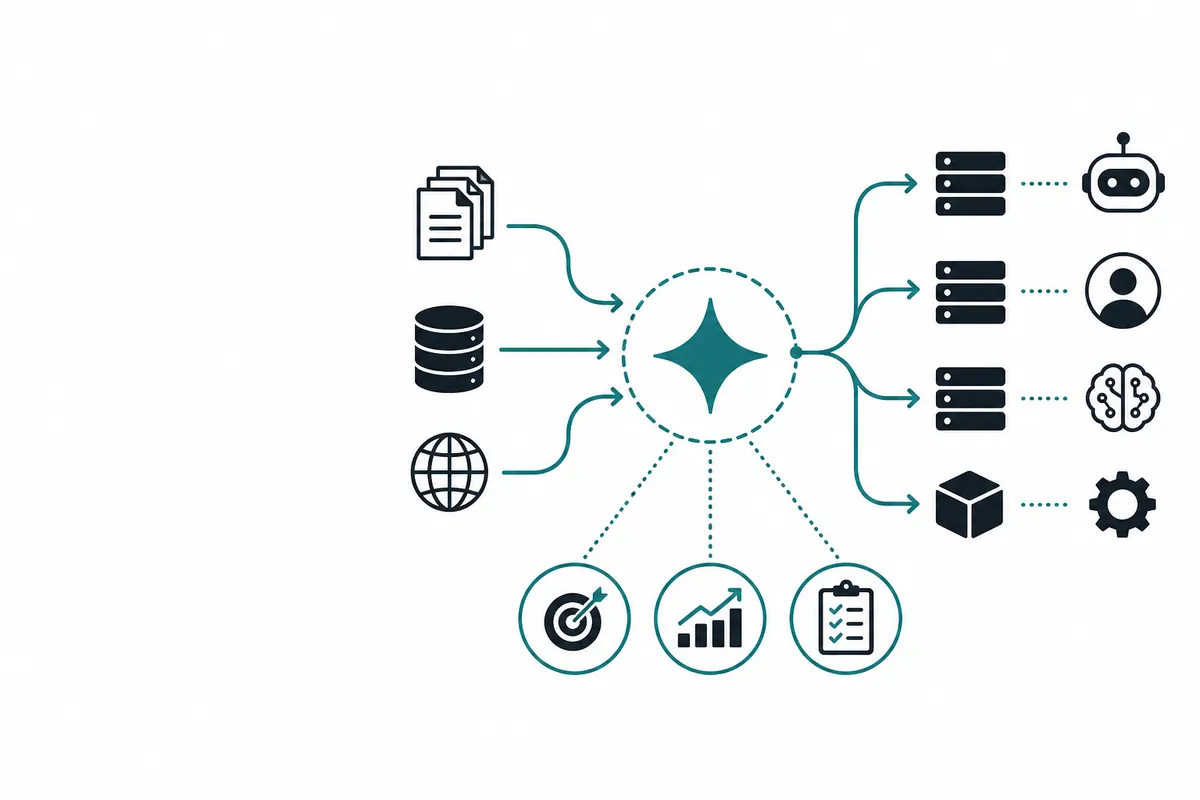
Gemini 2.5 Flash-Lite is useful as a routing layer for these systems. It can inspect a request, decide whether retrieval is needed, identify the likely domain, choose a tool path, and escalate difficult tasks to a stronger model.
The goal is not to minimize token spend in isolation. The better goal is to minimize cost per successful task.
Internal link: Use Crazyrouter to test multi-model routing
Why RAG needs routing#
Many RAG pipelines start like this:
User question → embed query → retrieve top-k chunks → send chunks to model → answer
That is fine for a prototype, but production traffic is messier.
Some questions do not need retrieval:
- “Summarize this text.”
- “Rewrite this error message for a status page.”
- “Classify this customer request.”
Some questions need retrieval before answering:
- “What is our refund policy for annual plans?”
- “Which SDK version supports streaming?”
- “What changed in the March API update?”
Some questions should not be answered automatically:
- “Delete this user’s account.”
- “Can we ignore this compliance requirement?”
- “Reset access for my teammate.”
A lightweight model can make that first routing decision quickly.
A routing schema for RAG and agents#
Use a small, strict schema:
{
  "route": "direct" | "rag" | "tool" | "strong_model" | "human_review",
  "domain": "docs | billing | account | engineering | policy | general | unknown",
  "retrieval_query": "string | null",
  "required_tools": ["string"],
  "risk_level": "low | medium | high",
  "reason": "string",
  "confidence": 0.0
}
The model suggests the path; your code enforces thresholds.
OpenAI-compatible routing example with Crazyrouter#
import OpenAI from "openai";

const client = new OpenAI({
  apiKey: process.env.CRAZYROUTER_API_KEY,
  baseURL: "https://crazyrouter.com/v1",
});

type Route = "direct" | "rag" | "tool" | "strong_model" | "human_review";

async function routeTask(userInput: string) {
  const completion = await client.chat.completions.create({
    model: "google/gemini-2.5-flash-lite",
    temperature: 0,
    messages: [
      {
        role: "system",
        content: `
You route user requests for a developer product.
Return only valid JSON with keys:
route, domain, retrieval_query, required_tools, risk_level, reason, confidence.

Allowed route values: direct, rag, tool, strong_model, human_review.
Use rag when company docs, product behavior, pricing, changelogs, or policies are needed.
Use tool when account-specific, billing-specific, or live system data is needed.
Use strong_model for complex reasoning, coding, or ambiguous multi-step planning.
Use human_review for legal, security, account access, refunds, abuse, or irreversible actions.
        `.trim(),
      },
      { role: "user", content: userInput },
    ],
  });

  return JSON.parse(completion.choices[0]?.message?.content ?? "{}");
}
Then enforce policy in code:
function selectExecutionPath(routeResult: any): Route {
  if (!routeResult || routeResult.confidence < 0.75) return "strong_model";
  if (routeResult.risk_level === "high") return "human_review";
  return routeResult.route;
}
This gives you a simple model-router-control loop.
Agent routing: use Flash-Lite before tools#
Agent systems are especially prone to unnecessary tool calls. A user asks a simple question, and the agent searches docs, checks a database, calls an API, and then writes an answer that could have been produced directly.
Use Gemini 2.5 Flash-Lite before agent execution to decide:
- Is a tool needed?
- Which tool family is relevant?
- Does this require fresh data?
- Is the request safe for automation?
- Should the task be split?
- Is the input missing required information?
Example tool-selection output:
{
  "route": "tool",
  "domain": "billing",
  "retrieval_query": null,
  "required_tools": ["invoice_lookup"],
  "risk_level": "medium",
  "reason": "The user asks about a specific invoice, so live account data is required before answering.",
  "confidence": 0.88
}
Your agent can then call only the relevant tool instead of exploring blindly.
Cost per token is the wrong primary metric#
Teams often compare models by input/output price alone. That is useful, but incomplete.
A better metric is:
cost per successful task = total workflow cost / number of tasks completed correctly
Total workflow cost includes:
- Router call cost
- Retrieval cost
- Tool call cost
- Final model call cost
- Retry cost
- Human review cost
- Latency cost if it affects user behavior
- Failure cost when the system gives a bad answer
A model that is cheaper per token but causes more retries may be more expensive per successful task. A stronger model that answers everything may be wasteful if 70% of requests are simple.
Example: three routing strategies#
| Strategy | Description | Strength | Weakness |
|---|---|---|---|
| One premium model for all tasks | Every request goes to the strongest model | Simple and high quality | Expensive; often slower |
| Rules only | Regex/metadata decides path | Cheap and predictable | Brittle for natural language |
| Flash-Lite router + escalation | Lightweight model routes first, code enforces policy | Balanced cost, latency, flexibility | Needs evaluation and logging |
The third strategy is often the best starting point for teams with meaningful traffic.
RAG routing comparison table#
| User request | Recommended route | Why |
|---|---|---|
| “Rewrite this paragraph in a friendlier tone.” | direct | No company knowledge needed |
| “What are the current API rate limits?” | rag | Needs current docs |
| “Why did my payment fail?” | tool + human/review rules | Needs account-specific data and may be sensitive |
| “Debug this distributed tracing issue.” | strong_model | Requires multi-step technical reasoning |
| “Delete all data for this account.” | human_review | Irreversible and policy-sensitive |
Evaluation plan for a Flash-Lite router#
Create a small dataset from real traffic. For each item, label:
- Correct route
- Correct domain
- Whether retrieval is needed
- Whether tools are needed
- Risk level
- Acceptable escalation behavior
Then measure:
| Metric | What it tells you |
|---|---|
| Route accuracy | Whether the router chooses the correct path |
| Dangerous under-escalation | Risky tasks incorrectly automated |
| Over-escalation | Simple tasks sent to stronger model or human review |
| Retrieval precision | Whether RAG is used only when useful |
| End-to-end success | Whether the final user task was solved |
| Cost per successful task | Whether routing improves unit economics |
Dangerous under-escalation should be weighted far more heavily than over-escalation. It is usually acceptable to send some uncertain cases to a stronger model. It is not acceptable to automate high-risk actions incorrectly.
Practical thresholds#
Start conservative:
confidence < 0.75→ stronger model or human reviewrisk_level = high→ human review- Account access, refunds, legal, security → human review or deterministic workflow
- Complex coding/debugging → stronger model
- Current product facts → RAG
- Simple transformations → direct
After collecting logs, tune thresholds based on observed errors.
Where Crazyrouter fits#
Crazyrouter is useful in this pattern because the model decision and execution model can be separate.
For example:
- Call
google/gemini-2.5-flash-liteto route. - If the route is
direct, answer with the same model or a mid-tier model. - If the route is
rag, retrieve docs and send the grounded prompt. - If the route is
strong_model, call a more capable model. - If the route is
human_review, create a queue item instead of generating a final answer.
Because the API is OpenAI-compatible, you can test this without rewriting your whole client stack.
Internal link: Crazyrouter API documentation
FAQ#
Is Gemini 2.5 Flash-Lite good enough for RAG answers?#
It can be good for narrow, grounded answers, but the safer first use is RAG routing: decide whether retrieval is needed and what query to retrieve. Use stronger models for complex synthesis or high-stakes final answers.
Should the router itself use retrieval?#
Usually no. Keep the router fast. It should decide whether retrieval is needed, not read the entire knowledge base itself.
How do I prevent the router from choosing the cheapest path too often?#
Use conservative thresholds and hard-coded policy rules. If confidence is low or risk is high, escalate regardless of the model’s suggested route.
What if the router returns invalid JSON?#
Treat it as a failure and route to a safe fallback, such as a stronger model or human review. Also log the input for prompt/schema improvement.
Why measure cost per successful task instead of cost per token?#
Because users care about completed work, not token efficiency. Retries, bad routes, tool misuse, and human corrections all affect real cost.
Bottom line#
Gemini 2.5 Flash-Lite is a practical fit for the control layer of RAG and agent systems. Use it to classify requests, choose retrieval paths, select tools, and escalate uncertainty. Then measure the result by end-to-end success, not just model price.
With Crazyrouter, developers can run that routing layer through an OpenAI-compatible API and keep the freedom to test different execution models behind it.
Start here: Browse available models on Crazyrouter