中文
中文 English
 Français
 Русский
 日本語
日本語 Tiếng Việt
 한국어
한국어 Deutsch
 Español
 Italiano
 Português
 العربية
 ไทย
ไทย Bahasa Indonesia
 Bahasa Melayu
 Türkçe
 Polski
 Nederlands
 Dansk
Dansk Norsk
Norsk Қазақша
6 Vision API Models Tested: Gemini 2.5, GPT-4.1, and Qwen3 VL for Image Understanding
A practical benchmark of Gemini 2.5 Flash, Gemini 2.5 Flash Lite, GPT-4.1 Mini, GPT-4.1 Nano, Qwen3 VL Flash, and Qwen3 VL Plus for image understanding APIs, covering accuracy, latency, cost per successful image, usage signals, failure modes, and production routing advice.
6 Vision API Models Tested: Gemini 2.5, GPT-4.1, and Qwen3 VL for Image Understanding#
If you are building image understanding into a product, the phrase “supports images” is not enough.
A model page can say that a model supports vision input, but your production route still has to answer harder questions:
- Does the OpenAI-compatible
image_urlpayload actually reach the model? - Does HTTP 200 mean the model really saw the image?
- Which route is fast enough for user-facing image uploads?
- Which route is cheap enough for bulk image classification?
- Which route should be used as fallback when the first model fails?
- Can usage metadata reveal a broken media path?
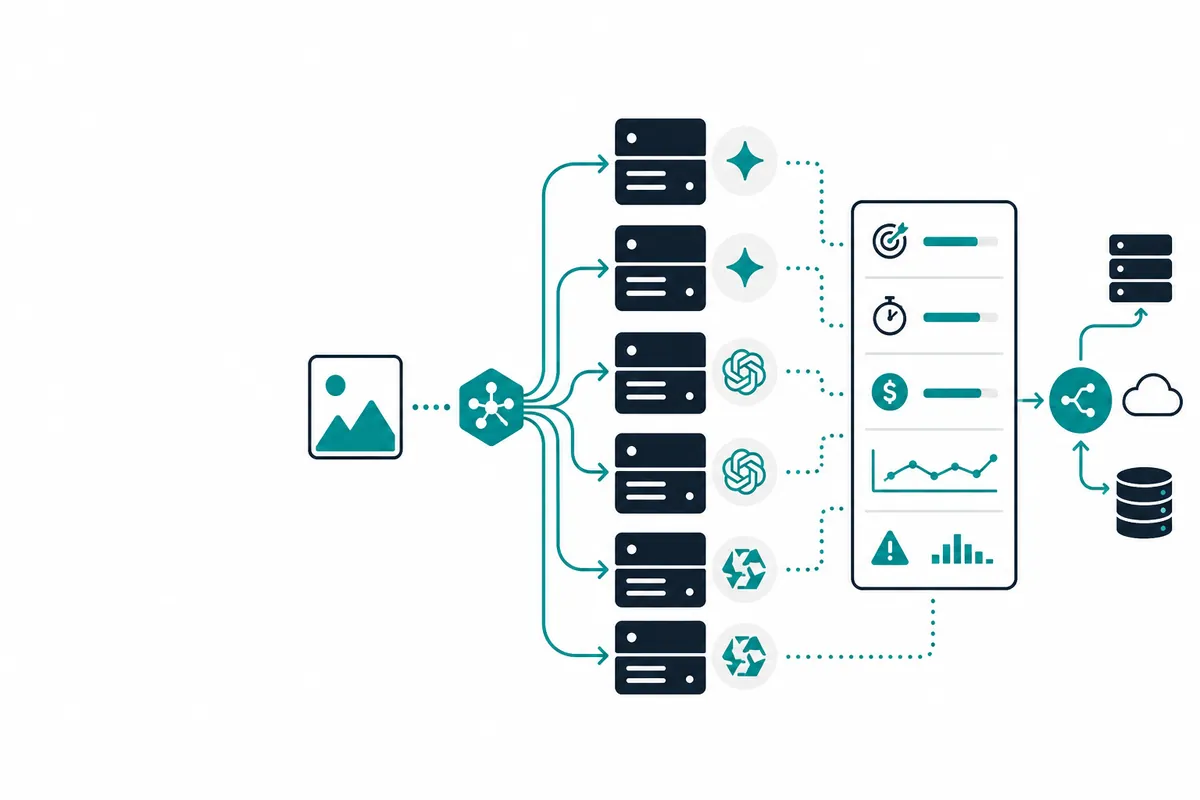
To make the comparison more practical, I tested six vision-capable models through the same OpenAI-compatible API shape:
gemini-2.5-flashgemini-2.5-flash-litegpt-4.1-minigpt-4.1-nanoqwen3-vl-flashqwen3-vl-plus
The goal is not to crown a universal winner. The useful question is: which model should you route to for a specific user workflow?
Test setup#
All tests used the Crazyrouter OpenAI-compatible Base URL:
https://cn.crazyrouter.com/v1
The request format was chat/completions, with the image passed through messages[].content[] as an image_url object.
Each model was tested on two stable public images:
- Python logo
- GitHub logo
Each image was run three times per model, so every model had six requests in total.
Test time: 2026-06-21T13:36:32Z.
This is a vision API smoke test. It is useful for checking whether the image_url route works and whether the model can perform simple visual recognition. It is not a full OCR, chart reasoning, document extraction, handwriting, or medical-image benchmark.
Quick recommendation#
Based on this run:
- Real-time user uploads / lowest latency: use
gpt-4.1-mini - Bulk logo, icon, or simple image classification: use
qwen3-vl-flash - Low-cost Gemini route: consider
gemini-2.5-flash-lite - Low-cost OpenAI-family route: consider
gpt-4.1-nano - Quality-oriented Qwen VL route: use
qwen3-vl-plusas an upgrade path - Do not use as default image_url vision route in this run:
gemini-2.5-flash
The most important finding is simple:
HTTP 200 does not prove image understanding succeeded.
In this test, gemini-2.5-flash returned HTTP success for all six requests, but the visual recognition score was 0/6. It also produced outputs such as “no image provided,” incorrect CBC logo recognition, and unrelated object descriptions.
That is the dangerous failure mode: the API call appears successful, but the model did not correctly process the image.
Overall results#
| Model | HTTP success | Correct recognition | No-image replies | Avg latency | Median latency | Slowest request | Input price / 1M tokens | Output price / 1M tokens | Estimated cost / 10k test-style calls | Positioning |
|---|---|---|---|---|---|---|---|---|---|---|
qwen3-vl-flash | 6/6 | 6/6 | 0 | 3.819s | 3.493s | 5.975s | $0.05 | $0.40 | $0.0915 | Best low-cost route for bulk recognition |
gpt-4.1-mini | 6/6 | 6/6 | 0 | 1.491s | 1.292s | 2.189s | $0.26 | $1.04 | $0.5226 | Best low-latency route for user-facing features |
gpt-4.1-nano | 6/6 | 6/6 | 0 | 2.863s | 2.562s | 4.213s | $0.065 | $0.26 | $0.1666 | Low-cost OpenAI-family route |
qwen3-vl-plus | 6/6 | 6/6 | 0 | 3.859s | 3.729s | 4.821s | $0.1429 | $1.4286 | $0.3848 | Quality-oriented Qwen VL upgrade route |
gemini-2.5-flash | 6/6 | 0/6 | 1 | 4.965s | 4.333s | 9.507s | $0.17 | $0.68 | $0.6168 | image_url path failed in this run |
gemini-2.5-flash-lite | 6/6 | 6/6 | 0 | 2.618s | 2.627s | 4.195s | $0.055 | $0.22 | $0.5466 | Low-cost Gemini lightweight route |
The estimated 10k-call cost is based on observed usage in this simple logo recognition test. It should not be treated as universal pricing for all image workloads. Larger images, OCR tasks, long descriptions, and multi-image prompts can change token usage significantly.
The useful production metric is not just model price. It is cost per successful image task.
A cheap route that frequently needs retries or fallback can be more expensive than a more reliable route.
Accuracy: five models passed, one model failed#
Correct recognition in this smoke test:
qwen3-vl-flash: 6/6gpt-4.1-mini: 6/6gpt-4.1-nano: 6/6qwen3-vl-plus: 6/6gemini-2.5-flash-lite: 6/6gemini-2.5-flash: 0/6
For simple logo and icon recognition, five of the six routes worked correctly. This means many lightweight models are already enough for basic image classification.
But gemini-2.5-flash is the important cautionary example: HTTP success does not mean the image path is healthy.
Latency: GPT-4.1 Mini was the fastest#
Average latency from lowest to highest:
gpt-4.1-mini: avg 1.491s, median 1.292s, slowest 2.189sgemini-2.5-flash-lite: avg 2.618s, median 2.627s, slowest 4.195sgpt-4.1-nano: avg 2.863s, median 2.562s, slowest 4.213sqwen3-vl-flash: avg 3.819s, median 3.493s, slowest 5.975sqwen3-vl-plus: avg 3.859s, median 3.729s, slowest 4.821sgemini-2.5-flash: avg 4.965s, median 4.333s, slowest 9.507s
For user-facing features, latency is part of product quality. If the user uploads an image and waits for a response, one or two seconds can matter.
For those workflows, gpt-4.1-mini is the strongest default route in this run.
Cost: Qwen3 VL Flash was the cheapest successful route#
Estimated cost for 10,000 test-style calls:
qwen3-vl-flash: about $0.0915gpt-4.1-nano: about $0.1666qwen3-vl-plus: about $0.3848gpt-4.1-mini: about $0.5226gemini-2.5-flash-lite: about $0.5466gemini-2.5-flash: about $0.6168
For high-volume tasks such as logo detection, icon classification, screenshot pre-filtering, or dataset tagging, qwen3-vl-flash is the strongest low-cost candidate.
The key is that it was not only cheap. It also passed the visual recognition smoke test.
Model-by-model notes#
GPT-4.1 Mini: best for real-time interactions#
gpt-4.1-mini had the lowest average latency and passed 6/6 recognition.
Use it for:
- user image uploads
- support screenshot analysis
- chat apps with image input
- latency-sensitive agent workflows
The tradeoff is cost. It is not the cheapest route, so it should not automatically be used for every bulk image task.
Qwen3 VL Flash: best for bulk low-cost recognition#
qwen3-vl-flash passed 6/6 recognition and had the lowest estimated cost in this test.
Use it for:
- bulk logo recognition
- icon detection
- simple image classification
- screenshot pre-classification
- high-volume visual tagging
It is slower than gpt-4.1-mini, but for batch workloads that may be acceptable.
Gemini 2.5 Flash Lite: usable low-cost Gemini route#
gemini-2.5-flash-lite passed 6/6 recognition and had acceptable latency.
It is a reasonable candidate if you want a Gemini-family backup route. However, usage metadata was not as straightforward as the Qwen route, so keep a visual smoke test in production.
GPT-4.1 Nano: low-cost OpenAI-family backup#
gpt-4.1-nano passed 6/6 recognition and is much cheaper than gpt-4.1-mini.
Use it for simple visual tags and lightweight classification. Do not assume it is the right route for complex document understanding, OCR, or deep visual reasoning.
Qwen3 VL Plus: quality-oriented Qwen upgrade route#
qwen3-vl-plus passed the test, but its latency and output price are higher than flash.
It is better treated as an upgrade route when qwen3-vl-flash is not enough, not as the default for every simple logo recognition task.
Gemini 2.5 Flash: do not use as default in this image_url route#
This was the problematic route in the test.
Results:
- HTTP success: 6/6
- Correct recognition: 0/6
- No-image reply: 1
- Incorrect unrelated outputs
- Suspicious usage/image-token signals
This does not necessarily prove the model itself is incapable. It may indicate an adapter, media-fetch, payload-conversion, or upstream routing issue in this specific image_url path.
But for production, the conclusion is the same: do not use it as the default vision route until your own smoke test confirms that image handling is fixed.
Scenario-based routing advice#
| Scenario | Default route | Fallback | Why |
|---|---|---|---|
| Real-time user image uploads | gpt-4.1-mini | qwen3-vl-flash or gemini-2.5-flash-lite | prioritize latency and reliability |
| Bulk logo or icon recognition | qwen3-vl-flash | gpt-4.1-nano | lowest cost among successful routes |
| Simple screenshot classification | qwen3-vl-flash or gpt-4.1-nano | gpt-4.1-mini | start cheap, upgrade hard cases |
| Support screenshot analysis | gpt-4.1-mini | qwen3-vl-plus | user-facing latency matters |
| OCR or document pre-filtering | separate benchmark required | stronger OCR/document model | logo tests do not prove OCR quality |
| Agent visual input | gpt-4.1-mini or qwen3-vl-flash | forced smoke test plus fallback | agents amplify bad visual inputs |
| Gemini backup route | gemini-2.5-flash-lite | gpt-4.1-nano | Flash Lite worked; Flash failed in this run |
Why usage signals matter#
Many image benchmarks only check the output text. In production, usage metadata can also be a health signal.
If a request returns HTTP 200 but:
- prompt tokens look like only the text prompt arrived
- image token fields are zero or missing
- the model says “no image provided”
- the answer is unrelated to the image
then the issue may be in the image transport path rather than the model itself.
Possible causes include:
image_urlnot forwarded correctly- gateway media fetch failure
- base64 or inline conversion failure
- OpenAI-compatible payload converted incorrectly
- upstream accepting the request but ignoring image content
- token accounting not matching actual media processing
For vision routes, text-only health checks are not enough. Use visual smoke tests.
API example#
from openai import OpenAI

client = OpenAI(
    api_key="YOUR_API_KEY",
    base_url="https://cn.crazyrouter.com/v1"
)

response = client.chat.completions.create(
    model="qwen3-vl-flash",
    messages=[{
        "role": "user",
        "content": [
            {"type": "text", "text": "Identify the main logo or object in this image."},
            {
                "type": "image_url",
                "image_url": {
                    "url": "https://raw.githubusercontent.com/github/explore/main/topics/python/python.png",
                    "detail": "low"
                }
            }
        ]
    }],
    max_tokens=40,
    temperature=0,
)

print(response.choices[0].message.content)
Do not add UTM parameters to API endpoints. UTM belongs in human-facing links, not SDK base_url values.
Final takeaway#
Vision API selection should be based on the user workflow, not just the model name.
- For real-time interactions, optimize for correct recognition plus low latency.
- For bulk classification, optimize for cost per successful image.
- For agents, optimize for reliability, monitoring, and fallback behavior.
- For OCR and document understanding, run a separate benchmark with real documents.
My practical ranking from this run:
- Default for real-time interaction:
gpt-4.1-mini - Default for bulk low-cost recognition:
qwen3-vl-flash - Low-cost Gemini backup:
gemini-2.5-flash-lite - Low-cost OpenAI backup:
gpt-4.1-nano - Qwen quality upgrade route:
qwen3-vl-plus - Avoid as default for now:
gemini-2.5-flash
The core question is not “does this model support images?”
The better question is:
Does this route reliably deliver the image to the model in my production API path?
That is what you should test before shipping.