简体中文
简体中文 繁體中文
繁體中文 English
 Français
 Русский
 日本語
日本語 Tiếng Việt
 한국어
한국어 Deutsch
 Español
 Italiano
 Português
 العربية
 ไทย
ไทย Bahasa Indonesia
 Bahasa Melayu
 Türkçe
 Polski
 Nederlands
 Dansk
Dansk Norsk
Norsk Қазақша
简体中文Tutorial
GPT-image-2 实战:AI 预测未来宝宝 — 看看你们的孩子长什么样
用 GPT-image-2 通过 Crazyrouter API 生成逼真的未来宝宝预测照片。描述父母特征,AI 自动融合生成宝宝人像。附完整代码。
C
Crazyrouter Team
2026年5月1日 / 1103 次浏览
分享:
Crazyrouter
GPT-image-2 实战:AI 预测未来宝宝 — 看看你们的孩子长什么样#
"我们的宝宝会长什么样?" — 每对情侣都问过这个问题。现在 GPT-image-2 可以根据描述的父母特征,融合生成一张逼真的宝宝人像照片。
这个玩法在 TikTok 和 Instagram 上爆火,情侣们纷纷分享 AI 预测的宝宝照片。效果可爱、适合分享、而且出奇地逼真。
本文是系列第五篇。
效果展示#
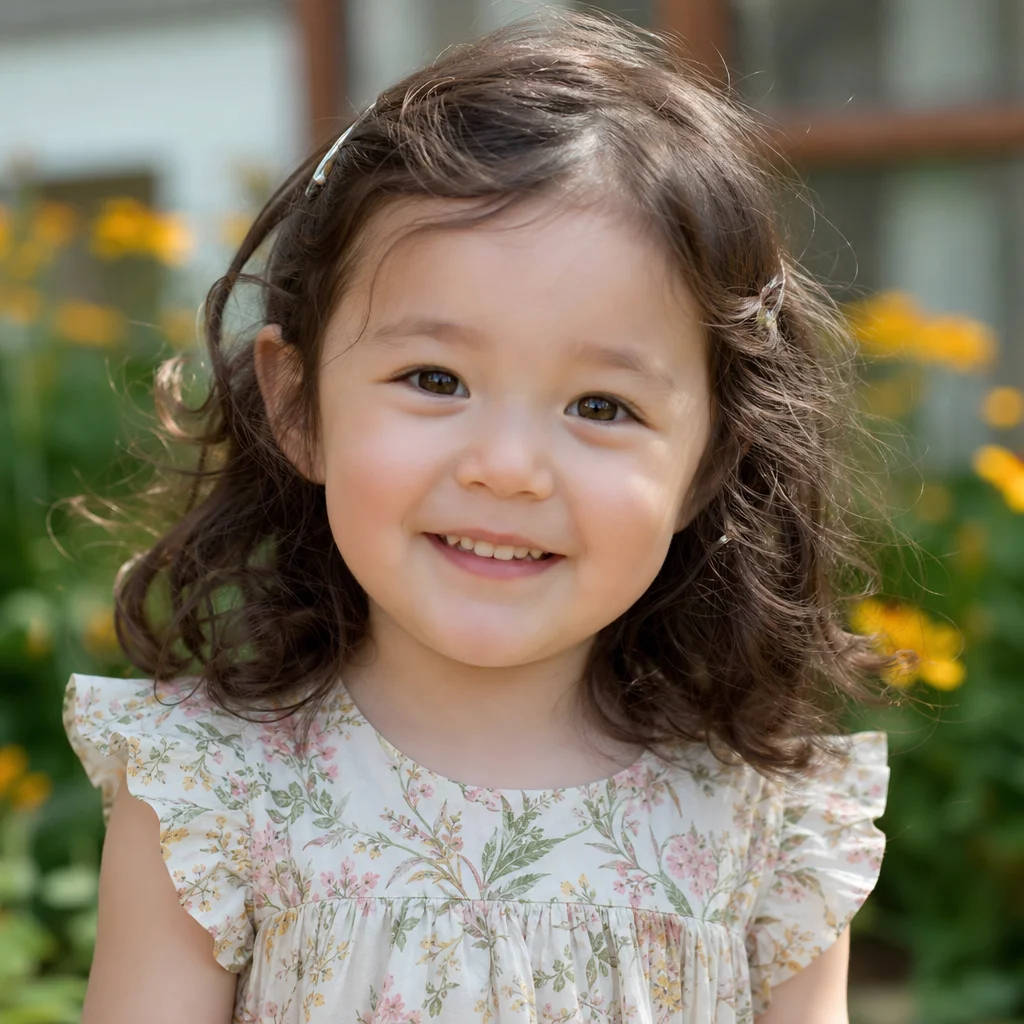
一个融合了东亚和欧洲特征的混血宝宝 — 自然光线、专业人像摄影风格,看起来就像真实照片。
完整代码#
Python#
python
from openai import OpenAI

client = OpenAI(
    api_key="your-crazyrouter-api-key",
    base_url="https://crazyrouter.com/v1"
)

# 描述父母特征
parent_a = {
    "ethnicity": "East Asian",
    "features": "dark brown eyes, straight black hair, round face, small nose"
}

parent_b = {
    "ethnicity": "Northern European",
    "features": "blue eyes, wavy light brown hair, oval face, high nose bridge"
}

baby_prompt = f"""
A professional portrait photo of an adorable 1-year-old baby.
The baby is a natural blend of two parents:
- Parent A: {parent_a['ethnicity']} — {parent_a['features']}
- Parent B: {parent_b['ethnicity']} — {parent_b['features']}

The baby should have a natural, realistic blend of both parents' features.
Possible traits: light brown eyes, slightly wavy dark brown hair,
medium nose bridge, mixed facial structure.

Setting: natural soft window light, clean white/cream background.
Style: professional baby portrait photography, 85mm lens,
shallow depth of field, warm tones.
The baby is smiling gently, wearing a simple white onesie.

Photorealistic. No text, no watermark.
"""

response = client.images.generate(
    model="gpt-image-2",
    prompt=baby_prompt,
    size="1024x1024",
    n=1
)

print(f"宝宝预测: {response.data[0].url}")
curl#
bash
curl -X POST https://crazyrouter.com/v1/images/generations \
  -H "Content-Type: application/json" \
  -H "Authorization: Bearer your-crazyrouter-api-key" \
  -d '{
    "model": "gpt-image-2",
    "prompt": "Professional portrait photo of an adorable 1-year-old baby. Natural blend of East Asian and Northern European features: light brown eyes, slightly wavy dark brown hair, medium nose bridge. Soft window light, cream background. Baby portrait photography, 85mm lens, shallow depth of field, warm tones. Baby smiling in white onesie. Photorealistic. No text.",
    "size": "1024x1024",
    "n": 1
  }'
Node.js#
javascript
import OpenAI from "openai";

const client = new OpenAI({
  apiKey: "your-crazyrouter-api-key",
  baseURL: "https://crazyrouter.com/v1",
});

const response = await client.images.generate({
  model: "gpt-image-2",
  prompt: `Professional portrait of an adorable 1-year-old baby.
Natural blend of East Asian and Northern European features.
Light brown eyes, slightly wavy dark brown hair, medium nose bridge.
Soft window light, cream background, baby portrait photography.
85mm lens, shallow depth of field, warm tones.
Baby smiling in white onesie. Photorealistic. No text.`,
  size: "1024x1024",
  n: 1,
});

console.log(response.data[0].url);
特征组合模板#
东亚 × 东亚#
code
父方:圆脸,单眼皮,直黑发,小鼻子
母方:鹅蛋脸,双眼皮,深棕发,高颧骨
宝宝特征:杏仁眼,柔软黑发,五官均衡
东亚 × 非洲#
code
父方:深棕色眼睛,直黑发,圆脸
母方:深棕色眼睛,卷曲黑发,轮廓分明,丰满嘴唇
宝宝特征:温暖棕色肤色,波浪黑发,大眼睛
欧洲 × 拉丁美洲#
code
父方:蓝眼睛,金发,白皙皮肤,窄脸
母方:棕色眼睛,深色波浪发,橄榄色皮肤,丰满嘴唇
宝宝特征:榛色眼睛,浅棕波浪发,温暖肤色
南亚 × 欧洲#
code
父方:深棕色眼睛,黑发,棕色皮肤,浓眉
母方:绿色眼睛,红棕发,白皙皮肤,雀斑
宝宝特征:浅棕色眼睛,深棕波浪发,中等肤色
生成不同年龄#
看看宝宝在不同年龄的样子:
python
ages = [
    ("新生儿", "a sleeping newborn baby wrapped in a white blanket"),
    ("1岁", "a smiling 1-year-old baby sitting up"),
    ("3岁", "a cheerful 3-year-old toddler playing"),
    ("5岁", "a happy 5-year-old child laughing"),
]

features = "blend of East Asian and European features, light brown eyes, wavy dark hair"

for age, description in ages:
    response = client.images.generate(
        model="gpt-image-2",
        prompt=f"Professional portrait of {description}. {features}. "
               f"Natural soft lighting, clean background. Photorealistic. No text.",
        size="1024x1024",
        n=1
    )
    print(f"{age}: {response.data[0].url}")
Prompt 技巧#
- 具体描述特征 — "浅棕色眼睛" 比 "混合眼睛" 效果好
- 描述融合结果 — 不要只列父母特征,要描述预期的融合效果
- 摄影关键词很重要 —
85mm lens, shallow depth of field, natural light大幅提升真实感 - 加 "Photorealistic. No text." — 防止卡通化输出和文字干扰
免责声明#
AI 宝宝预测纯属娱乐。遗传学远比可见特征的融合复杂得多,结果不代表实际遗传结果。请负责任地使用,尊重隐私。
成本#
| 项目 | 价格(Crazyrouter) |
|---|---|
| 1 张宝宝人像 | 约 $0.04-0.08 |
| 4 个年龄系列 | 约 $0.20-0.32 |
🚀 Crazyrouter — 一个 API Key,600+ 模型。GPT-image-2、GPT-5.5、Claude Opus 4.7、DeepSeek V4 等。
Implementation Guides
AuthenticationCreate and use API keys with the required authorization headers.Quick Start GuideMake the first Crazyrouter API call and validate your setup.Image Upload GuidanceUpload local reference images and use temporary public media URLs.IntroductionUnderstand Crazyrouter's all-in-one AI model API gateway.
Crazyrouter
主题
Tutorial