简体中文
简体中文 繁體中文
繁體中文 English
 Français
 Русский
 日本語
日本語 Tiếng Việt
 한국어
한국어 Deutsch
 Español
 Italiano
 Português
 العربية
 ไทย
ไทย Bahasa Indonesia
 Bahasa Melayu
 Türkçe
 Polski
 Nederlands
 Dansk
Dansk Norsk
Norsk Қазақша
简体中文Tutorial
GPT-image-2 实战:AI Meme 生成器 & 涂色书制作 — 好玩还能赚钱的两个项目
用 GPT-image-2 通过 Crazyrouter API 生成 Meme 表情包和涂色书页面。两个好玩又能变现的项目,附完整代码。
C
Crazyrouter Team
2026年5月1日 / 831 views
Share:
GPT-image-2 实战:AI Meme 生成器 & 涂色书制作#
系列最后一篇,介绍两个好玩又能赚钱的玩法:AI Meme 生成和AI 涂色书制作。
两者都利用了 GPT-image-2 的杀手级特性 — 文字渲染。Meme 需要清晰的文字叠加,涂色书需要干净的线稿。GPT-image-2 两者都能完美处理。
Part 1:AI Meme 生成器#
为什么用 GPT-image-2 做 Meme?#
传统做 Meme 需要找模板、P 图、加文字。GPT-image-2 一次 API 调用搞定 — 场景、人物、文字全部直接生成在图片里。
效果展示#
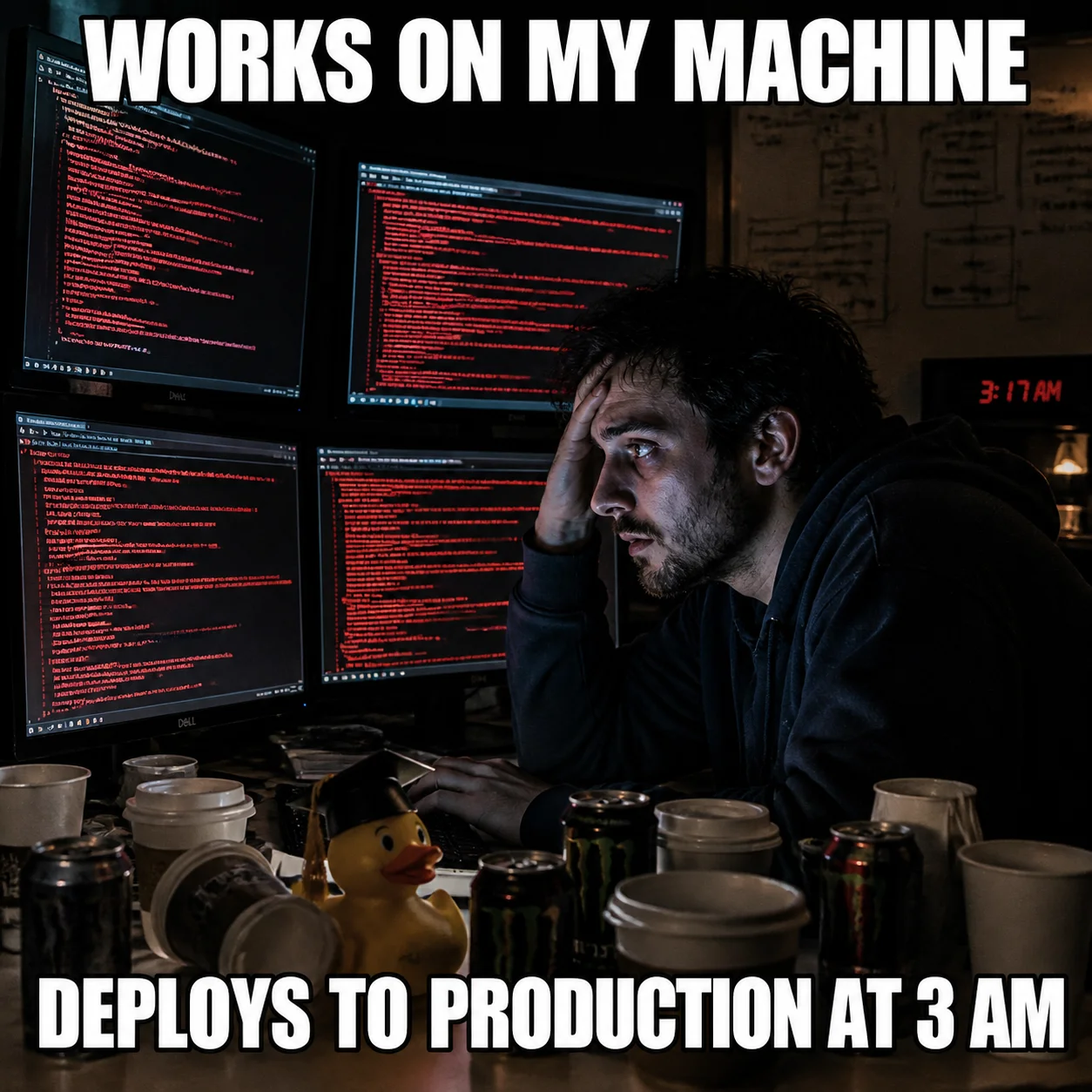
经典的"凌晨3点部署"程序员 Meme — Impact 字体文字渲染清晰,场景构图到位。
完整代码#
Python#
python
from openai import OpenAI

client = OpenAI(
    api_key="your-crazyrouter-api-key",
    base_url="https://crazyrouter.com/v1"
)

meme_prompt = """
A funny meme image in classic meme format.

Scene: A developer sitting at his desk at 3 AM, surrounded by empty
coffee cups and energy drink cans. His face is illuminated by 4 monitors
all showing error logs. A rubber duck sits on his desk wearing a tiny
graduation cap.

Top text (large white Impact font with black outline):
"WORKS ON MY MACHINE"

Bottom text (large white Impact font with black outline):
"DEPLOYS TO PRODUCTION AT 3 AM"

Style: realistic photo meme format, dramatic lighting, humorous.
"""

response = client.images.generate(
    model="gpt-image-2",
    prompt=meme_prompt,
    size="1024x1024",
    n=1
)

print(f"Meme: {response.data[0].url}")
curl#
bash
curl -X POST https://crazyrouter.com/v1/images/generations \
  -H "Content-Type: application/json" \
  -H "Authorization: Bearer your-crazyrouter-api-key" \
  -d '{
    "model": "gpt-image-2",
    "prompt": "Funny meme: developer at desk at 3AM, surrounded by coffee cups, 4 monitors showing errors, rubber duck with graduation cap. Top text in white Impact font: WORKS ON MY MACHINE. Bottom text: DEPLOYS TO PRODUCTION AT 3 AM. Realistic photo meme style, dramatic lighting.",
    "size": "1024x1024",
    "n": 1
  }'
Meme 生成函数#
可复用的通用函数:
python
def generate_meme(scene, top_text, bottom_text, style="realistic photo meme"):
    prompt = f"""
    A funny meme image. Scene: {scene}.
    Top text (large white Impact font with black outline): "{top_text}"
    Bottom text (large white Impact font with black outline): "{bottom_text}"
    Style: {style}, dramatic lighting, humorous.
    """
    response = client.images.generate(
        model="gpt-image-2",
        prompt=prompt,
        size="1024x1024",
        n=1
    )
    return response.data[0].url

# 示例
url = generate_meme(
    scene="A cat sitting at a computer looking confused at code",
    top_text="SENIOR DEVELOPER REVIEWING MY CODE",
    bottom_text="WHAT IS THIS"
)
10 个程序员 Meme 创意#
| # | 上方文字 | 下方文字 | 场景 |
|---|---|---|---|
| 1 | IT WORKS | DON'T TOUCH IT | 程序员慢慢后退 |
| 2 | 99 BUGS IN THE CODE | FIX ONE, 127 BUGS NOW | 程序员盯着屏幕惊恐 |
| 3 | FULL STACK DEVELOPER | FULL STACK OF PROBLEMS | 程序员抛接着火的笔记本 |
| 4 | WORKS IN DEVELOPMENT | 500 ERROR IN PRODUCTION | 两格对比:平静 vs 混乱 |
| 5 | JUST ONE MORE FEATURE | SAID EVERY PM EVER | 溢出的购物车 |
| 6 | GIT PUSH --FORCE | TO MAIN ON FRIDAY | 核爆炸 |
| 7 | WHERE'S THE DOCUMENTATION? | THE CODE IS THE DOCUMENTATION | 空荡荡的图书馆 |
| 8 | ME IN THE INTERVIEW | ME ON DAY 1 | 超级英雄 vs 迷茫的谷歌搜索者 |
| 9 | GIT MERGE | 127 CONFLICTS | 两列火车即将相撞 |
| 10 | AI WILL REPLACE DEVELOPERS | DEVELOPERS NOW SERVE AI | 机器人写代码,人类端咖啡 |
Part 2:AI 涂色书制作#
为什么这是一门真生意#
AI 涂色书是 Amazon KDP(Kindle Direct Publishing)上的热门品类。用 GPT-image-2 生成页面,编排成书,发布,赚取被动收入。
市场数据:
- Amazon 上 AI 涂色书月销量可达数千本
- 制作成本极低(AI 生成 + 排版)
- 适合各种主题:动物、花卉、曼陀罗、城市风景、奇幻
效果展示#
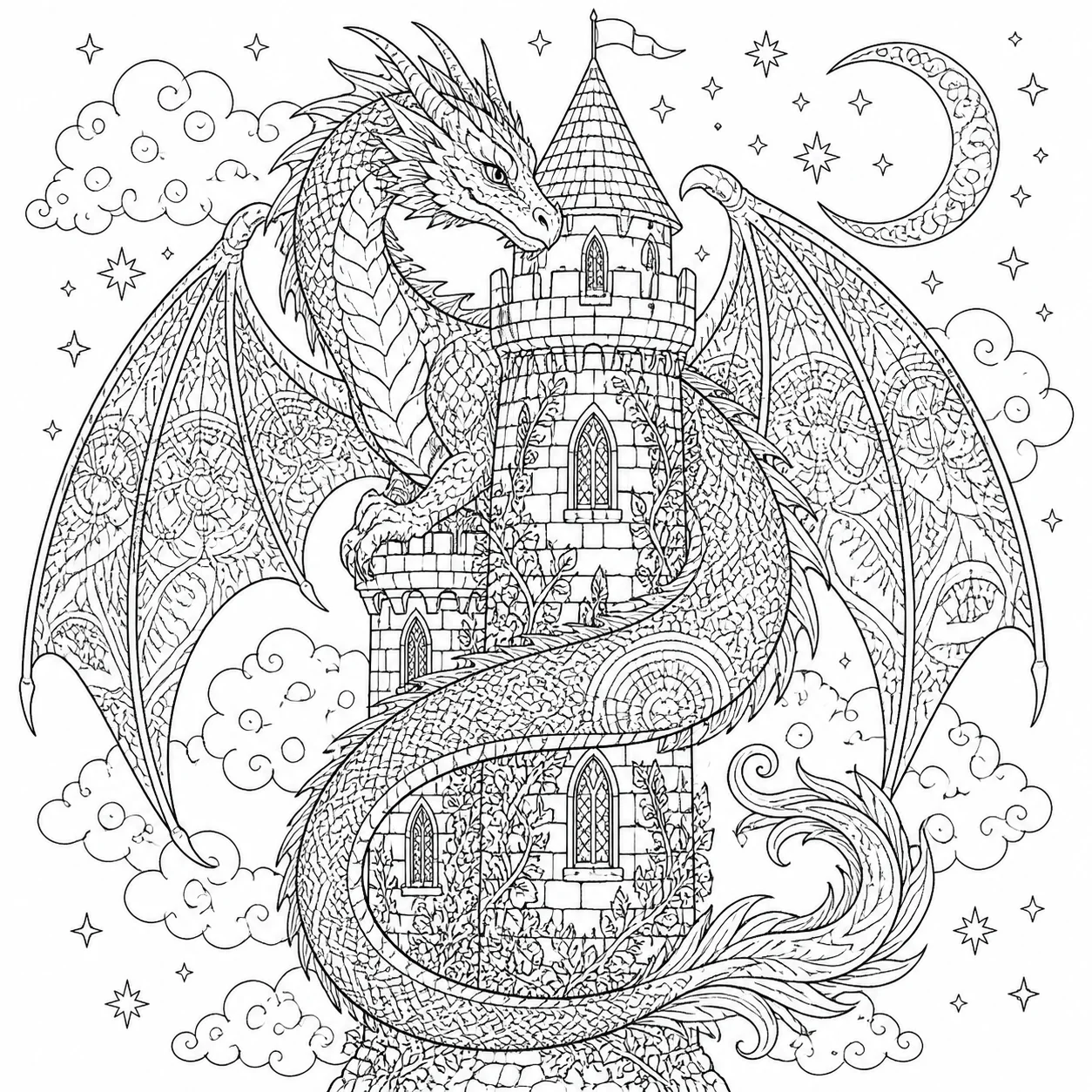
纯黑白线稿 — 龙与城堡的奇幻主题,曼陀罗风格的细节填充。可以直接打印出来涂色。
完整代码#
Python#
python
coloring_prompt = """
A coloring book page for adults. Black and white line art only,
no shading, no gray tones. Clean, crisp outlines suitable for
coloring with colored pencils or markers.

Subject: A majestic dragon coiled around a medieval castle tower.
The dragon has detailed scales and spread wings. The castle has
ornate windows and climbing vines. Background filled with clouds
and small birds.

Style: intricate mandala-inspired patterns filling the dragon's
body and castle walls. Medium complexity — detailed enough to be
engaging but not overwhelming.

Pure black lines on white background. No color. No text.
"""

response = client.images.generate(
    model="gpt-image-2",
    prompt=coloring_prompt,
    size="1024x1024",
    n=1
)

print(f"涂色页: {response.data[0].url}")
curl#
bash
curl -X POST https://crazyrouter.com/v1/images/generations \
  -H "Content-Type: application/json" \
  -H "Authorization: Bearer your-crazyrouter-api-key" \
  -d '{
    "model": "gpt-image-2",
    "prompt": "Adult coloring book page. Black and white line art only, no shading. A majestic dragon coiled around a medieval castle tower with detailed scales, spread wings, ornate windows, climbing vines. Mandala-inspired pattern fills. Medium complexity. Pure black lines on white. No color, no text.",
    "size": "1024x1024",
    "n": 1
  }'
批量生成一本完整涂色书#
python
themes = [
    "A majestic dragon coiled around a castle tower",
    "An enchanted forest with mushroom houses and fairies",
    "An underwater scene with coral reef and tropical fish",
    "A Japanese garden with koi pond and pagoda",
    "A steampunk airship flying over a Victorian city",
    "A phoenix rising from flames with spread wings",
    "A mermaid sitting on rocks by the ocean",
    "A treehouse village connected by rope bridges",
    "A mandala pattern with lotus flowers and butterflies",
    "A wolf howling at a detailed moon with forest background",
]

base_prompt = """Adult coloring book page. Black and white line art only,
no shading, no gray tones. Clean crisp outlines. Intricate mandala-inspired
pattern fills. Medium complexity. Pure black lines on white. No color, no text.
Subject: """

for i, theme in enumerate(themes, 1):
    response = client.images.generate(
        model="gpt-image-2",
        prompt=base_prompt + theme,
        size="1024x1024",
        n=1
    )
    print(f"第{i}页: {response.data[0].url}")
Amazon KDP 发布流程#
- 用 GPT-image-2 生成 20-30 页
- 用图片放大工具提升到 300 DPI
- 生成封面页(同样用 GPT-image-2)
- 编排成 PDF,设置好页边距
- 上传到 Amazon KDP — 定价 9.99
- 每本利润约 $3-6(扣除印刷成本后)
成本汇总#
| 项目 | 图片数 | 成本(Crazyrouter) |
|---|---|---|
| 10 个 Meme | 10 | 约 $0.50 |
| 30 页涂色书 | 30 | 约 $1.50 |
| 完整项目 | 40 | 约 $2.00 |
一本完整涂色书的生成成本不到 $2。
本系列 6 篇文章到此结束。从手相分析到 Meme 生成,GPT-image-2 通过 Crazyrouter API 打开了一个充满创意和变现可能的世界。
🚀 Crazyrouter — 一个 API Key,600+ 模型。GPT-image-2、GPT-5.5、Claude Opus 4.7、DeepSeek V4 等。
Implementation Guides
AuthenticationCreate and use API keys with the required authorization headers.Usage Logs and Cost MonitoringUse management APIs to query logs, quota, token usage, and dollar cost.Quick Start GuideMake the first Crazyrouter API call and validate your setup.Image Upload GuidanceUpload local reference images and use temporary public media URLs.