简体中文
简体中文 繁體中文
繁體中文 English
 Français
 Русский
 日本語
日本語 Tiếng Việt
 한국어
한국어 Deutsch
 Español
 Italiano
 Português
 العربية
 ไทย
ไทย Bahasa Indonesia
 Bahasa Melayu
 Türkçe
 Polski
 Nederlands
 Dansk
Dansk Norsk
Norsk Қазақша
AI API Security Best Practices in 2026: A Developer Checklist
An AI API is an external boundary, even when it sits behind a friendly SDK. Your application sends prompts, files, tool definitions, and sometimes personal data to a model provider. A leaked key can c...

AI API Security Best Practices in 2026: A Developer Checklist#
An AI API is an external boundary, even when it sits behind a friendly SDK. Your application sends prompts, files, tool definitions, and sometimes personal data to a model provider. A leaked key can create an unexpected bill; a weak tool policy can turn a prompt injection into a destructive action. This guide turns AI API security best practices into an implementation checklist.
What does AI API security include?#
AI API security covers identity, secrets, transport, data handling, model access, output validation, and operational visibility. It is broader than hiding an API key in an environment variable. A secure design limits what each credential can do, minimizes what leaves your system, and makes abnormal usage easy to detect.
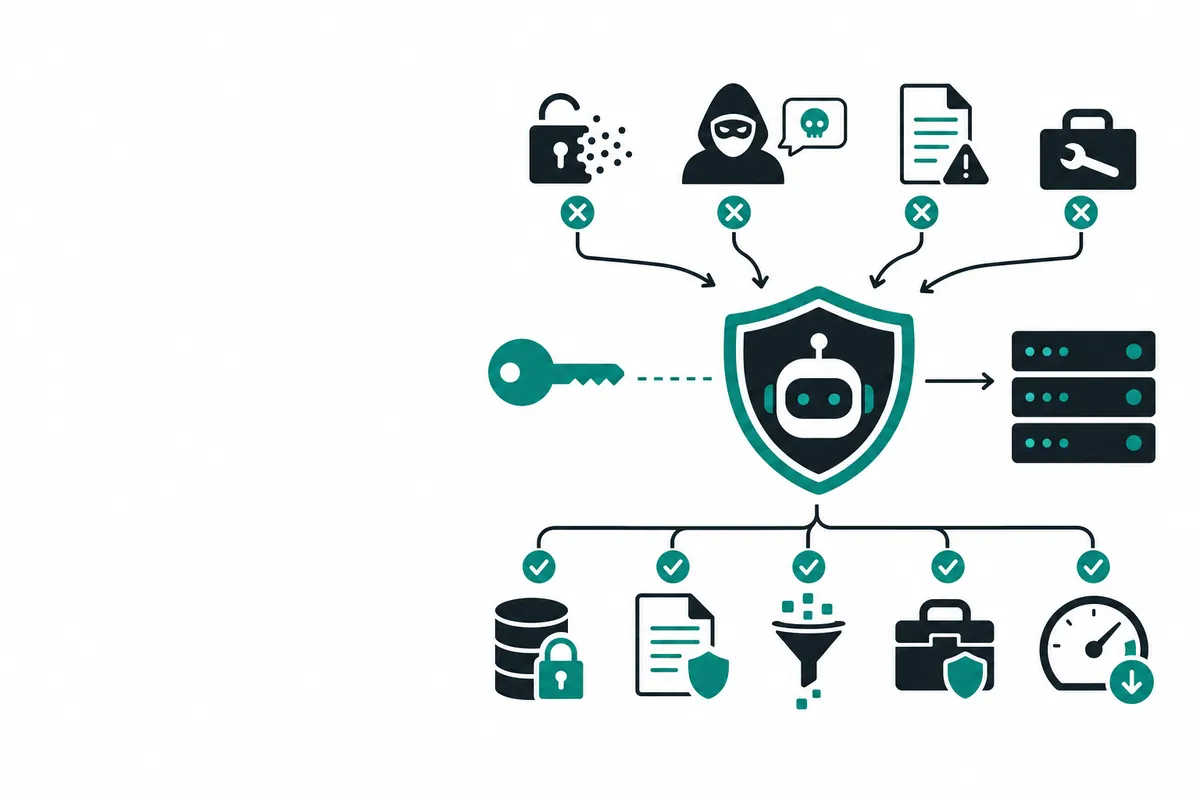
The practical baseline is: keep keys server-side, use short-lived or scoped tokens where possible, redact sensitive content, validate model output, restrict function calling, and set spend and rate limits. A gateway such as Crazyrouter can also centralize model credentials, routing, usage records, and failover policies.
Security comparison: direct providers, self-hosting, and a gateway#
| Approach | Key management | Operational burden | Best fit | Main risk |
|---|---|---|---|---|
| Direct provider APIs | Separate keys per vendor | Medium | One-provider apps | Key sprawl and inconsistent controls |
| Self-hosted open models | Your infrastructure | High | Regulated or specialized workloads | Patch, network, and GPU exposure |
| Managed AI gateway | Central policy and routing | Low to medium | Multi-model products | Misconfigured shared access |
No option is automatically secure. The right choice depends on your threat model, data residency requirements, and team capacity.
How to secure an AI API: implementation steps#
1. Keep credentials out of clients and logs#
Never place a provider key in browser JavaScript, mobile binaries, Git repositories, or prompts. Your frontend should call your backend, and your backend should attach the credential. Store it in a secret manager and inject it at runtime.
import os
from openai import OpenAI

client = OpenAI(
    api_key=os.environ["CRAZYROUTER_API_KEY"],
    base_url="https://crazyrouter.com/v1",
)
Use separate credentials for local development, staging, production, and CI. Rotate immediately after a suspected leak. Add secret scanning to pull requests and block commits containing common key patterns.
2. Apply least privilege#
Create tokens with only the models, IP ranges, environments, and spend limits they need. A batch summarizer does not need image generation. A staging service should not share production credentials. If your gateway supports token restrictions, use them for each service rather than one global key.
3. Minimize and classify data#
Classify inputs before sending them: public, internal, confidential, or regulated. Remove names, account numbers, access tokens, and unnecessary metadata. Do not assume a model needs the entire database row; send the smallest context that answers the task. Define retention and deletion behavior for prompts, responses, uploaded files, and logs.
4. Treat prompts as untrusted input#
Prompt injection is an application security problem. Separate system instructions from user content, clearly delimit retrieved documents, and never let retrieved text silently rewrite authorization rules. For high-risk workflows, require a deterministic policy check before an action is executed.
5. Gate tool and function calls#
A model may propose a function call, but your application should decide whether it is allowed. Validate the function name and every argument against a schema. Require confirmation for payments, deletion, permission changes, and external messages. Log the decision, not just the model's proposal.
const allowed = new Set(["lookupOrder", "createTicket"]);
if (!allowed.has(toolCall.name)) throw new Error("Tool not permitted");
if (toolCall.name === "createTicket" && user.role !== "support") {
  throw new Error("Insufficient permission");
}
6. Add rate, quota, and spend controls#
Use per-user, per-IP, and per-tenant limits. Cap maximum input size and output tokens. Add a daily budget alert and a hard stop for unusual spend. Retry only transient failures; uncontrolled retries can multiply both cost and exposure.
7. Validate outputs#
Treat generated text as data, not executable code. Parse JSON with a strict schema, escape HTML, sanitize Markdown rendered in a browser, and use allowlists for URLs and commands. For code-generation features, run output in an isolated sandbox with no production credentials.
8. Monitor the full request lifecycle#
Record request IDs, tenant, model, latency, token counts, status, and policy decisions. Redact prompt content by default. Alert on key use from new locations, sudden token spikes, repeated refusals, tool-call anomalies, and elevated error rates.
Pricing and security cost tradeoffs#
| Cost item | Direct provider | Crazyrouter-style gateway |
|---|---|---|
| API access | Official input/output rates | Usage-based rates vary by model |
| Key management | Build and operate it | Centralize routing and credentials |
| Observability | Build or buy separately | Usage dashboard and records available |
| Multi-provider failover | Custom engineering | Gateway policy can simplify it |
| Minimum commitment | Depends on provider | No monthly fee or minimum consumption in the documented plan |
Pricing changes, so confirm current model rates on the Crazyrouter pricing page before budgeting.
FAQ#
Should an AI API key ever be exposed in a frontend?#
No. Proxy requests through a server you control and issue your own short-lived user session credentials.
How often should AI API keys be rotated?#
Rotate on a schedule appropriate to risk, and immediately after exposure, staff changes, or suspicious usage. Short-lived credentials are preferable for CI jobs.
Is a gateway more secure than a direct provider?#
It can reduce key sprawl and centralize controls, but only if access policies, tenant isolation, logging, and data handling are configured correctly.
How do I protect against prompt injection?#
Keep retrieved or user-provided text untrusted, separate it from policy instructions, restrict tools, and require application-side authorization before side effects.
What is the first security control to implement?#
Move secrets server-side, set a spend limit, add output validation, and log request metadata. Those controls reduce the most immediate risks.
Summary#
AI API security best practices are mostly disciplined boundary design: scoped credentials, minimized data, constrained tools, validated outputs, and measurable usage. Centralizing multi-model access through Crazyrouter can simplify that boundary while keeping an OpenAI-compatible integration. Start with a non-production token, configure limits, and test your failure and rotation procedures before launch.