简体中文
简体中文 繁體中文
繁體中文 English
 Français
 Русский
 日本語
日本語 Tiếng Việt
 한국어
한국어 Deutsch
 Español
 Italiano
 Português
 العربية
 ไทย
ไทย Bahasa Indonesia
 Bahasa Melayu
 Türkçe
 Polski
 Nederlands
 Dansk
Dansk Norsk
Norsk Қазақша
Kimi K2 Thinking Postmortem: Add Action Verification to Agent Workflows
A developer-focused Kimi K2 Thinking postmortem about action verification, tool-call boundaries, retries, and practical Python, Node.js, and cURL integration patterns.
Kimi K2 Thinking Postmortem: Add Action Verification to Agent Workflows#
Reasoning models can produce a convincing plan and still take the wrong action. A tool name can be correct while its arguments are unsafe, stale, or aimed at the wrong record. This is the central lesson from a Kimi K2 Thinking agent postmortem: reasoning is not proof that an external side effect is valid.
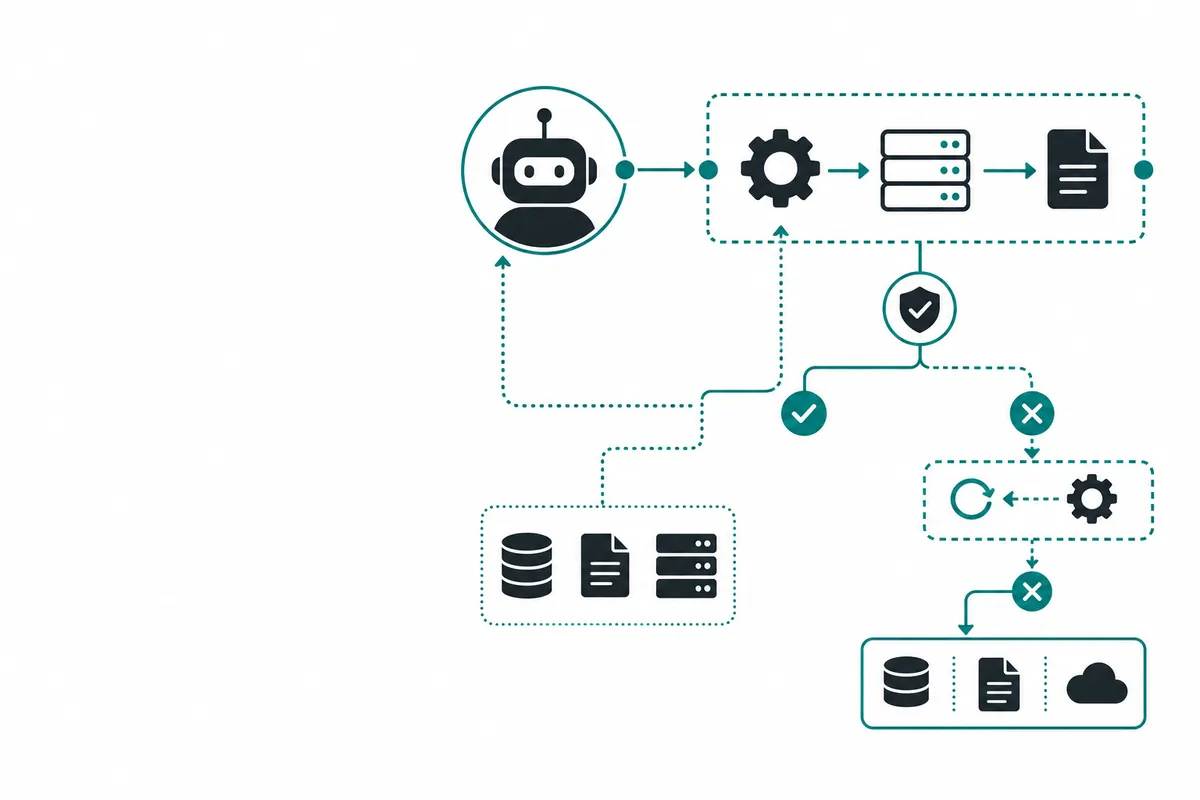
The fix is an explicit action-verification layer between model output and tool execution. The model proposes a structured action. Your application validates the schema, checks permissions and current state, asks for approval when risk is high, executes the tool, and sends the result back for a final check. This design is useful with Kimi K2 Thinking and with any model that can produce tool calls.

What is Kimi K2 Thinking?#
Kimi K2 Thinking is a reasoning-oriented model in the Kimi family. In an agent workflow, it can analyze a task, decide which tool may help, and produce a proposed sequence of actions. The model does not replace your authorization system, transaction boundary, database constraints, or audit log.
A useful mental model is:
user request -> model proposal -> schema validation -> policy check
             -> state check -> approval (if needed) -> tool execution
             -> result validation -> user-visible response
The postmortem pattern is especially important for actions that send messages, change files, update records, spend money, or alter account settings. Read-only search can often use a lighter path, but it should still validate arguments and timeouts.
Kimi K2 Thinking vs alternatives#
Model selection should follow the failure you are trying to prevent.
| Option | Best fit | Reliability advantage | Limitation |
|---|---|---|---|
| Kimi K2 Thinking | Multi-step analysis and tool planning | More deliberate reasoning can expose dependencies | More reasoning does not authorize an action |
| Fast chat model | Classification and simple routing | Lower latency and simpler operations | May miss hidden dependencies |
| Rules engine | High-risk, deterministic policy | Decisions are explicit and testable | Less flexible for ambiguous language |
| Human approval | Irreversible or expensive actions | Strongest final authorization | Adds delay and operating cost |
The practical answer is usually hybrid: let the model interpret intent, let code enforce policy, and reserve human approval for actions that cannot be rolled back. You can compare Kimi models and other supported choices in the model directory.
A verification-first Kimi K2 API design#
Start with a narrow tool contract. Do not expose a generic run_sql, shell, or send_anything function to the model. Define operations with typed fields, allowed targets, and a risk level. For example, create_draft_email is safer than send_email, and update_ticket_status should accept a known ticket ID and an allowlisted status.
Python example#
This example asks for a proposed action, then validates the result in application code. It is illustrative and has not been executed here. The exact structured-output parameters depend on the selected model route, so adapt them to the current API documentation.
import json
import os
from openai import OpenAI

client = OpenAI(
    api_key=os.environ["CRAZYROUTER_API_KEY"],
    base_url="https://crazyrouter.com/v1",
)

tools = [{
    "type": "function",
    "function": {
        "name": "update_ticket_status",
        "description": "Propose a ticket status update; application code must approve it.",
        "parameters": {
            "type": "object",
            "properties": {
                "ticket_id": {"type": "string"},
                "status": {"type": "string", "enum": ["open", "pending", "resolved"]},
            },
            "required": ["ticket_id", "status"],
            "additionalProperties": False,
        },
    }
}]

response = client.chat.completions.create(
    model="kimi-k2-thinking",
    messages=[{"role": "user", "content": "Resolve ticket T-104 after the customer confirms the fix."}],
    tools=tools,
)

call = response.choices[0].message.tool_calls[0]
proposal = json.loads(call.function.arguments)

if proposal["ticket_id"] != "T-104":
    raise ValueError("Ticket does not match the requested target")

# Check current database state and caller permissions before writing.
print("Approval required:", proposal)
Node.js example#
import OpenAI from "openai";

const client = new OpenAI({
  apiKey: process.env.CRAZYROUTER_API_KEY,
  baseURL: "https://crazyrouter.com/v1",
});

const result = await client.chat.completions.create({
  model: "kimi-k2-thinking",
  messages: [{ role: "user", content: "Draft a status change for ticket T-104." }],
  tools: [{
    type: "function",
    function: {
      name: "update_ticket_status",
      parameters: {
        type: "object",
        properties: {
          ticket_id: { type: "string" },
          status: { type: "string", enum: ["open", "pending", "resolved"] }
        },
        required: ["ticket_id", "status"],
        additionalProperties: false
      }
    }
  }]
});

console.log(result.choices[0].message.tool_calls ?? []);
cURL example#
curl https://crazyrouter.com/v1/chat/completions \
  -H "Authorization: Bearer $CRAZYROUTER_API_KEY" \
  -H "Content-Type: application/json" \
  -d '{
    "model": "kimi-k2-thinking",
    "messages": [{"role":"user","content":"Propose, but do not execute, a status update for ticket T-104."}],
    "tools": [{"type":"function","function":{"name":"update_ticket_status","parameters":{"type":"object","properties":{"ticket_id":{"type":"string"},"status":{"type":"string","enum":["open","pending","resolved"]}},"required":["ticket_id","status"],"additionalProperties":false}}}]
  }'
The key control is outside the prompt. Validate JSON against a schema, compare requested and proposed targets, re-read the current record before writing, enforce user permissions, and record an idempotency key. After execution, validate the tool result and tell the model what actually happened. The tool-calling guide and authentication guide provide the shared request pattern.
Kimi K2 Thinking pricing: official vs gateway#
The supplied pricing knowledge base does not contain a verified official Kimi K2 Thinking input/output rate. It also does not provide a fixed Crazyrouter unit price for this model. Avoid inventing a number; check the current provider terms and live gateway listing before forecasting spend.
| Cost item | Official provider | Crazyrouter |
|---|---|---|
| Kimi K2 Thinking tokens | Verify current official rate and billing unit | Check the live model price; no fixed figure is asserted here |
| Access setup | Provider account and limits | One gateway account for supported models |
| Billing model | Provider terms apply | Pay as you go, with no monthly fee or minimum spend listed in the product knowledge base |
| Model switching | Provider-specific integration may differ | Compatible gateway pattern with a model-ID change where supported |
Use the live pricing page and measure input, output, retries, and tool-loop count. Reasoning traces and repeated calls can make a workflow cost more than a single chat request.
Five FAQs#
1. What is Kimi K2 Thinking good at?#
It is suited to tasks that need deliberate analysis, planning, and possible tool selection. Your application still controls whether a tool call is allowed.
2. Does reasoning make an agent safe?#
No. Reasoning can improve a proposal, but safety comes from schema validation, authorization, state checks, approval rules, and audit logs.
3. Can Kimi K2 Thinking call tools through an OpenAI-compatible API?#
It may, when the selected route supports tool calling. Confirm the current model capability and request schema before depending on it in production.
4. How should I retry a failed action?#
Retry model requests only when appropriate, use bounded exponential backoff, and make external writes idempotent. Never blindly repeat an unknown-status payment or account mutation.
5. Should every Kimi K2 Thinking action require human approval?#
No. Use policy tiers. Read-only actions and reversible drafts can be automated; irreversible, high-cost, or sensitive actions should pause for approval.
Summary#
The strongest lesson from a Kimi K2 Thinking postmortem is simple: treat model output as an untrusted proposal. A small verification layer prevents mismatched targets, stale writes, unsafe permissions, and duplicate retries. Start with one narrowly scoped tool, log every proposal and decision, and add approval only where the risk justifies the delay. When you need a consistent endpoint for supported reasoning models, open the Crazyrouter playground, verify the live model ID, and test your action policy before production.
<!-- crazyrouter-related-links -->