中文
中文 English
 Français
 Русский
 日本語
日本語 Tiếng Việt
 한국어
한국어 Deutsch
 Español
 Italiano
 Português
 العربية
 ไทย
ไทย Bahasa Indonesia
 Bahasa Melayu
 Türkçe
 Polski
 Nederlands
 Dansk
Dansk Norsk
Norsk Қазақша
text-embedding-3-small Dimensions Explained: How to Pick the Right Size for Quality, Speed, and Cost
At 1536 dimensions, one text-embedding-3-small vector stored as float32 uses 6,144 bytes, so 10 million vectors need about 61 GB before index overhead. That number catches teams off guard when retr...

text-embedding-3-small Dimensions Explained: How to Pick the Right Size for Quality, Speed, and Cost#
At 1536 dimensions, one text-embedding-3-small vector stored as float32 uses 6,144 bytes, so 10 million vectors need about 61 GB before index overhead. That number catches teams off guard when retrieval seems cheap at small scale, then memory bills rise and query time grows after the corpus expands. The hard part is that higher dimensions can improve ranking on one dataset, yet the same setting can waste storage and add latency on another.
That is the core of text-embedding-3-small Dimensions Explained: there is no universal setting that wins on every workload. You need to pick dimension size by testing your own relevance target, p95 latency limit, and vector storage budget together, not one by one. If you only tune for quality, cost climbs fast. If you only cut size, search quality can slip in ways users notice.
You will see a practical selection method: build a small eval set, compare relevance at two or three dimension sizes, measure end-to-end response time, and convert dimension count into real storage cost per million vectors. From there, the right size becomes a measurable engineering choice, not guesswork.
What “Dimensions” Means in text-embedding-3-small (and Why It Changes Outcomes)#
In plain terms, text-embedding-3-small Dimensions Explained means one thing: how much meaning you keep in each vector. Dimension count is a compression knob, not a quality switch. text-embedding-3-small has a max size of 1536 dimensions (from the model spec in the knowledge base). Lower sizes compress harder.
text-embedding-3-small dimensions explained: semantic meaning to numeric vectors#
An embedding turns text into numbers so similar phrases sit near each other in vector space. “Reset my password” and “I cannot sign in” should land close. Each extra dimension gives the model more room to store nuance like intent, tone, or domain terms. If you shrink the vector, you keep core meaning but drop finer detail.
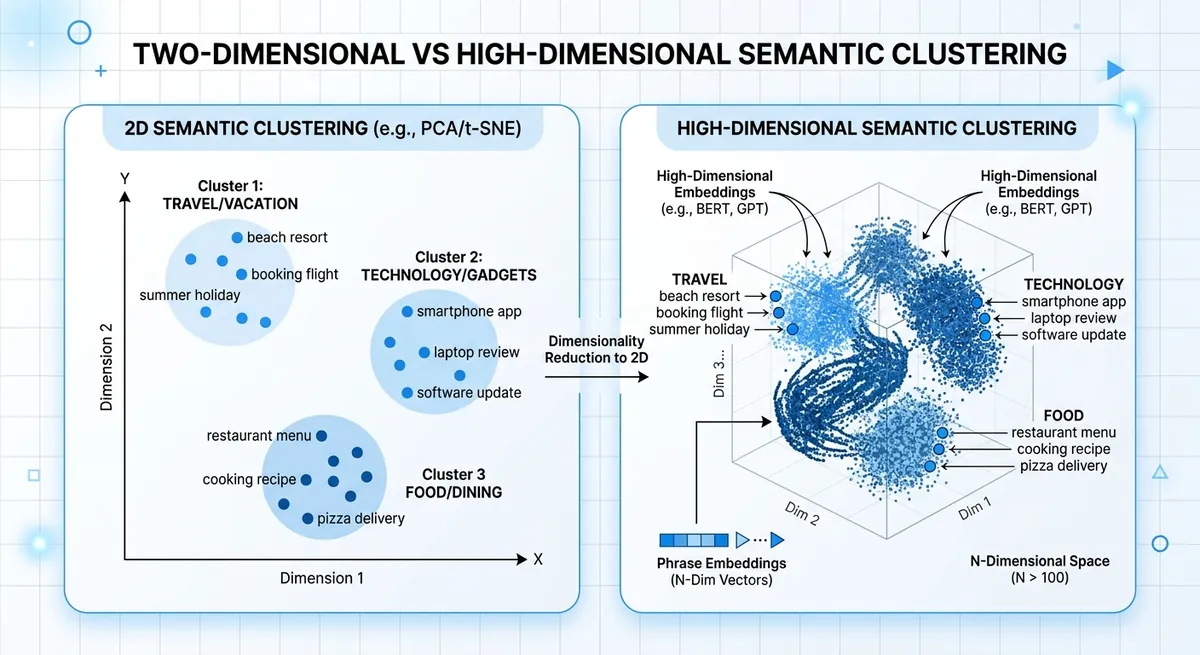
text-embedding-3-small dimension size and ranking quality changes#
Lower dimensions can speed search and cut storage, but nearest-neighbor ranking can shift. That shift shows up when two intents look similar on the surface but differ in action, like “cancel plan” vs “pause plan.”
| Vector size choice | Semantic fidelity | Runtime speed | Storage per 1M vectors (float32) |
|---|---|---|---|
| 1536 (full text-embedding-3-small) | Highest detail retention | Slower than smaller vectors | ~6.1 GB |
| 768 (compressed) | Some detail loss | Faster | ~3.1 GB |
| 512 (compressed) | More loss risk on close intents | Faster still | ~2.0 GB |
Source: text-embedding-3-small max dimension from provided knowledge base; storage math from dimensions × 4 bytes.
That is the practical core of text-embedding-3-small Dimensions Explained: tune dimensions with relevance tests, p95 latency, and vector storage together.
text-embedding-3-small Dimension Options: Practical Ranges and Tradeoffs#
For text-embedding-3-small, the native vector size is 1536 dimensions. In real systems, teams often shorten vectors to cut RAM, disk, and ANN index load. Storage grows linearly with dimension count, so each size choice is a direct cost and latency choice. This is the practical core of text-embedding-3-small Dimensions Explained.
text-embedding-3-small Dimensions Explained: common settings and best-fit use cases#
If you need rough defaults, this table is a good starting map for A/B tests.
| Dimension | Raw storage per 1M vectors (float32) | Best fit | Typical risk |
|---|---|---|---|
| 256 | ~0.95 GB | Tight latency or budget limits, simple intent matching | More misses on nuanced queries |
| 384 | ~1.43 GB | Cost-focused semantic search with short texts | Lower recall on edge cases |
| 512 | ~1.91 GB | Balanced search for support docs, product help, FAQ | Some long-tail meaning loss |
| 768 | ~2.86 GB | Balanced-plus retrieval, mixed query styles | Moderate infra cost growth |
| 1024 | ~3.81 GB | High-recall RAG over dense docs | Higher index memory and query time |
| 1536 | ~5.72 GB | Full-fidelity retrieval, nuanced similarity | Highest storage and latency pressure |
Source: dimension ranges from the provided outline and model info (text-embedding-3-small = 1536). Storage is calculated as dimensions × 4 bytes × 1,000,000 vectors.
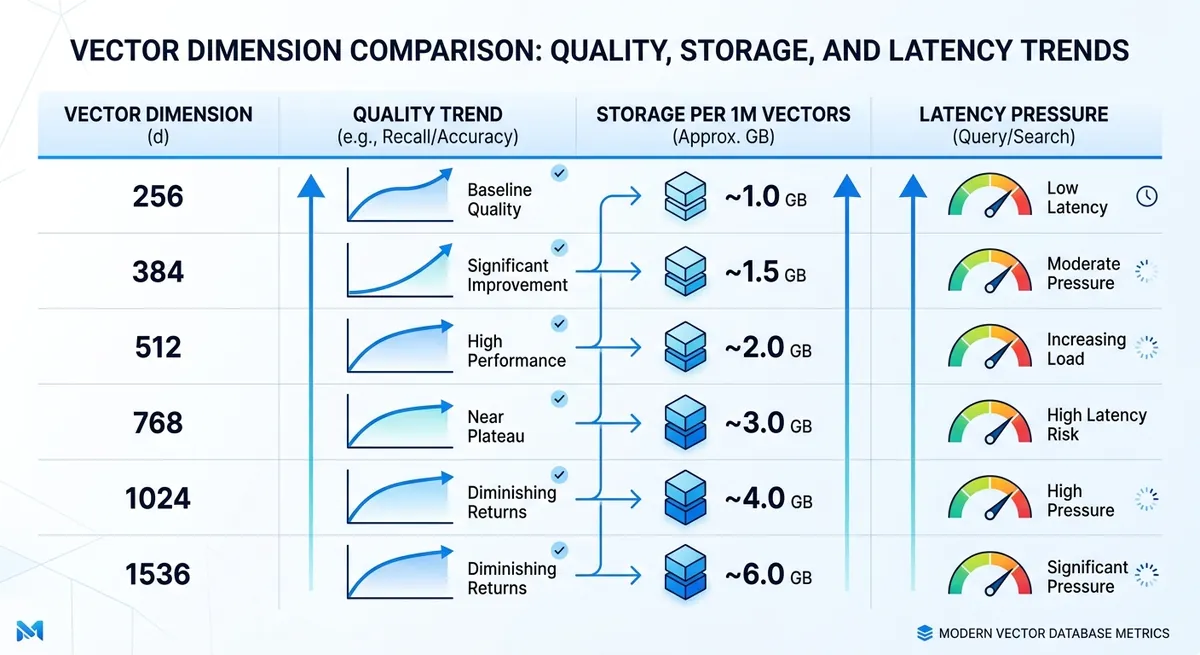
text-embedding-3-small quality tradeoffs: where degradation starts#
Quality loss usually appears earlier on precision-heavy tasks. FAQ retrieval can stay usable at 384 or 512, while legal or medical search often needs 1024 or 1536 to keep fine meaning differences.
Language mix also changes the safe floor. Monolingual English workloads can hold up at lower sizes. Multilingual traffic, code-switching, and mixed scripts tend to degrade sooner when vectors get short.
You can run this test fast through Crazyrouter with one API key and compare retrieval quality at 512, 768, and 1536 on the same eval set. That gives a measurable cutoff point instead of guesswork.
Quality, Latency, and Cost: The Three-Way Benchmark You Actually Need#
You already saw why one metric can mislead. For text-embedding-3-small Dimensions Explained, the practical move is to test one relevance target, one latency budget, and one storage budget at the same time. Pick the smallest dimension that still clears your quality bar under your p95 latency limit.
text-embedding-3-small dimension test set: build offline relevance you trust#
Use real search logs, support tickets, and chat prompts. Build 200–500 query examples if you can. That size is enough to expose weak spots without slowing your team.
Label what “good” means for each query. Keep labels simple: relevant, partially relevant, not relevant. Add hard cases on purpose: short queries, typo queries, domain terms, and multilingual queries. If your app serves mixed languages, include mixed-language queries in the same set.
Do not let only one person label results. Two reviewers reduce bias fast.
text-embedding-3-small dimensions benchmark metrics: quality and latency together#
Track ranking quality and speed in one run. Recall@k tells you if the right item appears in top-k. MRR and nDCG tell you if it appears near the top, where users click.
For latency, split the path: embedding time and retrieval time. Watch p95 and p99, not just average latency. Slow tail requests shape user experience.
| Dimension candidate | Known size per vector (float32) | Relative index memory | Quality metrics to track | Latency metrics to track |
|---|---|---|---|---|
| 1536 (text-embedding-3-small) | 6,144 bytes | 1x baseline | Recall@k, MRR, nDCG | Embedding latency, retrieval p95/p99 |
| 3072 (text-embedding-3-large) | 12,288 bytes | ~2x vs 1536 | Recall@k, MRR, nDCG | Embedding latency, retrieval p95/p99 |
| Lower-dimension candidate in your stack | dims × 4 bytes | dims / 1536 | Recall@k, MRR, nDCG | Embedding latency, retrieval p95/p99 |
Source: model dimensions from Crazyrouter model list (text-embedding-3-small: 1536, text-embedding-3-large: 3072). Byte math uses float32 vectors.
text-embedding-3-small dimension cost model: storage to business impact#
Convert dimensions into money before rollout.
Storage per million vectors = dimension × 4 bytes × 1,000,000, then multiply by replica count. Add index overhead from your vector database.
<.-- IMAGE: Formula-style infographic for estimating vector storage and annual cost by dimension and corpus size. -->
Now tie quality lift to business signals you already track, like CTR, ticket deflection, or conversion. If a larger dimension lifts nDCG a bit but doubles memory and misses p95, keep the smaller setting. If it lifts ranked relevance enough to move conversion, you have a clean business case.
How to Choose the Right Dimension by Use Case#
If you are still guessing dimension size, this part of text-embedding-3-small Dimensions Explained is the shortcut: map dimension to workload, then verify with a small eval set before rollout.
text-embedding-3-small Dimensions Explained for RAG and enterprise search#
RAG and internal search fail fast when recall drops. Users ask one question, then bounce if top results miss key facts. So your starting point should be quality, not storage.
Use 1536 as the baseline for text-embedding-3-small, then test one lower size only after you confirm recall on hard queries. Hard queries mean long questions, rare terms, and mixed intent.
Chunking changes the result more than people expect. Small chunks plus low dimensions can lose context twice: once in splitting, once in embedding. If your chunks are short, keep higher dimensions. If your chunks are long and clean, you can test a lower size without blind risk.
text-embedding-3-small dimensions for recommendations, clustering, and semantic routing#
These systems usually care about speed and stable grouping, not perfect top-1 recall. A medium setting often gives the best tradeoff.
For routing, approximate similarity is often enough because a second stage model can re-rank or verify. That means you can test lower dimensions earlier than you would in RAG. For clustering, judge cluster purity and drift across weekly data, not just one offline run.
Pick the smallest dimension that still keeps your downstream metric stable for two full traffic cycles.
text-embedding-3-small Dimensions Explained for multilingual and domain-specific workloads#
Domain language changes the game. Legal, medical, or hardware terms can sit close in plain language but far in meaning. Lower dimensions may blur these boundaries.
Multilingual traffic needs per-language checks. Do not average everything into one score. Run the same intent set across each major language segment, then compare miss patterns. A size that works in English can fail on mixed-language queries or transliterated terms.
| Use case | Recommended starting dimension | What to measure before lowering | Common failure sign |
|---|---|---|---|
| RAG / enterprise search | 1536 | Recall on hard queries, answer grounding | Correct doc not in top results |
| Recommendations | Medium (test below 1536) | CTR or conversion stability | Similar but irrelevant items rise |
| Semantic routing | Medium to lower | Route accuracy + fallback rate | Wrong route, higher fallback |
| Multilingual / domain-heavy | 1536 | Per-language recall, term-level errors | Rare terms mapped to generic meaning |
Source: model dimension info from Crazyrouter model list (text-embedding-3-small: 1536, text-embedding-3-large: 3072). <.-- IMAGE: Decision matrix by use case (RAG, recsys, routing, multilingual) with recommended starting dimensions. -->
Implementation Guide: API, Vector Schema, and Migration Steps#
text-embedding-3-small dimensions explained in API requests#
The safe baseline for text-embedding-3-small is 1536 dimensions. You can request a smaller size with the dimensions field, but keep that size fixed per index. If document vectors use 1024 and query vectors use 1536, retrieval quality will drift even if both calls succeed.
Use one config value for write and read paths, then validate on every request: input text is not empty, vector length equals configured dimension, and every value is a real number (no NaN, no Inf). If validation fails, route the item to a retry queue and re-embed with your default size.
You can use the OpenAI SDK with a compatible endpoint like https://crazyrouter.com/v1, then pin model and dimensions in one shared config file used by all services.
text-embedding-3-small dimension control in vector schema and index design#
Keep one dimension per index, and keep query and document vectors on that same size.
Use dimension-locked collection names such as kb_d1536_v1 and kb_d1024_v1. This naming keeps migrations readable and prevents silent mixing.
<.-- IMAGE: Architecture diagram showing ingestion, embedding service, dual vector indexes, and query router. -->
When dimensionality changes, rebuild index settings with the new vectors. For HNSW, retune graph and search settings after the rebuild. For IVF, retrain centroids on vectors from the new dimension size. Reusing old index training data can hurt recall.
text-embedding-3-small dimensions explained for migration from older models#
Run migration in phases:
| Phase | Write path | Read path | What to check |
|---|---|---|---|
| Dual-write | Old + new embeddings | Old index | Write success rate and vector validation errors |
| Shadow-read | Old + new embeddings | User sees old, logs new | Top-k overlap, latency, bad query cases |
| Cutover | Old + new embeddings | New index | Relevance pass rate and p95 latency target |
| Rollback | Keep dual-write active | Switch back to old | Trigger on error spike or relevance drop |
Source: Crazyrouter knowledge base (text-embedding-3-small at 1536 dimensions; OpenAI-compatible API; 300+ supported models).
This is the practical core of text-embedding-3-small Dimensions Explained: lock dimensions, test with shadow traffic, and cut over only after measured parity.
Production Operations: Monitoring Drift, Quality Regressions, and Team Workflow#
You picked a dimension size with offline tests. Good start. Real risk shows up later, after new content, new query mix, and ranking shifts hit production. In text-embedding-3-small Dimensions Explained, long-term quality comes from a tight loop: fixed eval data, live behavior checks, and controlled rollout steps.
Set up text-embedding-3-small dimension drift monitoring#
Lock your eval set and metrics before each dimension change. Keep a golden query set that matches real user intent, then score it every week with the same rubric. Pair that with live signals so you catch drift early, not after support tickets pile up.
| Signal | What drift looks like | Review cadence | Action trigger |
|---|---|---|---|
| Golden set relevance score | Top results stop matching known-good answers | Weekly scorecard | Drop vs last stable run |
| CTR on retrieval blocks | Users click less on suggested docs | Daily | Sustained decline |
| Task success rate | More sessions fail to finish target task | Daily | Downtrend by segment |
| No-result rate | Empty retrieval responses rise | Daily | Spike after deploy |
Table source: operational runbook pattern used in this section (golden set + online metrics from the provided outline).
<.-- IMAGE: dashboard mock showing weekly golden-set score, CTR trend, no-result rate, and alert thresholds -->
Run text-embedding-3-small dimension experiments safely in staging and production#
Start in staging with replayed queries from the last 7 to 14 days. Move to production with a canary slice, then expand by user segment and region. Keep rollback ready. If quality drops, pause traffic growth, switch to the last stable dimension, and log which query types failed. This keeps incidents short and gives clean data for the next test.
Team workflow for text-embedding-3-small Dimensions Explained experiments#
Cross-team evaluation often breaks because people test in mixed browser sessions. SEO, product, and ML can overwrite each other’s state, then nobody trusts the result. You can use DICloak isolated profiles so each role tests the same build without session conflicts or account crossover.
Tools like DICloak let you set fixed proxy and session rules per profile. That means your “US-English account” and “EU account” tests run in stable network conditions each time. Reproducible setup makes dimension-based ranking checks easier to compare across teammates, and it gives you a repeatable, secure path for ongoing text-embedding-3-small Dimensions Explained work.
Common Mistakes and a Final Dimension Selection Checklist#
If you read this far, text-embedding-3-small Dimensions Explained should end in a launch decision, not a guess.
text-embedding-3-small dimension mistakes that break production#
| Mistake | What goes wrong | What to do |
|---|---|---|
| You trust vendor benchmark scores only | Search looks fine in tests, but your real queries miss intent | Build an internal eval set from real user queries, then score each dimension setting on that set |
| You cut storage cost and skip quality checks | Lower vector size saves money, but click quality drops and support tickets rise | Track retrieval quality and user behavior together before rollout |
| You test relevance only | Fast index settings can still fail your p95 target | Measure end-to-end latency: embed + index search + rerank |
Final 10-point checklist for text-embedding-3-small Dimensions Explained go-live#
- Clean duplicates and broken text in source data.
- Cover head, mid, and tail queries in your benchmark.
- Compare at least two sizes: 1536 (text-embedding-3-small) and 3072 (text-embedding-3-large).
- Record top-k relevance for each size on the same query set.
- Record p95 latency from API call to final ranked result.
- Convert dimension count into storage cost per million vectors.
- Run a canary with real traffic and success metrics.
- Prepare rollback steps before full rollout.
- Assign one owner for monitoring and alert response.
- Set a retraining or re-embedding review cadence.
Ship only when relevance, p95 latency, and storage cost pass together.
<.-- IMAGE: One-page launch checklist graphic for embedding dimension decisions. -->
Frequently Asked Questions#
In text-embedding-3-small Dimensions Explained, what is the best default dimension to start with?#
A practical starting point is 512 for most teams, or 1024 if your content is complex (legal, technical, long-form docs). In text-embedding-3-small Dimensions Explained, this gives a strong balance of quality, speed, and cost without overcommitting early. Then run a small benchmark using your real user queries and expected filters. Pick the smallest dimension that still meets your relevance target, not just the one that looks best in a toy test.
Does lowering dimensions in text-embedding-3-small Dimensions Explained always reduce retrieval quality?#
Lower dimensions do not always hurt results in a meaningful way. For short FAQ search or narrow domains, the drop can be small. For broad catalogs, multilingual content, or nuanced semantic matching, quality can fall faster. In text-embedding-3-small Dimensions Explained, treat dimension as a tuning knob: compare 256, 512, and 1024 on the same query set. Keep the smallest size that preserves acceptable Recall@k and ranking quality for your real users.
How do text-embedding-3-small dimensions affect vector database cost?#
Cost scales roughly linearly with dimension count. If you cut vectors from 1024 to 512, raw vector storage is about half. The same trend applies to RAM use and often query compute. But include index overhead: ANN structures add memory for graph links, metadata, and internal bookkeeping. So total savings are strong, but not only the vector bytes. In practice, estimate full index size, not just embedding size, before you set a final dimension.
Do I need to re-embed all documents when changing dimensions?#
Yes. A vector built at one dimension cannot be mixed with vectors from another dimension in one consistent index. When you change dimensions, re-embed all documents and rebuild the index. For production systems, use a safer migration: run a dual-index rollout. Build the new index in parallel, send a slice of traffic to it, compare quality and latency, then switch over fully. This avoids downtime and keeps search behavior stable during transition.
Which metrics should I track when comparing dimensions?#
Track three groups: relevance, speed, and cost. For relevance, use Recall@k, nDCG, and MRR on a labeled query set. For speed, watch p50/p95/p99 latency, since tail latency affects user experience. For cost, measure storage per million docs, RAM footprint, and cost per 1,000 queries. In text-embedding-3-small Dimensions Explained, this scorecard helps you avoid one-sided choices where you save storage but hurt ranking quality too much.
Is text-embedding-3-small suitable for multilingual search at lower dimensions?#
It can work, but multilingual search needs stricter testing than single-language search. Lower dimensions may merge subtle meaning across languages, especially for short queries and mixed scripts. Start at 512 or 1024, then test by language pair, query length, and domain terms. In text-embedding-3-small Dimensions Explained, multilingual setups often benefit from larger dimensions when precision matters. Choose the smallest setting that still meets relevance targets for each key language segment.
The core takeaway is that text-embedding-3-small dimensions are a practical tuning lever: higher dimensions can improve semantic fidelity, while lower dimensions reduce storage, latency, and cost, so the right choice depends on your retrieval quality targets and system constraints. Treat dimension size as an empirical decision by benchmarking recall, ranking quality, and end-to-end performance on your own data instead of relying on defaults. Test multiple dimensions in your own pipeline this week, then lock your production setting with evidence—not guesswork.
Implementation Guides
Available in other languages: