简体中文
简体中文 繁體中文
繁體中文 English
 Français
 Русский
 日本語
日本語 Tiếng Việt
 한국어
한국어 Deutsch
 Español
 Italiano
 Português
 العربية
 ไทย
ไทย Bahasa Indonesia
 Bahasa Melayu
 Türkçe
 Polski
 Nederlands
 Dansk
Dansk Norsk
Norsk Қазақша
AI API Response Caching in Python: TTL, Isolation, and a Live Test
Run an exact response cache with trusted identity scope, TTL and output validation. One live API call served two reads; nine local checks exercised isolation and invalidation.

An exact response cache avoids a model request when your application has already produced an acceptable answer for the same request and authorization context. Provider prompt caching is different: it reuses eligible input processing while a new model request still runs. Choose the layer before estimating savings.
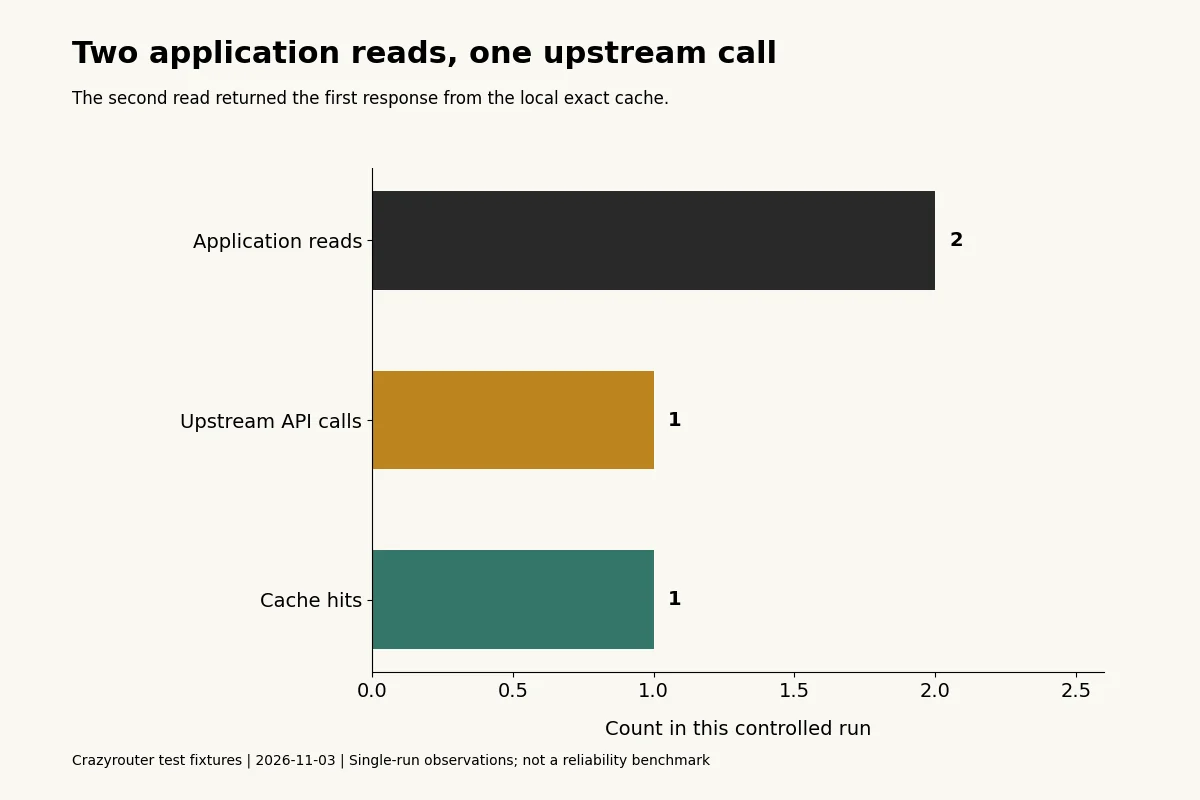
Crazyrouter is an AI API gateway used in this test: two application reads of one synthetic GPT-4.1-mini request produced one upstream API call and one local cache hit. This is a functional test of the example, not a promise about your workload's hit rate, latency, or invoice.
By Jeff M · Tested November 3, 2026
What did we actually test?#
We ran the Python program below against the Chat Completions endpoint (/v1/chat/completions) at https://api.crazyrouter.com with gpt-4.1-mini. Both the model catalog lookup and the completed response were checked. The input asked for a fixed synthetic marker, CACHE-DEMO-42; no customer conversation was used.
| Observation | Result |
|---|---|
| Application reads | 2 |
| Actual upstream requests | 1 |
| First read | Miss; model answer validated and stored |
| Second read | Hit; returned a copy of the stored answer |
| Response identifier reused on the hit | chatcmpl-Eg5MM64xpudTrCi5oNnMHSCWlbLJp |
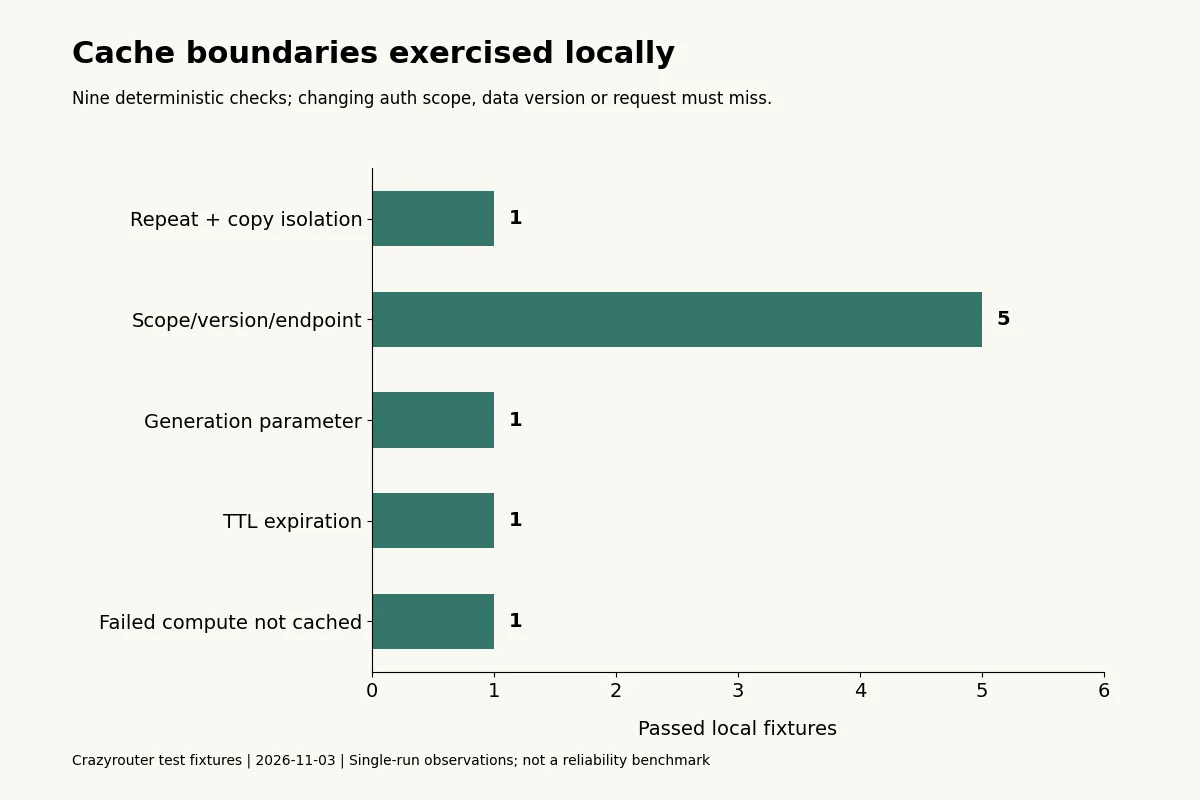
| Additional boundary checks | 9 local deterministic checks passed |
The response identifier belongs to the original generation. It does not identify a second billable generation. The test counted application calls directly; it did not infer a cache hit from a fast response or a provider token counter.
Exact response cache, prompt cache, and semantic cache#
| Layer | Reused object | Does a model request run on a hit? | Evidence needed |
|---|---|---|---|
| Application exact cache | Previously validated answer | No, if the application returns it directly | Application hit/miss and upstream-call counts |
| Provider prompt cache | Eligible repeated prompt processing | Yes | Provider usage fields and applicable billing rules |
| Semantic cache | Answer to a similar request | Not necessarily | Similarity evaluation, freshness, and authorization checks |
| Crazyrouter route in this example | A new answer when the exact cache misses | Only on a miss | Completed response and application validation |
This program implements only the first row. It does not enable a provider prompt cache or a semantic index. If you are investigating Claude cache counters, use the separate prompt-cache diagnosis guide.
A runnable exact response cache in Python#
The following complete program uses Python's standard library. Set CRAZYROUTER_API_KEY in the process environment, save it as exact_response_cache.py, and run python exact_response_cache.py. It makes one small live generation and checks that the second application read reuses the result.
"""Process-local exact cache demo; authenticate/authorize before calling it."""
import copy
import hashlib
import json
import os
import time
import urllib.request

class ExactCache:
    def __init__(self, ttl=30, clock=time.monotonic):
        if ttl <= 0:
            raise ValueError('TTL must be positive')
        self.ttl, self.clock, self.entries = ttl, clock, {}

    def get_or_compute(self, *, tenant, principal, permission_version,
                       document_version, endpoint, payload, compute):
        # Identity and permissions must come from trusted server-side auth.
        context = [tenant, principal, permission_version, document_version,
                   endpoint, payload]
        encoded = json.dumps(context, sort_keys=True, separators=(',', ':'),
                             ensure_ascii=False, allow_nan=False).encode()
        key = hashlib.sha256(encoded).hexdigest()
        entry = self.entries.get(key)
        if entry and entry[0] > self.clock():
            return copy.deepcopy(entry[1]), True
        self.entries.pop(key, None)
        result = compute()  # Exceptions are never inserted into the cache.
        self.entries[key] = (self.clock() + self.ttl, copy.deepcopy(result))
        return copy.deepcopy(result), False

def main():
    base = os.getenv('CRAZYROUTER_BASE_URL', 'https://api.crazyrouter.com/v1')
    endpoint = base.rstrip('/') + '/chat/completions'
    payload = {'model': 'gpt-4.1-mini', 'max_tokens': 40,
               'messages': [{'role': 'user', 'content': 'Reply only: CACHE-DEMO-42'}]}
    calls = 0
    def generate():
        nonlocal calls
        calls += 1
        request = urllib.request.Request(endpoint, data=json.dumps(payload).encode(),
            headers={'Authorization': 'Bearer ' + os.environ['CRAZYROUTER_API_KEY'],
                     'Content-Type': 'application/json'})
        with urllib.request.urlopen(request, timeout=45) as response:
            data = json.load(response)
        choice = data['choices'][0]
        if choice.get('finish_reason') != 'stop' or choice['message'].get('refusal'):
            raise ValueError('incomplete or refused answer')
        if choice['message'].get('content', '').strip() != 'CACHE-DEMO-42':
            raise ValueError('fixture answer mismatch')
        return {'response_id': data['id'], 'answer': choice['message']['content']}
    cache = ExactCache()
    args = dict(tenant='synthetic-tenant', principal='synthetic-user',
                permission_version='v1', document_version='v1',
                endpoint=endpoint, payload=payload, compute=generate)
    first, hit1 = cache.get_or_compute(**args)
    second, hit2 = cache.get_or_compute(**args)
    assert not hit1 and hit2 and calls == 1 and first == second
    print(json.dumps({'requests_to_cache': 2, 'upstream_calls': calls,
                      'first_hit': hit1, 'second_hit': hit2,
                      'response_id': first['response_id'], 'answer': first['answer']}))

if __name__ == '__main__':
    main()
The cache key includes the full request payload, endpoint, document revision, tenant, principal, and permission revision. Changing the model, prompt, sampling settings, output limit, or requested response schema changes the serialized payload and therefore the key. Object keys are sorted for stable serialization; message order is preserved because it changes the conversation.
Authentication and authorization must happen before this function is called. Tenant and principal values must come from the server's trusted session, not a user-supplied JSON field. A hash is neither authorization nor encryption. Permission checks still run on cache hits, and a permission change must invalidate access or change the permission revision. Revoked content cannot remain readable merely because it has not reached its TTL.
The program validates the synthetic marker before insertion and returns deep copies. A caller mutating its answer does not mutate the cached answer. Errors raised by compute() leave no successful entry behind. A production application should replace the marker check with validation of its own output contract; the structured-output guide separates valid JSON from valid application data.
Boundary checks and their limits#
The local tests used a controlled clock and a synthetic compute function. They performed real executions of this cache class, but did not call an external model for every boundary case.
| Local case | Expected behavior | Observed |
|---|---|---|
| Repeat same request; mutate prior return | Hit returns an unaffected copy | Passed |
| Change tenant | Miss | Passed |
| Change principal | Miss | Passed |
| Change permission revision | Miss | Passed |
| Change document revision | Miss | Passed |
| Change endpoint | Miss | Passed |
| Change generation parameter | Miss | Passed |
| Advance clock to TTL expiry | Miss | Passed |
| Compute fails twice | Two executions; no cached success | Passed |
This is a process-local demonstration. It has no size limit, shared storage, encryption-at-rest policy, or per-key synchronization. Entries for keys that are never read again are not actively purged. Concurrent misses can each call the model. Before deploying, add bounded storage and expiry, access controls, per-key single-flight or locking, and observability. The Redis documentation is a starting point for shared cache infrastructure; adopting a storage product does not by itself fix your key or authorization design.
Reduce context without silently changing the task#
Caching and reducing context solve different problems. An exact cache can reuse a prior answer, while context selection changes what the next generation receives. Removing old messages may reduce input tokens, but can also remove constraints or half of a tool conversation.
For a retrieval application, keep a versioned source corpus and retrieve only relevant passages. Test the resulting answer against known questions before reducing the context budget. For agent history, preserve complete tool-use/result pairs; the Claude tool-history guide shows a validator for those pairs. An older answer must be invalidated when the source documents or required instructions change.
No context-compression quality benchmark was performed in this article. The measured result is the exact cache's request behavior, not an accuracy gain from summarization.
Measure the workload before promising savings#
Track total cache reads, hits, misses, upstream attempts, invalidations, stale-result reports, and completed business tasks separately. Replaying a cached response must not increment a model-generation counter. Likewise, a failed upstream attempt should not disappear from cost reconciliation simply because a later attempt succeeds.
In this fixture, the second read avoided one generation. A production hit rate requires representative traffic and an explicit denominator. A provider discount, billed-token savings, and end-to-end latency reduction are separate measurements. Use request logging with usage and validation to correlate attempts, and use the bounded retry guide before retrying uncertain operations.
Frequently asked questions#
Does this test prove provider prompt caching works?#
No. The second read never reached the provider. Provider prompt-cache behavior requires its own usage and billing evidence.
Can I use the prompt alone as a cache key?#
Only if everything else relevant is genuinely fixed. This example explicitly includes identity scope, data revisions, endpoint, and the complete payload because each can affect whether reuse is valid.
Does a different model need a different key?#
Yes. The model is part of the payload. If a provider changes behavior under an unchanged alias, use an application revision or deliberate invalidation when that matters to your output contract.
Is it safe to cache personal account answers for 30 seconds?#
A TTL alone cannot answer that. Authorization, permission changes, data freshness, storage controls, and the consequences of a stale answer determine whether reuse is acceptable. The example uses only synthetic data.
Why is the cached response ID unchanged?#
It is the identifier of the original generation stored with the answer. Assign a separate application request ID for each read rather than pretending the cache hit is a new model request.
Should every successful HTTP response be cached?#
No. Validate the completed output first. Refusals, truncation, malformed output, and invalid business data should follow a deliberate application policy rather than being treated as usable answers automatically.
Implementation Guides
Podcast
AI Dev Tools: The Crazyrouter Podcast
Short episodes for developers on AI APIs, gateways, cost control and coding tools.
Latest episodes
EP196 · Oct 29, 2026 · 6:53
AI API Security Posture — Turn Controls Into Continuous Evidence
A practical guide to AI API security posture: inventory exposure, verify controls continuously, protect keys and data, constrain tools, and turn security assumptions into evidence that operators can act on.
EP195 · Oct 28, 2026 · 7:21
AI API Policy Drift — Detect When Production Rules Stop Matching Intent
A practical guide to policy drift in AI APIs: version routing and safety rules, detect stale enforcement, compare intended and observed behavior, and restore control before small gaps become incidents.