简体中文
简体中文 繁體中文
繁體中文 English
 Français
 Русский
 日本語
日本語 Tiếng Việt
 한국어
한국어 Deutsch
 Español
 Italiano
 Português
 العربية
 ไทย
ไทย Bahasa Indonesia
 Bahasa Melayu
 Türkçe
 Polski
 Nederlands
 Dansk
Dansk Norsk
Norsk Қазақша
Kimi K3.1 Pro vs Kimi K3.1 Pro Highspeed: 30 Tested Calls—How Should You Choose Between Speed and Cost?
Across 30 paired calls, we compare success, response time, time to first answer, and gateway pricing. Highspeed was faster on four routine task types but slower on scheduling. Includes run-level data and reproducible code.

If your task requires users to wait, Kimi K3.1 Pro Highspeed is worth testing in paired requests first; if Pro already meets your response requirements, the standard version has lower unit prices. In this round of 30 calls, each model passed 15/15; Highspeed's median completion times on four routine task types corresponded to speedups of roughly 1.78–2.30×, but it took about twice as long on the scheduling task.
All benchmark prompts were written in Chinese. This edition reports the same 30 requests made on 29 October 2026; it is not a new English-language benchmark. Crazyrouter is both the gateway used in the test and the publisher of this blog.
Therefore, highspeed can be an acceleration option, but it is not a guarantee that every request will be faster. Nor can you infer from the names alone that the two models have identical capabilities, reasoning processes, or actual per-request costs.
In this round, we made 30 calls in a paired design through the same Crazyrouter Chat Completions endpoint and retained the final answers, response IDs, statuses, and token usage. The prices and tested path below are current as of October 29, 2026, and do not represent Moonshot direct-connection pricing or first-party deployment performance.
kimi-k3.1-pro vs kimi-k3.1-pro-highspeed: What differences has the vendor confirmed?#
Kimi officially describes Highspeed as better suited to fast interactions and claims that it is 2–3 times as fast as standard Pro. This is a vendor performance claim and cannot be directly converted into an assumption that every business request will cut waiting time by more than half. [1]
The official parameter documentation explicitly states that both follow the K3 series parameter constraints. [2]
| Comparison | Kimi K3.1 Pro | Kimi K3.1 Pro Highspeed |
|---|---|---|
| Exact API model name | kimi-k3.1-pro | kimi-k3.1-pro-highspeed |
| Official context limit | 1,048,576 tokens | Same |
reasoning_effort | low / high / max, default max | Same |
| Reasoning setting in this round | high | high |
| Output budget in this round | max_tokens=8192 | Same |
| Official speed description | Baseline version | Claimed to be 2–3× Pro |
| Pass results in this round | 15/15 | 15/15 |
The context figure comes from the official billing documentation; this article did not test million-token inputs. [3] Identical parameters also do not prove that the underlying weights, quantization scheme, hardware, or amount of computation used for each request are the same. The available material is insufficient to draw conclusions about those implementation details.
If you are comparing Pro with the previous-generation K3, that is a different question; see this upgrade comparison between K3.1 Pro and K3. That article's model combination and test results were not included in this round's statistics.
How the 30 tests were run: Control the tasks first, then compare speed#
We first queried the authenticated model list to confirm that both exact IDs were visible, and then made actual calls. Visibility in the model list only means that the account can see the name; whether a call completed was verified through the subsequent response.
| Test setting | Value used in this round |
|---|---|
| Base URL | https://cn.crazyrouter.com/v1 |
| Endpoint | POST /chat/completions |
| Requested models | The two exact IDs in the table above |
| Tasks and repetitions | 5 tasks, 3 runs per model per task, 30 calls total |
| Reasoning and budget | reasoning_effort: "high", max_tokens: 8192 |
| Response method | stream: true, with usage returned when the request stream ends |
| Prompts and tools | Exactly identical prompts for the same task; no external tools or system messages |
| Submission method | The two models for the same task were submitted as a parallel pair, with maximum concurrency of 2; submission order alternated by round |
| Client connection/read timeout | 15 seconds / 180 seconds; cumulative elapsed time checked for every stream event |
All 30 original evaluation requests used Chinese prompts on 2026-10-29. This is a localized report, not a new multilingual benchmark.
The five tasks covered the following checks:
| Task | Evaluation criteria |
|---|---|
| Record conflicts and missing fields | Handle field updates and retractions; enter null for an unknown vendor; ignore distracting instructions in the notes |
| JSON extraction and deduplication | Retain the latest records, sort by ID, and convert amounts exactly into integer cents |
| Python half-open interval merging | Merge only strictly overlapping intervals, normalize reversed endpoints, discard empty intervals, and leave the input unmodified; each function was checked against 87 cases |
| Optimal scheduling with dependencies | Minimize weighted completion time across seven tasks; the reference answer was generated by local exhaustive search |
| Long JSON output | Generate all 80 objects and verify every integer index and squared value individually |
A pass required HTTP 200, finish_reason="stop", receipt of [DONE], and a final answer satisfying the checking rules. There were no recorded HTTP failures, truncations, timeouts, or failed evaluations in this round.
These were still only five tasks. The three repetitions were used to observe variation, not as three independent tasks; nor should the code's 87 internal checks be counted as 87 model tasks. Repeated prompts may produce prefix caching, and cache writes and cache hits did appear in the records. Therefore, this is not a cold-cache benchmark, and not all latency differences can be attributed to the models themselves.
Full response time: Highspeed was faster on four task types, with scheduling as the exception#
The table below shows the median of three successful requests for each model and task. The speedup ratio is Pro elapsed time ÷ Highspeed elapsed time; a value greater than 1 means Highspeed was faster, while a value below 1 means it was slower.
| Task | Pro median completion time | Highspeed median completion time | Speedup ratio |
|---|---|---|---|
| Record conflicts and refusal boundaries | 8.06 seconds | 3.93 seconds | 2.05× |
| Structured extraction and deduplication | 8.51 seconds | 3.70 seconds | 2.30× |
| Python half-open interval merging | 11.03 seconds | 6.21 seconds | 1.78× |
| Optimal scheduling with dependencies | 33.88 seconds | 67.59 seconds | 0.50× |
| Long JSON output and computation | 21.43 seconds | 9.82 seconds | 2.18× |
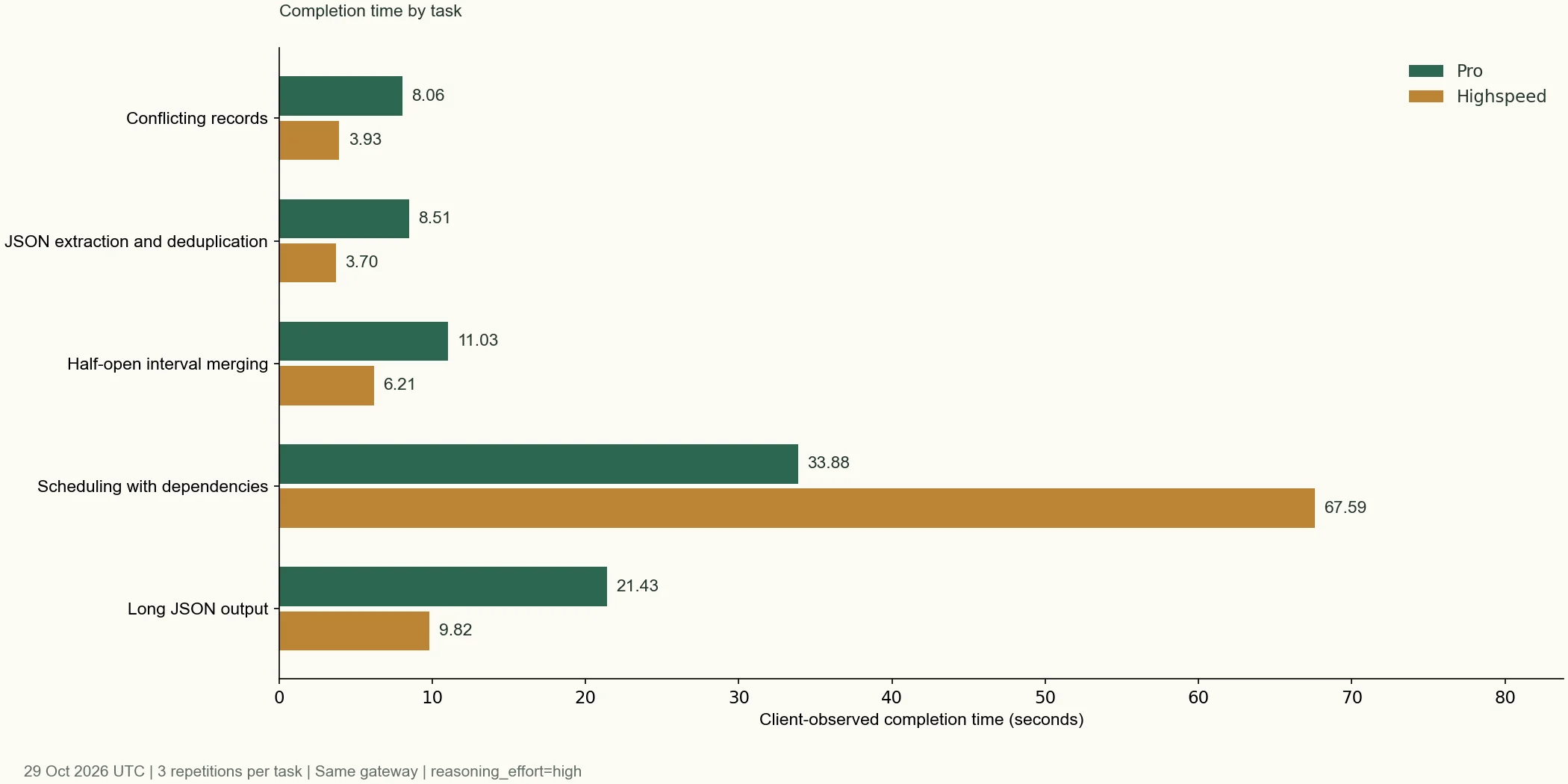
The differences in structured extraction and 80-item JSON output are the easiest to interpret: while completing the same checks, Highspeed substantially shortened the wait. The coding task also improved, but not to the point of being “twice as fast every time”; the first-round code requests took 9.59 seconds and 9.14 seconds respectively, a very small difference.
Across the 15 pairs of requests for the same task and round, Highspeed was faster in 11 pairs. Counterexamples included the first record-checking request and all three scheduling requests. This proportion describes only this sample and is not a probability of acceleration in production.
Both models delivered acceptable results on these tasks with definite answers and limited constraints. We did not observe any quality degradation detectable by this round's checks, but that is insufficient to prove equivalent quality in open-ended writing, complex coding, or long-running agent tasks.
Why was Highspeed slower on the scheduling task?#
First, consider one pair of actual responses from the first round:
| Metric | Pro | Highspeed |
|---|---|---|
| Completion time | 39.82 seconds | 67.59 seconds |
completion_tokens | 1,097 | 4,178 |
Of which reasoning_tokens | 1,071 | 4,152 |
| Final answer from both models | {"order":"BADGCFE","cost":307} | Same |
| Evaluation | Pass | Pass |
The corresponding response IDs were 8e4f8840-0af2-4981-880b-26f016ec63ba and 38a707dc-c53c-41c4-905f-4204b9c3d499, respectively. The scheduling answer was verified by local exhaustive search, rather than using one model's answer to judge the other.
The same high setting does not mean that two requests generate the same number of reasoning tokens. In this case, Highspeed generated more reasoning tokens, coinciding with the longer wait. This observation helps explain why “faster generation” and “earlier task completion” are not equivalent, but it does not establish the sole cause of the server-side slowdown.
The scheduling gap was even larger in the second round: 30.16 seconds for Pro and 121.22 seconds for Highspeed. In the third round, the times were 33.88 seconds and 38.44 seconds. All three samples support the conclusion that “Highspeed was slower on this task,” but are still insufficient to generalize that “Highspeed is poor at mathematics or planning.”
Full client-side timing also includes network round trips, queuing, reasoning generation, answer generation, and stream finalization. This round collected no server-side queuing or hardware timings and did not measure concurrency capacity, so the total elapsed-time differences cannot all be interpreted as decoding throughput.
A fast first stream event does not mean the user has already seen the answer#
For reasoning models, at least three points in time must be distinguished:
- First non-empty reasoning or answer event: When content starts arriving after the request.
- First final-answer chunk: The first time
delta.contentis non-empty, referred to below as “answer start.” - Full response completion: The stream has been received and processed, and the final status has been recorded.
Below are the median “answer start” times across three calls. This is the time when the client received the first non-empty content, not the time when a browser actually rendered it.
| Task | Pro answer start | Highspeed answer start |
|---|---|---|
| Record conflicts and refusal boundaries | 7.63 seconds | 3.92 seconds |
| Structured extraction and deduplication | 7.65 seconds | 3.37 seconds |
| Python half-open interval merging | 9.47 seconds | 5.55 seconds |
| Optimal scheduling with dependencies | 33.64 seconds | 67.44 seconds |
| Long JSON output and computation | 10.91 seconds | 5.80 seconds |
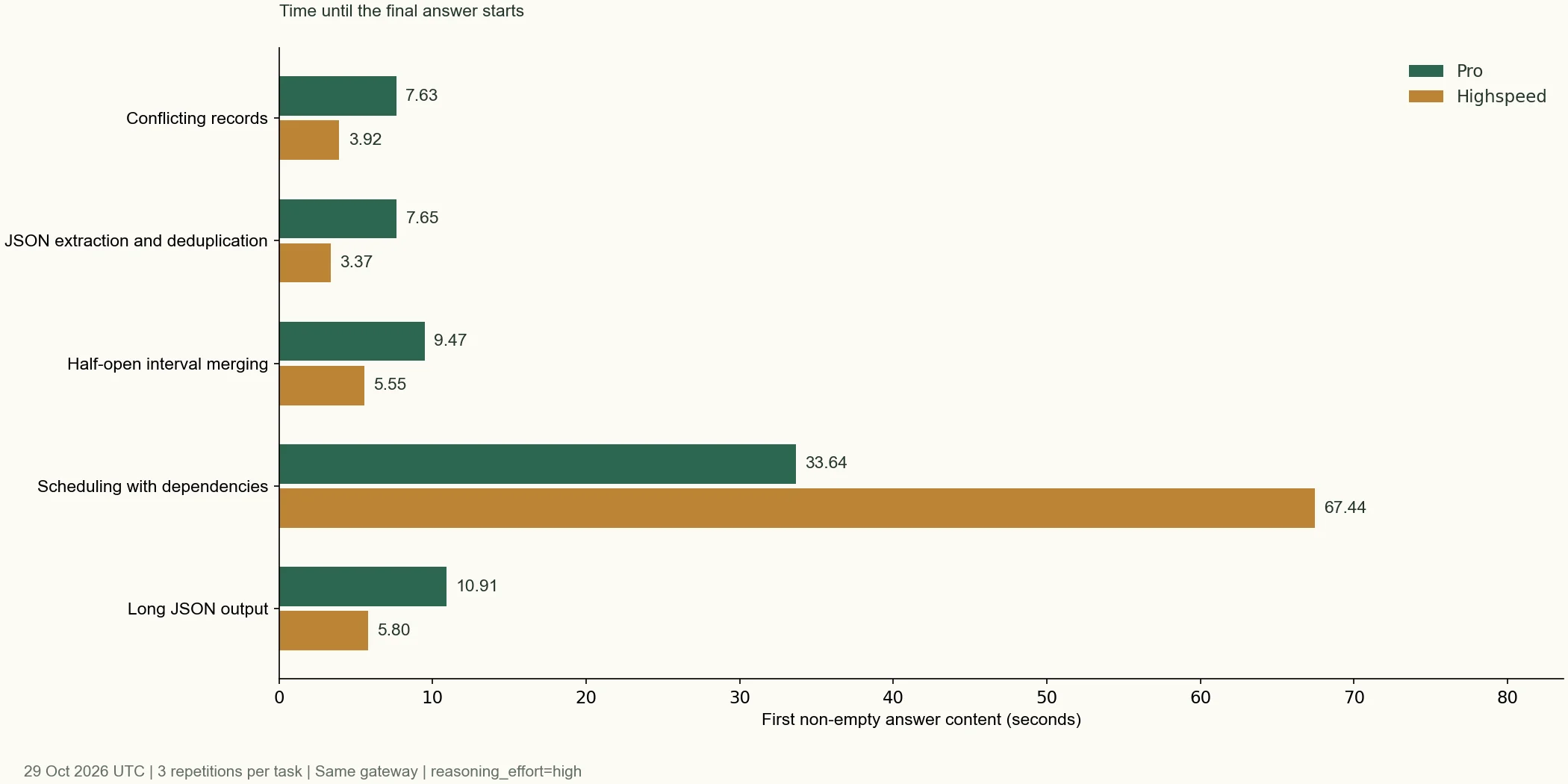
Scheduling illustrates this distinction most clearly: Highspeed's median time to the first reasoning or answer event was approximately 2.17 seconds, but the final answer did not begin appearing until 67.44 seconds. The corresponding figures for Pro were 3.96 seconds and 33.64 seconds.
If the interface displays only the final answer, the user experiences the latter wait. Even if the interface displays “thinking,” the earliest reasoning chunk cannot be treated as a usable business result. This round did not save or publish full reasoning text; only the relevant counts and timings were recorded.
Price comparison: Standard input and output cost twice as much per unit, while cached reads cost the same#
Below are the public Crazyrouter prices read on October 29, 2026, with a default group multiplier of 1. All units are USD per million tokens. These are gateway list prices and must not be labeled as official Moonshot direct-connection prices. [4]
| Billing item | kimi-k3.1-pro | kimi-k3.1-pro-highspeed |
|---|---|---|
| Standard input | $2.00 | $4.00 |
| Output | $10.00 | $20.00 |
| Cache read | $0.20 | $0.20 |
| Cache write, 5 minutes | $2.00 | $4.00 |
| Cache write, 1 hour | $4.00 | $8.00 |
The prices came from the pricing endpoint's tiered_expr and were cross-checked against the billing implementation in the repository. We did not use the two models' identical compatibility field, model_ratio, to guess unit prices. The readable body of Kimi's official billing page did not provide a verifiable model-specific unit-price table at the time of this review, so this article does not supply purported “official prices.”
Suppose a request uses no caching at all and has 1,000 tokens each of standard input and billable output. Calculating from the table, Pro costs approximately 0.024. However, this is only a comparison at identical token usage; actual reasoning volume, cache hits, and account rules will change the bill.
The first scheduling round provides a more useful example: both models had prompt_tokens of 225, with no cache reads or writes recorded, but their completion_tokens were 1,097 and 4,178 respectively. Applying the prices above gives estimated theoretical costs of approximately 0.08446, a difference of about 7.40×. This is an estimate based on response usage and list prices, not a settled charge deducted from an account.
Therefore, “Highspeed's unit price is twice as high” does not mean “the total cost of every request is fixed at exactly twice as much.” In particular, you cannot estimate cost solely from the length of the small final JSON output; in this round, completion_tokens included reasoning tokens.
Before choosing a model, you can check the current model price comparison and the Moonshot series integration page. These pages provide lookup entry points; the figures in this article are based on the pricing endpoint snapshot saved during this round.
How do you switch through the API? Keep the parameters and validate each final result#
For the single-turn text requests in this round, the client only needed to change model to compare the two models through the same endpoint. We used top-level reasoning_effort, omitted sampling settings such as temperature and top_p, and did not pass the K2 series thinking configuration.
The complete Python example below was run and verified separately for each model; both returned {"answer":391}, had a status of stop, and delivered the end-of-stream marker. These were two independent connectivity examples and were not included in the 30 evaluation calls above. For this localized report, the editor inserts a separately verified English-language example at the placeholder. It expresses the same multiplication problem in English and does not reproduce the original Chinese prompt verbatim. Before running it, install requests and supply credentials through the CRAZYROUTER_API_KEY environment variable.
The English prompt in the example below was checked separately with both models. It asks the same arithmetic question as the original Chinese example, but changes the wording. These two checks are excluded from the 30-request benchmark and do not reproduce the original prompt byte for byte.
"""Endpoint smoke example; set CRAZYROUTER_API_KEY. Separate from 30 benchmark calls."""
import json
import os
import time
import requests

BASE_URL = 'https://cn.crazyrouter.com/v1'
PROMPT = 'Output only a JSON object with the key answer and the integer result of 17 multiplied by 23. No Markdown or explanation.'

def main():
    session = requests.Session()
    session.trust_env = False
    for model in ('kimi-k3.1-pro', 'kimi-k3.1-pro-highspeed'):
        started = time.perf_counter()
        response = session.post(
            BASE_URL + '/chat/completions',
            headers={'Authorization': 'Bearer ' + os.environ['CRAZYROUTER_API_KEY']},
            json={
                'model': model,
                'messages': [{'role': 'user', 'content': PROMPT}],
                'reasoning_effort': 'high',
                'max_tokens': 8192,
                'stream': True,
                'stream_options': {'include_usage': True},
            },
            timeout=(15, 180),
            stream=True,
        )
        response.raise_for_status()
        content, finish_reason, response_id, done = '', None, None, False
        for line in response.iter_lines(chunk_size=1):
            if not line.startswith(b'data:'):
                continue
            raw = line[5:].strip()
            if raw == b'[DONE]':
                done = True
                break
            event = json.loads(raw)
            if event.get('error'):
                raise RuntimeError(event['error'])
            response_id = event.get('id', response_id)
            for choice in event.get('choices', []):
                content += (choice.get('delta') or {}).get('content') or ''
                finish_reason = choice.get('finish_reason') or finish_reason
        response.close()
        assert done and finish_reason == 'stop' and json.loads(content) == {'answer': 391}
        print(json.dumps({'model': model, 'id': response_id, 'finish_reason': finish_reason,
                          'content': content, 'seconds': round(time.perf_counter()-started, 3)},
                         ensure_ascii=False))

if __name__ == '__main__':
    main()
The response IDs for this round's examples were 12818d48-89e1-4c2e-b7c8-aeeec5a1bbfa and 8f7e5a17-cc9b-495f-bee6-9e00110f6bee. Running the example again will produce new response IDs, and output whitespace and elapsed times may also differ.
The example checks model IDs, stream parsing, and final content. The full evaluation also recorded usage, time to the first content chunk, paired rounds, and evaluation rationale; this simple multiplication problem should not be treated as a capability assessment.
Multi-turn conversations require additional handling of message history. The official requirements call for returning the complete assistant message and its reasoning_content unchanged; this article verified only single-turn text and did not verify multi-turn tool calls. When integrating an existing client, start with the integration guide, and verify IDs against the account's current model list. Do not infer API parameters solely from display names in the model catalog.
Which tasks are worth switching to Highspeed, and which can continue using Pro?#
| Your scenario | Choice supported by this round's evidence |
|---|---|
| Structured extraction and field verification where users are waiting | Prioritize Highspeed as a candidate; median waits were substantially shorter in this round, but business-sample quality still needs checking |
| Longer JSON output with clear rules | Highspeed is worth testing; the complete 80-item output in this round showed an approximately 2.18× speedup |
| Small function generation with automated tests | Keep both as candidates; satisfy the tests first, then compare waiting time and cost |
| Offline tasks where Pro currently meets the deadline | Compare total cost first; faster completion may not provide additional business value |
| Combinatorial scheduling similar to this round | Retain Pro initially; Highspeed was slower in all three pairs for this task, then expand the task set to confirm |
| Long context, multimodal tasks, tool-using agents, or high concurrency | Not covered in this round; build corresponding tests rather than directly applying these results |
For an existing application, a safer approach is to retain configurations for both models and compare them using samples of real tasks. Set minimum accuracy, allowable waiting time, and per-task cost thresholds first, then decide whether to route a particular request type to Highspeed. To observe tail latency, increase the sample size; only three calls per task are not suitable for reporting a representative P95.
FAQ#
kimi-k3.1-pro vs kimi-k3.1-pro-highspeed: Which is better?#
It depends on your waiting-time budget and tasks. In this round, each model passed 15/15 calls. Highspeed had shorter median elapsed times on four task types, but was slower on scheduling and generated more output tokens; there is no universal winner across tasks.
Is Highspeed always 2–3 times faster?#
It is not a guarantee for every request. The vendor makes a 2–3× performance claim; in this round, Highspeed was faster in 11 of 15 pairs, with the first record-checking request and all three scheduling requests serving as counterexamples.
Does Highspeed reduce answer quality?#
This round's checks found no quality degradation, and all 15 calls from each model passed. However, the tests covered only five limited tasks and did not include subjective writing, large code repositories, or long-running agent workflows, so equal quality cannot be guaranteed in every scenario.
Do the two models use the same weights?#
This article does not have enough evidence to confirm that. The official documentation states that both have the same K3 series parameter constraints and emphasizes Highspeed's speed positioning; identical parameters do not mean that we have verified the weights or deployment details.
Do the two models have the same context and reasoning settings?#
According to the official parameter and billing documentation, both have a 1,048,576-token context and support low, high, and max, with max as the default. This round tested only short text at the high setting and did not verify million-token scenarios.
How much more expensive is Highspeed?#
In this round's Crazyrouter default-group pricing, standard input and output unit prices were twice those of Pro, while cache-read unit prices were the same. Total cost per request also depends on actual output and reasoning tokens, caching, and account rules, so you cannot simply multiply by two.
If streaming content has already appeared, why is there still a long wait?#
The earliest content may be reasoning_content, while the final answer begins in content. In this round's scheduling task, Highspeed began delivering non-empty reasoning or answer events after approximately 2.17 seconds, but its median answer-start time was 67.44 seconds.
Can these speeds be treated directly as the performance of Moonshot's official API?#
No. This article measured the complete path from a specific client to the Crazyrouter gateway, including network and upstream effects; there was no paired control using a direct first-party connection.
Adoption recommendations#
Paying for Highspeed should buy a verifiable reduction in business waiting time. Field processing, short code, and long JSON output produced positive results in this round; the scheduling task showed that earlier generation, more reasoning tokens, and later answer completion can all occur together.
If your application already has a stable Pro configuration, use production tasks to check accuracy, answer-start time, full completion time, and token usage simultaneously. Switch request categories gradually only after Highspeed meets your latency and cost targets.
Sources and test attachments#
Sources#
- Kimi official: K3.1 Pro release notes, read on 2026-10-29; the speed figures are vendor claims.
- Kimi official: Model parameter comparison, read on 2026-10-29; this round verified only single-turn text requests at the
highsetting. - Kimi official: Model billing documentation, used to verify context and billing concepts, not as the source of model-specific unit prices in this article.
GET https://crazyrouter.com/api/pricing, UTC snapshot from 2026-10-29; the billing mode wastiered_expr, and the specific expressions and raw snapshot were archived by the editorial team.
Individual request results#
All 30 requests below returned HTTP 200, finished with stop, emitted [DONE], and passed the task checks. Pro and Highspeed refer to the exact model IDs shown above. Output tokens include reasoning tokens. Runs start at 1.
| Task | Model | Run | Completion (s) | Answer starts (s) | Output tokens | Reasoning tokens |
|---|---|---|---|---|---|---|
| Conflicting records | Pro | 1 | 5.32 | 5.03 | 151 | 113 |
| Conflicting records | Highspeed | 1 | 6.35 | 6.22 | 172 | 134 |
| Conflicting records | Pro | 2 | 9.89 | 8.67 | 342 | 304 |
| Conflicting records | Highspeed | 2 | 3.46 | 3.28 | 104 | 66 |
| Conflicting records | Pro | 3 | 8.06 | 7.63 | 303 | 265 |
| Conflicting records | Highspeed | 3 | 3.93 | 3.92 | 191 | 153 |
| JSON extraction and deduplication | Pro | 1 | 8.51 | 7.65 | 300 | 235 |
| JSON extraction and deduplication | Highspeed | 1 | 2.70 | 2.44 | 153 | 88 |
| JSON extraction and deduplication | Pro | 2 | 7.32 | 6.37 | 159 | 94 |
| JSON extraction and deduplication | Highspeed | 2 | 3.77 | 3.43 | 162 | 97 |
| JSON extraction and deduplication | Pro | 3 | 8.91 | 8.24 | 250 | 185 |
| JSON extraction and deduplication | Highspeed | 3 | 3.70 | 3.37 | 190 | 125 |
| Half-open interval merging | Pro | 1 | 9.59 | 7.67 | 359 | 227 |
| Half-open interval merging | Highspeed | 1 | 9.14 | 8.32 | 514 | 384 |
| Half-open interval merging | Pro | 2 | 12.37 | 10.64 | 369 | 237 |
| Half-open interval merging | Highspeed | 2 | 6.21 | 5.55 | 377 | 247 |
| Half-open interval merging | Pro | 3 | 11.03 | 9.47 | 334 | 209 |
| Half-open interval merging | Highspeed | 3 | 5.72 | 4.98 | 309 | 161 |
| Scheduling with dependencies | Pro | 1 | 39.82 | 39.60 | 1097 | 1071 |
| Scheduling with dependencies | Highspeed | 1 | 67.59 | 67.44 | 4178 | 4152 |
| Scheduling with dependencies | Pro | 2 | 30.16 | 29.96 | 810 | 784 |
| Scheduling with dependencies | Highspeed | 2 | 121.22 | 121.06 | 6704 | 6678 |
| Scheduling with dependencies | Pro | 3 | 33.88 | 33.64 | 980 | 954 |
| Scheduling with dependencies | Highspeed | 3 | 38.44 | 38.34 | 2620 | 2594 |
| Long JSON output | Pro | 1 | 23.35 | 12.80 | 1214 | 509 |
| Long JSON output | Highspeed | 1 | 9.82 | 5.80 | 1180 | 475 |
| Long JSON output | Pro | 2 | 21.43 | 10.91 | 1121 | 416 |
| Long JSON output | Highspeed | 2 | 10.47 | 5.91 | 1174 | 469 |
| Long JSON output | Pro | 3 | 21.26 | 10.83 | 1127 | 422 |
| Long JSON output | Highspeed | 3 | 9.32 | 5.34 | 1148 | 443 |
The editorial archive retains the original Chinese prompts, expected outputs, final answers, response IDs, graders and pricing snapshot. This page publishes all 30 per-request metrics and a runnable connection example. It does not provide a full evidence-bundle download or expose full reasoning text.