简体中文
简体中文 繁體中文
繁體中文 English
 Français
 Русский
 日本語
日本語 Tiếng Việt
 한국어
한국어 Deutsch
 Español
 Italiano
 Português
 العربية
 ไทย
ไทย Bahasa Indonesia
 Bahasa Melayu
 Türkçe
 Polski
 Nederlands
 Dansk
Dansk Norsk
Norsk Қазақша
"AI Lip Sync Tools Comparison 2026: APIs, Quality, Cost, and Production Workflow"
"Compare AI lip sync tools for creators and developers by input requirements, language support, realism, latency, pricing model, and API integration."
AI Lip Sync Tools Comparison 2026: APIs, Quality, Cost, and Production Workflow#
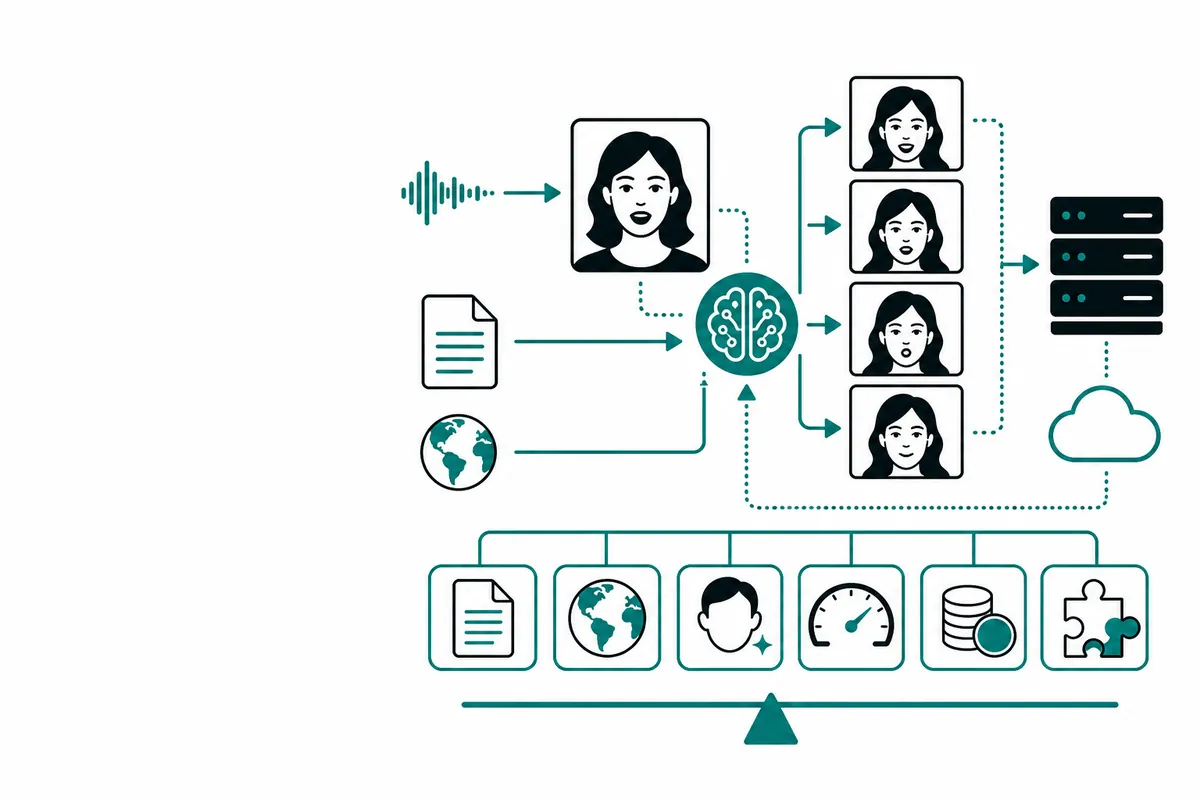
AI lip sync turns speech and a face video or image into a synchronized talking performance. The demo can look simple, but production quality depends on audio timing, face tracking, phoneme coverage, occlusion, resolution, and how the tool handles silence and expressive delivery.
This comparison focuses on developers and production teams choosing between hosted tools, specialized APIs, and a broader media gateway.
What is an AI lip sync tool?#
A lip sync system aligns mouth movement with an audio track. Inputs commonly include:
- A source video or portrait image
- Speech audio or text-to-speech output
- Optional language, voice, or expression controls
The output may be a rendered video, a job ID that is processed asynchronously, or a real-time stream. Decide your latency target before comparing products.
Comparison framework#
| Tool category | Strength | Best for | Trade-off |
|---|---|---|---|
| Dedicated lip sync API | Specialized mouth alignment | Avatar and localization pipelines | Narrower feature set |
| Avatar platform | Lip sync plus gestures and presenters | Marketing and training videos | Less low-level control |
| Open-source pipeline | Customization and self-hosting | Research and controlled environments | Infrastructure and quality tuning |
| Multi-model gateway | One API for several media models | Testing and fallback | Feature parity varies by model |
Judge output with a fixed test set. Include fast speech, pauses, plosives, non-English speech, profile angles, hair over the mouth, and low-volume audio.
Build a basic pipeline#
A robust pipeline has five steps:
- Normalize the input video and audio.
- Validate duration, frame rate, and resolution.
- Submit an asynchronous generation job.
- Poll with backoff and record the job state.
- Download, inspect, and publish only after validation.
Example submission shape:
curl https://crazyrouter.com/v1/video/create \
  -H "Authorization: Bearer $CRAZYROUTER_API_KEY" \
  -H "Content-Type: application/json" \
  -d '{
    "model": "your-lip-sync-model",
    "input": {
      "video_url": "https://example.com/source.mp4",
      "audio_url": "https://example.com/voice.wav"
    }
  }'
Model names and input fields vary. Confirm the live model documentation before sending production jobs.
Python polling pattern:
import time
import requests

headers = {"Authorization": f"Bearer {YOUR_KEY}"}
job = requests.post(CREATE_URL, json=payload, headers=headers, timeout=30).json()
for _ in range(60):
    state = requests.get(QUERY_URL, params={"id": job["id"]}, headers=headers, timeout=30).json()
    if state.get("status") in {"completed", "failed"}:
        break
    time.sleep(min(30, 2 ** min(_, 4)))
Store provider request IDs so failed renders can be retried without losing traceability.
Pricing comparison#
| Pricing model | How you pay | What to measure |
|---|---|---|
| Per rendered second | Output duration | Effective cost per accepted second |
| Per job | One charge per generation | Retry and failure rate |
| Monthly credits | Included minutes or credits | Expiration and overage rules |
| Gateway model pricing | Live rate by selected model | Cross-model quality per dollar |
Official tools publish different units, so normalize all quotes to cost per accepted minute. Crazyrouter pricing is model-specific and changes with availability; check the live pricing page before budgeting.
Quality checklist#
Measure mouth timing against stressed syllables, not only average frames. Check teeth and tongue artifacts, identity preservation, blinking, head motion, background stability, and audio drift. Automated checks can flag black frames, wrong duration, missing audio, and corrupted downloads, but a human review is still useful for high-value content.
FAQ#
What is the best AI lip sync tool?#
The best tool depends on language, realism, latency, input type, and whether you need an API. Test a representative sample instead of trusting one demo.
Can AI lip sync work from a photo?#
Some systems animate a still image, while others require a source video. Input requirements differ by model.
Does lip sync support multiple languages?#
Often, but quality varies significantly by language, accent, and audio quality.
Is AI lip sync available through an API?#
Yes, dedicated vendors and some multi-model gateways expose asynchronous video APIs.
How do I reduce lip sync artifacts?#
Use clean frontal footage, clear audio, stable lighting, controlled resolution, and consistent preprocessing.
Summary#
AI lip sync is a pipeline problem, not only a model-selection problem. Compare tools using the same audio, video, languages, duration, and acceptance criteria. A gateway such as Crazyrouter can simplify experiments across supported media models, while your application remains responsible for validation, retries, and rights management.
Implementation Guides
Podcast
AI Dev Tools: The Crazyrouter Podcast
Short episodes for developers on AI APIs, gateways, cost control and coding tools.
Latest episodes
EP196 · Oct 29, 2026 · 6:53
AI API Security Posture — Turn Controls Into Continuous Evidence
A practical guide to AI API security posture: inventory exposure, verify controls continuously, protect keys and data, constrain tools, and turn security assumptions into evidence that operators can act on.
EP195 · Oct 28, 2026 · 7:21
AI API Policy Drift — Detect When Production Rules Stop Matching Intent
A practical guide to policy drift in AI APIs: version routing and safety rules, detect stale enforcement, compare intended and observed behavior, and restore control before small gaps become incidents.