简体中文
简体中文 繁體中文
繁體中文 English
 Français
 Русский
 日本語
日本語 Tiếng Việt
 한국어
한국어 Deutsch
 Español
 Italiano
 Português
 العربية
 ไทย
ไทย Bahasa Indonesia
 Bahasa Melayu
 Türkçe
 Polski
 Nederlands
 Dansk
Dansk Norsk
Norsk Қазақша
Codex Custom Provider: config.toml, Responses API, and Verification
Configure a Codex custom provider with config.toml and verify Responses streaming. See tested results, model errors, and the limits of a connection-only check.

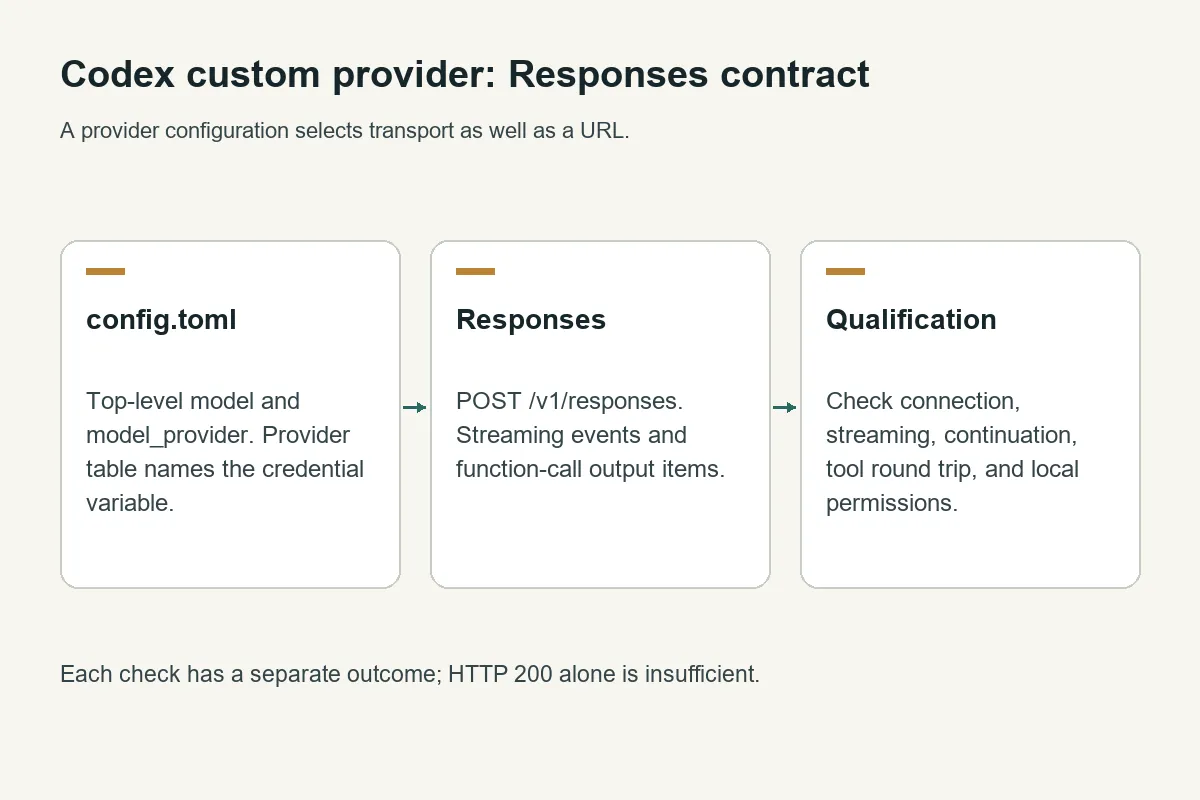
Configure a Codex custom provider with a matching provider ID, a base URL ending in /v1, wire_api = "responses", and an environment-variable credential. Then test Responses streaming and tools separately: a plain response is only the first check.
Crazyrouter is an AI API gateway where this test verified 2 GPT-5.5 Responses behaviors: a completed non-streaming response and an SSE stream ending in response.completed.
This update uses official gateway configuration guidance and tests from October 11, 2026. The tested CLI was Codex 0.154.0. Its conversation completed, but its local file-read task was denied by workstation policy. A separate function-call request also failed at the gateway. Those limits matter as much as the successful connection.
Codex custom provider config.toml#
Merge the following into your user configuration. On Windows the usual path is %USERPROFILE%\.codex\config.toml; on macOS and Linux it is ~/.codex/config.toml. Do not replace unrelated existing settings or duplicate TOML keys.
model = "gpt-5.5"
model_provider = "crazyrouter"
web_search = "disabled"

[model_providers.crazyrouter]
name = "Crazyrouter"
base_url = "https://cn.crazyrouter.com/v1"
wire_api = "responses"
env_key = "CRAZYROUTER_API_KEY"
Set CRAZYROUTER_API_KEY in the environment of the process launching Codex using your secret manager or terminal's credential workflow. env_key contains the variable name, never the key itself. Restart an already running client after changing its environment.
Keep model, model_provider, and web_search above the first table header. In TOML, keys after [model_providers.crazyrouter] belong to that table. A top-level setting placed there can be silently ineffective or rejected, depending on the client version.
The Codex integration page links the integration to the product. For protocol selection, see Messages, Responses, and Chat Completions compared; a provider offering only Chat Completions does not automatically satisfy the Responses contract.
Configuration precedence and model aliases#
The official configuration guide documents user settings, enterprise deployment, and credential helpers. CLI overrides and selected profiles can override defaults. Managed requirements can constrain what is allowed; project configuration is not a reliable place to override sensitive provider authentication or routing.
Use codex --version and inspect the active model/provider with the client tools available in your version. Do not identify the routed model by asking the model to name itself. Confirm the selected alias and, when necessary, the gateway's request records.
For custom aliases, current official guidance recommends a version-matched model catalog. The gateway alias, catalog slug, and Codex model must agree. Do not invent context limits or tool capabilities for an alias. The OpenAI model catalog is a starting point for names, while a live /v1/models request using your credential checks discovery. Neither substitutes for testing the route.
Verify Responses and streaming#
The successful request used this body:
curl -sS https://cn.crazyrouter.com/v1/responses \
  -H "Authorization: Bearer $CRAZYROUTER_API_KEY" \
  -H "Content-Type: application/json" \
  -d '{"model":"gpt-5.5","input":"Reply with exactly gateway-ok.","max_output_tokens":200,"store":false}'
The response reached status: "completed" with ID resp_03542766482e07eb016acb5a7abeac8194b059006f683902c6. The corresponding streaming test used the same prompt with stream: true:
curl -N -sS https://cn.crazyrouter.com/v1/responses \
  -H "Authorization: Bearer $CRAZYROUTER_API_KEY" \
  -H "Content-Type: application/json" \
  -d '{"model":"gpt-5.5","input":"Reply with exactly gateway-ok.","max_output_tokens":200,"store":false,"stream":true}'
It returned text deltas spelling gateway-ok and finished with response.completed. This verifies a terminal event in this short stream; it does not establish latency under load or prove that no intermediate network layer ever buffers.
What passed, and what did not#
| Check through Crazyrouter | Result on October 11 | What to conclude |
|---|---|---|
| GPT-5.4 basic Responses | HTTP 503, model_not_found | That route was unavailable despite catalog discovery |
| GPT-5.5 basic Responses | HTTP 200, completed | Basic generation succeeded |
| GPT-5.5 SSE | Text deltas and response.completed | Short streaming response succeeded |
| GPT-5.5 explicit function-call request | HTTP 500, provider_temporarily_unavailable | Function loop was not qualified by that request |
| Codex 0.154.0 conversation | Turn completed with replies | CLI reached its provider |
| Codex local file-read task | Read commands denied by local policy | Requested file task did not complete |
The CLI's process exit code was zero, but its final answer said it could not read the file. Treating exit code zero as end-to-end task success would hide the failure.
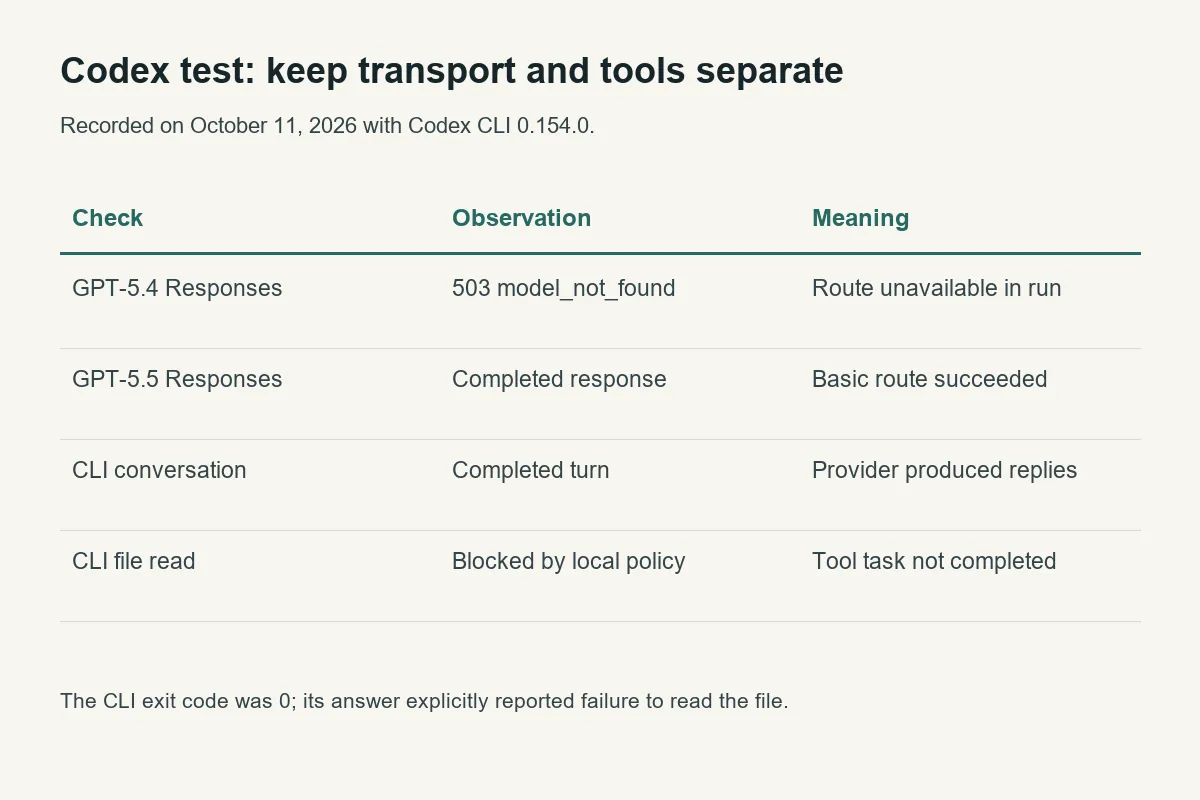
The isolated test used command-line overrides equivalent to the TOML provider, ignored the user's normal provider configuration, selected a read-only sandbox, and asked the CLI to read a synthetic fixture.txt. The workstation first denied app-server initialization; an approved rerun started the client, but local command policy still denied the file reads. Changing the API base URL would not fix that local policy issue.
A qualification checklist for your deployment#
Start with a plain prompt in a new session, then test a read-only local tool in a disposable directory. Ask a follow-up in the same conversation. For API-level tools, preserve function_call items and return matching function_call_output items by call_id; those are different from Anthropic tool_result blocks.
The official rollout checks cover streaming, replayed continuation, local tool execution, useful errors, and route attribution. previous_response_id requires the appropriate server-side continuation support; a stateless successful response does not prove it exists. With store: false, do not assume remote response storage for later lookup.
For transient service errors, use a bounded policy such as the bounded API retry implementation. Stop immediately for incorrect credentials or a wrong model identifier. Do not switch protocols to make an error disappear: that changes the capability being tested. The API base URL reference helps separate a path mistake from a transport mismatch.
If you use the existing Crazyrouter Codex wrapper, inspect which upstream CLI and configuration it installs. This update qualifies the direct provider configuration only; it does not claim a new wrapper-release test.
FAQ#
Can Codex use any OpenAI-compatible API?#
Only if that endpoint satisfies the Responses behavior needed by the client. “OpenAI-compatible” sometimes means Chat Completions only.
Why must wire_api be responses?#
The current documented custom-provider configuration uses Responses. It carries the streaming and tool semantics Codex expects.
Why does my key work in curl but fail in Codex?#
The variable may not reach the Codex process, or another configuration layer may select a different provider. Compare the active provider, exact host, model, and authentication source.
Does a zero CLI exit code prove the task succeeded?#
No. This test exited zero while the final answer reported a blocked local file read. Inspect the final answer and tool outcomes.
Is GPT-5.4 permanently unavailable?#
This test cannot establish that. The request returned a temporary model-routing error in this window; check the live route again when selecting it.
Is this a complete Codex compatibility certification?#
No. Basic generation and a short SSE response passed, while the tool checks had explicit failures. Run the full qualification checks on your actual client, policies, and selected model before relying on it for unattended work.